This article explains how to establish secure communication between two LoRa end-node devices using Lora E5 mini boards. LoRa, which stands for “long range,” is a wireless technology with the ability to send small amounts of data over large distances.
Two end-node devices can exchange encrypted messages. The transmitting device encrypts the message before sending it and waits for a confirmation response. Upon receiving the encrypted message, the receiving device sends a confirmation and displays the decrypted message on the serial monitor.
The following guide offers insights into implementing encryption for seamless and secure communication between LoRa end-node devices.

Figure 1. The block diagram of two LoRa end-to-end devices.
Abstract
- A list of the most common and secure encryption algorithms
- How to upload firmware to the LoRa E5 mini board
- How to send and receive messages
- The program flow or algorithm and explanation
Requirements
- LoRa E5 mini board by Seed Studio.
Common encryption algorithms
The following encryption algorithms are widely recognized for their security and widespread use:
- AES (Advanced Encryption Standard): a top-tier symmetric encryption algorithm trusted globally by governments, organizations, and individuals for its reliable security. It has become the standard for several applications.
- RSA (Rivest–Shamir–Adleman): a well-known asymmetric encryption algorithm essential for secure key exchange, digital signatures, and other cryptographic tasks. It’s based on factoring large composite numbers.
- ECC (Elliptic Curve Cryptography): a popular asymmetric encryption method, valued for its strong security with shorter key lengths — offering equivalent security to algorithms like RSA but with greater efficiency.
- SHA-256 (Secure Hash Algorithm 256): a member of the SHA-2 family that’s commonly used for data integrity checks and digital signatures. It’s highly secure and widely implemented across various applications.
- ChaCha20: a modern symmetric encryption algorithm celebrated for its high performance and security. It’s a popular alternative to AES in applications like HTTPS and VPNs.
- HMAC (Hash-based Message Authentication Code): not an encryption algorithm, but commonly employed to create secure message authentication codes (MACs) using cryptographic hash functions. It’s essential for ensuring data integrity and authentication.
- Diffie-Hellman Key Exchange: enables the secure exchange of cryptographic keys over a public channel. It’s also fundamental to secure the keys in many protocols.
Uploading code to the LoRa E5 mini
The firmware leverages the AES (Advanced Encryption Standard) encryption algorithm to ensure security. Both devices use the same code.
Messages are entered as plain text through the serial monitor, where the transmitting device automatically encrypts them before they’re sent. The receiving device then decrypts the message and displays the decoded content in a readable format on the serial monitor. This streamlined process guarantees secure communication while maintaining user-friendly readability.
1. To ensure the LoRa code flashes correctly, select the genuine ST-Link V2 with an STM chip. Be cautious of imitations with Chinese chips, as they may not perform as well. Using the original ST-Link is recommended for the best results.
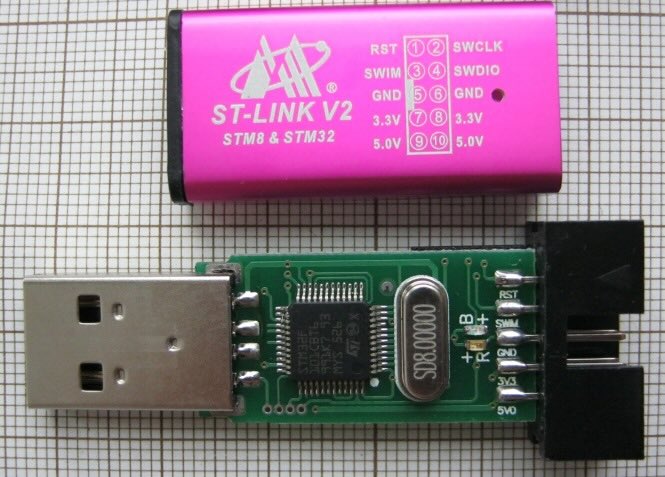
Figure 2. The original ST-Link V2.
2. Connect five wires — 3V3, SWDIO, SWCLK, RST, and GND — to the LoRa E5 mini board as shown below.

Figure 3. The ST-Link connection with the LoRa E5 mini board.
3. Open the STM32CUBE Programmer and click on the “Connect” button.

Figure 4. The STM32CUBE programmer connect target.
4. Select the hex file by clicking on the “Open File” tab.

Figure 5. Open the hex file.
5. Click on “Download” to upload the code.

Figure 6. Upload the code.
6. A pop-up should appear on the screen, indicating that the download is complete.

Figure 7. Download complete.
How to send and receive messages

Figure 8. Sending and receiving messages.
Connecting devices and using the serial terminal
Connect both devices to your computer and open the serial terminal. We use Arduino’s serial terminal.
1. Select the appropriate port for each device and set the baud rate to 9600. Then, choose the “NL & CR” option.

Figure 9. The serial terminal.
2. Try sending a message via one of the serial terminals. On the TX terminal, both the encrypted and plain text messages will be displayed. Encrypted messages are prefixed with “Encrypt MSG:” while the plain text messages are labeled, “TX MSG:“. Upon successful reception by the RX device, the message “SENT CONFIRMD” will appear, confirming delivery. This setup provides a clear view of the transmitted content and confirmation status, improving the communication monitoring process.

Figure 10. The TX terminal.
3. On the RX terminal, encrypted messages are clearly marked with the “Encrypt MSG:” prefix, while decrypted messages are shown with the “RX MSG:” prefix. This makes differentiating between encrypted and decrypted messages easy, ensuring better comprehension of the received data.

Figure 11. The RX terminal.
The algorithm
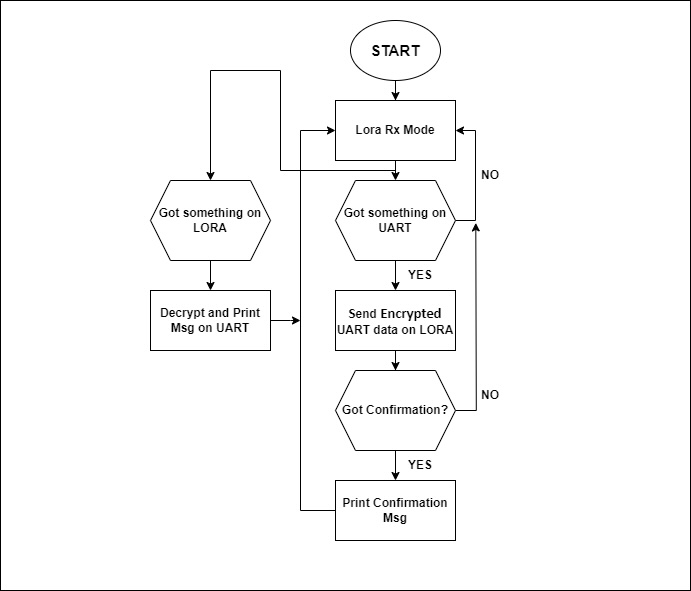
Figure 12. The algorithm for securing the LoRa networks.
The code explanation
The LoRa Firmware is different from other STM codes. For example, the “c” is not the main code. Rather, the main file is “subghz_phy_app.c” as shown in the image below.

Figure 13. The main code file.
1. This function starts the UART interrupt, which is alerted to wake up and read any messages.

Figure 14. The UART interrupt.
2. The UART RX calls back the function (provided below). In this function, the UART RX data is stored in “circBuffer” until it detects ‘\n’. Then, it encrypts the string, sending it to the LoRa board.

Figure 15. The UART RX function.
3. When a message is received on LoRa, it first prints an RSSI.

Figure 16. Printing the RSSI.
4. After printing the RSSI, the RX buffer is detected from LoRa. If the RX data is ‘*’, then “Sent Confirmed” is printed, confirming that data has been received from the other device. If the RX data is something else, it decrypts the data first and then prints it on the UART.

Figure 17. The printed message.
A secure messaging device
This messaging device example is practical in situations where data security is critical. Adding a screen, keypad, and battery enhances its portability, while a power-saving sleep mode can extend battery life for years. Adding a battery (and sleep mode) would make the device particularly beneficial in remote areas without Internet access.
Overall, this LoRa setup would ensure secure communication and reliable operation in nearly any situation.
You may also like:




Filed Under: Tutorials
Questions related to this article?
👉Ask and discuss on Electro-Tech-Online.com and EDAboard.com forums.
Tell Us What You Think!!
You must be logged in to post a comment.