Engineers Garage

  • Electronic Projects & Tutorials
    • Electronic Projects
      • Arduino Projects
      • AVR
      • Raspberry pi
      • ESP8266
      • BeagleBone
      • 8051 Microcontroller
      • ARM
      • PIC Microcontroller
      • STM32
    • Tutorials
      • Audio Electronics
      • Battery Management
      • Brainwave
      • Electric Vehicles
      • EMI/EMC/RFI
      • Hardware Filters
      • IoT tutorials
      • Power Tutorials
      • Python
      • Sensors
      • USB
      • VHDL
    • Circuit Design
    • Project Videos
    • Components
  • Articles
    • Tech Articles
    • Insight
    • Invention Stories
    • How to
    • What Is
  • News
    • Electronic Product News
    • Business News
    • Company/Start-up News
    • DIY Reviews
    • Guest Post
  • Forums
    • EDABoard.com
    • Electro-Tech-Online
    • EG Forum Archive
  • DigiKey Store
    • Cables, Wires
    • Connectors, Interconnect
    • Discrete
    • Electromechanical
    • Embedded Computers
    • Enclosures, Hardware, Office
    • Integrated Circuits (ICs)
    • Isolators
    • LED/Optoelectronics
    • Passive
    • Power, Circuit Protection
    • Programmers
    • RF, Wireless
    • Semiconductors
    • Sensors, Transducers
    • Test Products
    • Tools
  • Learn
    • eBooks/Tech Tips
    • Design Guides
    • Learning Center
    • Tech Toolboxes
    • Webinars & Digital Events
  • Resources
    • Digital Issues
    • EE Training Days
    • LEAP Awards
    • Podcasts
    • Webinars / Digital Events
    • White Papers
    • Engineering Diversity & Inclusion
    • DesignFast
  • Guest Post Guidelines
  • Advertise
  • Subscribe

Testing MOSFET – (Part 16/17)

By Diksha May 17, 2022

MOSFET are more commonly used transistors. They are known for their high switching speed and high input impedance. That is why they are preferred to be used in the fabrication of integrated circuits and the high frequency application chips. Individual MOSFET are also widely used in lots of applications. Before using a MOSFET in a circuit, it is important to check if it is not faulty. In a defective MOSFET, the drain may get shorted to the gate. This can cause the drain voltage feedback to the gate terminal and this voltage then feed to the driver circuit through the gate resistor which can blow the driver circuit further. Therefore it is better to test the MOSFET before using it in the circuit. As N-channel MOSFET are more common so testing of N-channel MOSFET is only discussed in this tutorial.
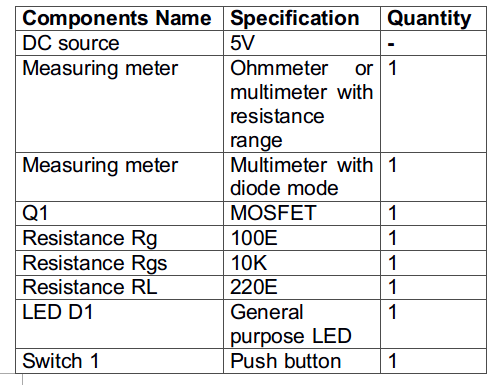
Components Required – 
List of Components required for MOSFET Tester
Fig. 1: List of components required for MOSFET Tester
Testing Methods of MOSFET
There are two common methods of testing a MOSFET – 
1)  By using a measuring meter – In this method, the MOSFET is checked by using a multimeter or Ohmmeter. In this method again there are following three ways to check a faulty MOSFET – 
I)Diode Test- It requires multimeter with diode mode
II)Resistance Test – It requires ohmmeter
III)By using ohmmeter and multimeter in diode mode
2) By using basic electronics components – In this method a test circuit is designed to check the working status of the MOSFET.  
Diode Test 
In this method, a multimeter with diode mode is requuired to test the MOSFET. As MOSFET has internal body diode, in N-channel MOSFET that body diode is from source to drain with anode at source and cathode at drain of the diode. In forward bias, the drop across the diode is very less depending upon the type of diode. In most of the MOSFETs, the forward drop across the diode is from 0.4 V to 0.9 V. In reverse bias, this diode acts like an open circuit or high resistance path. So, the MOSFET can be checked by examining the conductivity across this source-drain body diode. Follow the below steps to conduct the diode test –  
1.For this test, set the multimeter in the diode mode.
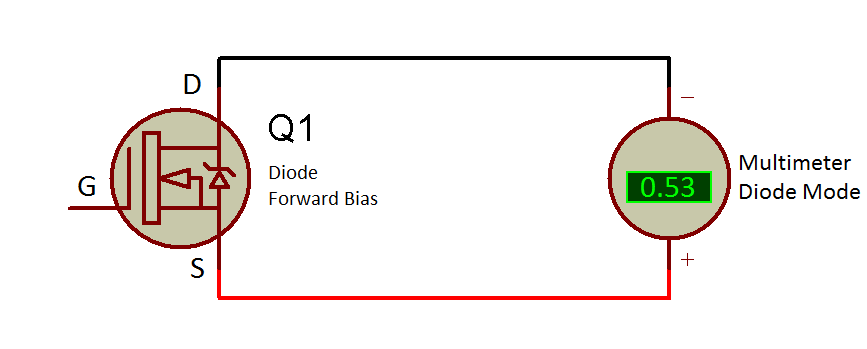
2.For N- channel MOSFET, connect the red probe (positive) to the source and black one at the drain (common). The body diode is in forward bias condition this way. Now at multimeter, a reading in between 0.4 V to 0.9 V (as shown in figure below) must be obtained. If reading is zero or there is no reading then the MOSFET is defective.
Circuit Diagram showing Voltage Drop across MOSFET in Forward Bias
Fig. 2: Circuit Diagram showing Voltage Drop across MOSFET in Forward Bias
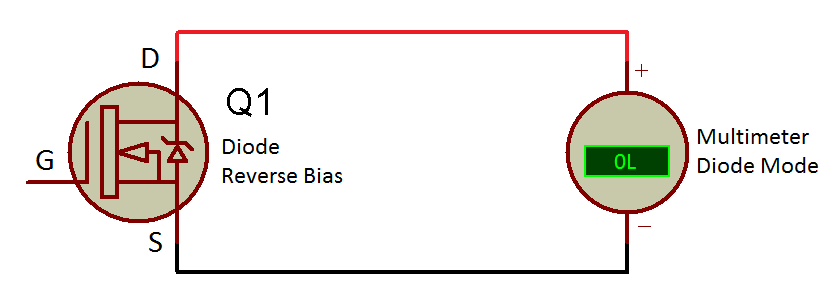
3. By reversing the probes of the meter an open circuit condition should occur and no reading must appear on multimeter due to the reverse bias of diode (refer below figure). If the reading is not zero, the MOSFET is defective.

Circuit Diagram showing Zero Volt Drop across MOSFET in Reverse Bias


Fig. 3: Circuit Diagram showing Zero Volt Drop across MOSFET in Reverse Bias

Resistance Test
In this method an ohmmeter is required. The MOSFET drain to source (Rds) resistance is very high (in mega ohms) when no triggering pulse is applied to its gate terminal. So, this feature of MOSFET can be utilized for testing a faulty MOSFET. Follow the below steps to conduct the resistance test –  
1. A good MOSFET should have high resistance (Rds) from drain to source irrespective of the polarity of the meter probes. 
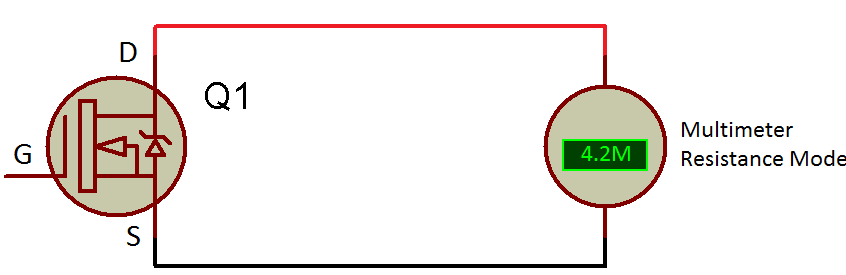
2. Set the meter to its resistance mode or use an ohmmeter and check the drain to source resistance. The reading should have resistance in mega ohms(as shown in figure below). Check the MOSFET datasheet to verify its drain to source resistance (Rds) in off state and compare it with observed value of Rds (off).
Circuit Diagram showing High Drain to Source Resistance across MOSFET
Fig. 4: Circuit Diagram showing High Drain to Source Resistance across MOSFET 

  3. If the value of drain to source resistance (Rds(off)) comes out to be zero or less than that specified in its datasheet, the MOSFET is defective
Checking MOSFET using ohmmeter and multimeter in diode mode
In this method, the MOSFET is checked by triggering its Gate terminal. When the gate of the MOSFET is triggered, the drain to source resistance(Rds) of MOSFET goes very low (mega ohms to ohms) depending upon the type of MOSFET. The MOSFET can be triggered by multimeter, as the meter is having a battery inside it. So it acts like a power source when it is set at diode mode. But before triggering the MOSFET, ensure that the threshold voltage (Vth or Vgs) of the MOSFET is not too large which multimeter unable to provide. Follow the below steps to conduct this test –  
1. Check the drain to source resistance by the resistance test mentioned above. Note the drain to source resistance, Rds(off) for reference.
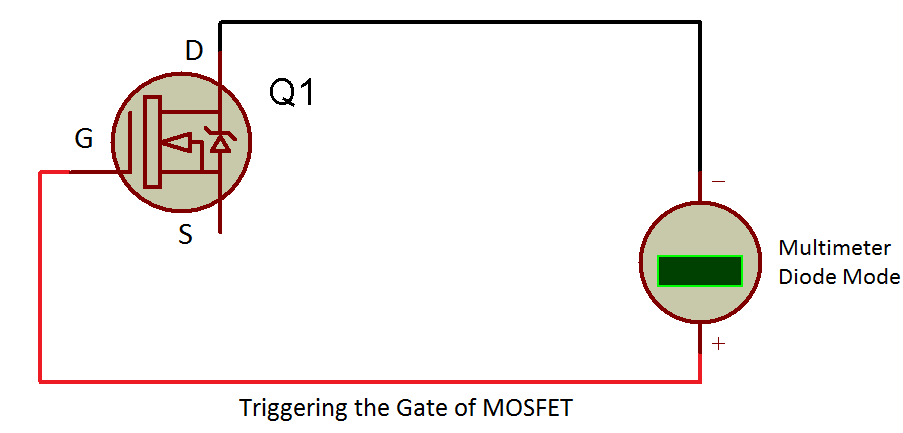
2. Trigger the MOSFET by setting the multimeter at diode mode then fix the meter black (negative) probe to the drain and touch the red one momentarily to the gate. This should trigger the gate (as shown in figure below). The MOSFET must turns ON by this.
Circuit Diagram showing Triggering of the Gate of MOSFET
Fig. 5: Circuit Diagram showing Triggering of the Gate of MOSFET

3. Take an ohmmeter and check the drain to source resistance, Rds(on).  This time the reading should be very low (zero or approximately zero) than the previous Rds(off) reading (as shown in figure below). This will confirm that the MOSFET is in good condition. Refer to the datasheet of the MOSFET in case to check the value of drain to source resistance in on condition, Rds(on) and compare it with the observed value. If the observed value has much variation with that specified by the datasheet, the MOSFET is faulty.
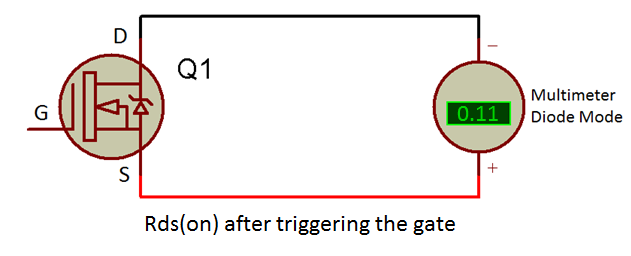
Circuit Diagram showing Low Drain to Source Resistance (Rds) of MOSFET in On Condition
Fig. 6: Circuit Diagram showing Low Drain to Source Resistance (Rds) of MOSFET in On Condition
4. If the reading is the same as the Rds(off), then also MOSFET is faulty.
5. If the value of drain to source resistance in on condition, Rds (on) is as per the value specified in the datasheet then, for further testing, discharge the MOSFET by shorting the gate and drain by using finger or by using any jumper wire. 
6. Again check the drain to source resistance (Rds) by the resistance method. The reading should be equal to the previous reading of drain to source resistance in off condition, Rds(off). If the reading is less than the previous Rds (off) reading, then also MOSFET is defective. 
Testing MOSFET using basic electronic components 
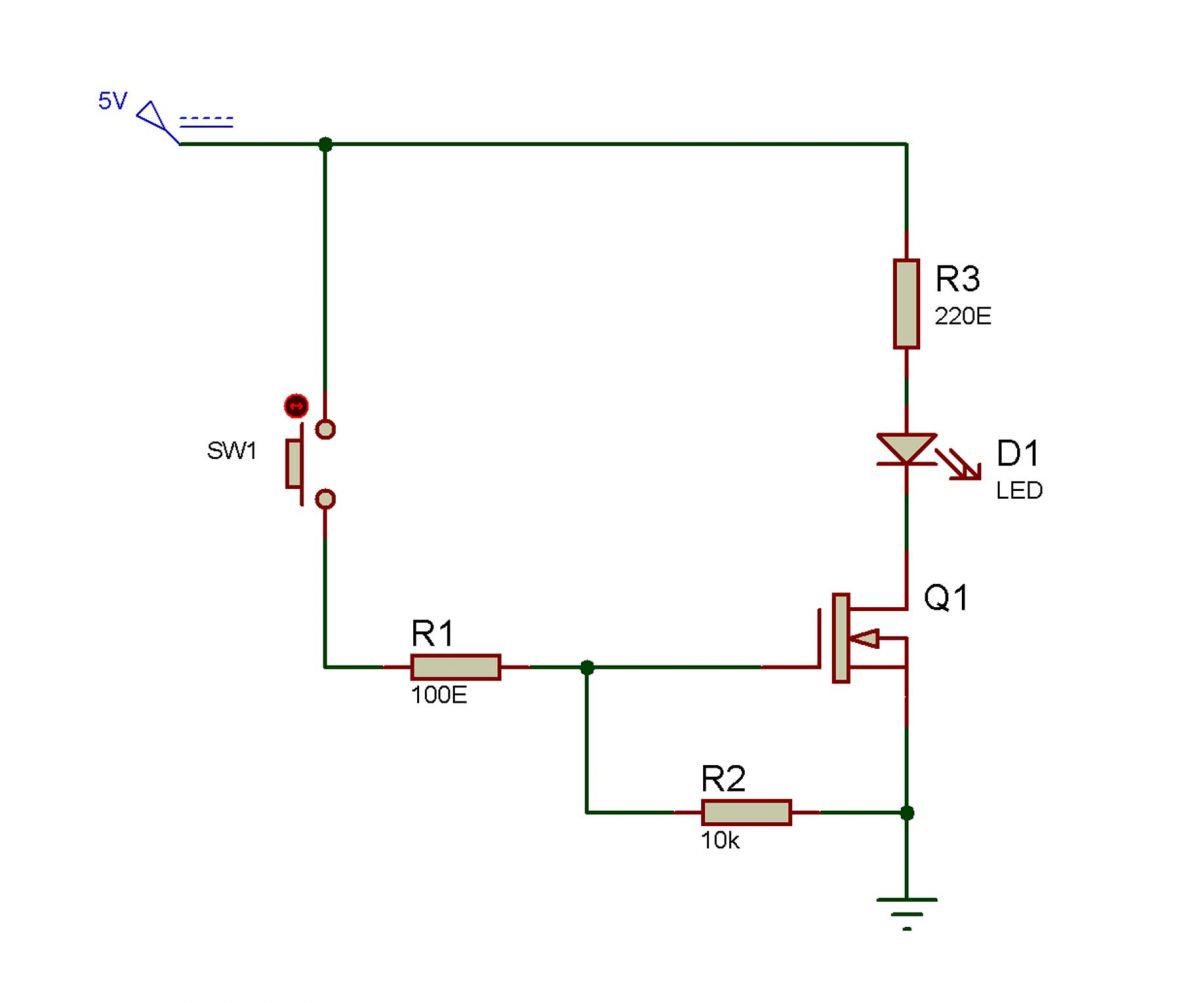
This method of testing is one of the best and accurate ways for checking a MOSFET. For conducting this test, first of all, assemble a circuit as shown below – 
Circuit Diagram for MOSFET Testing
Fig. 7: Circuit Diagram for MOSFET Testing
Follow the below steps to conduct this test –  
1.Apply a gate trigger pulse through the resistance R1 with a push button.
2.There is an LED connected to the load (shown as resistance R3) for visual indication when MOSFET is turned ON and OFF.
3.In the circuit, the gate to source resistance of the MOSFET (Rgs) acts like a pull-down resistance as well as it discharges the parasitic capacitance of the MOSFET which protects the MOSFET from any damage.
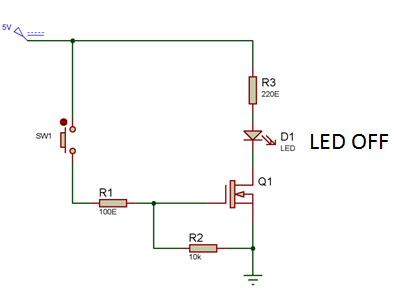
4.Initially, the push button is in its normal state, therefore, the gate is not connected to the power supply. In this state, the drain to source resistance is very high as checked by the resistance test. So the LED at load should not turn ON (as shown in figure below). This indicates that MOSFET is in OFF state. If the LED is glowing, the MOSFET is faulty.
Circuit Diagram showing LED in OFF state before Triggering the Gate
Fig. 8: Circuit Diagram showing LED in OFF state before triggering the Gate
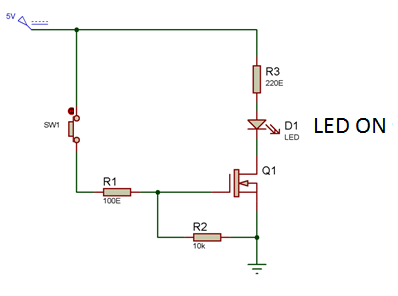
5.When the button is pressed, the gate is triggered and this makes the drain to source resistance very low approximating to zero ohms. So the load should get all the voltage drop across it and this should turn ON the LED. This will indicate that MOSFET is in ON state and working properly (as shown in figure below). If the LED remains in OFF state that means the MOSFET is defective.
Circuit Diagram showing LED in ON State after Triggering the Gate
Fig. 9: Circuit Diagram showing LED in ON state after triggering the Gate
6.When the button is released then the gate discharges through the gate to source resistance (Rgs) and the LED should again turn OFF. If it does not turn off then the MOSFET is faulty.
7.In this test circuit, LED consumes around 20 mA current which is sufficient enough for decent brightness of the LED. For limiting the current a current limiter resistance must be connected in series to it. The load resistance work as the current limiter resistance in the circuit.
The value of this resistance can be calculated as follow – 
(Input voltage of LED), Vin=  5V
As per the ohms law, Vin= IL* RL
desired current for LED, IL= 20mA
By putting all the values, 
5 = 0.02* RL
RL = 250E
As per the availability, a resistance of 220E is taken for the current limiting resistor. So, 
RL = 220E
While testing the MOSFET using the test circuit, following precautions must be taken care of – 
1. The input power supply to the gate must be greater than or equal to the threshold voltage (Vgs(the)) of the MOSFET otherwise, it will not turn ON the MOSFET. For this refer the datasheet of the MOSFET in case.
2. Do not exceed the input voltage (drain voltage and gate voltage) of MOSFET greater than its breakdown voltage as it can damage the MOSFET.
3. Normally the current requirement of the LED is 20 mA (approx.). So, choose the appropriate current limiter resistor (RL) so that it can provide enough current to drive the LED ON.
4. Always use a gate to source resistance to avoid any external noise at the gate and to discharge the parasitic capacitance of the MOSFET. Otherwise, MOSFET can get damaged as this parasitic capacitor will keep on charging and will exceed the limit of the gate to source breakdown voltage.
5. Always use a low value of resistor (10E to 500E) at the gate of the MOSFET. This will solve the problem of ringing (parasitic oscillations) and voltage spike in the MOSFET.
6. When testing the MOSFET by the test circuit method, use low side switching circuit (as in the circuit diagram above). Do not use high side switching circuit for MOSFET as it will never turn ON the MOSFET and then the defective MOSFET can be checked. 
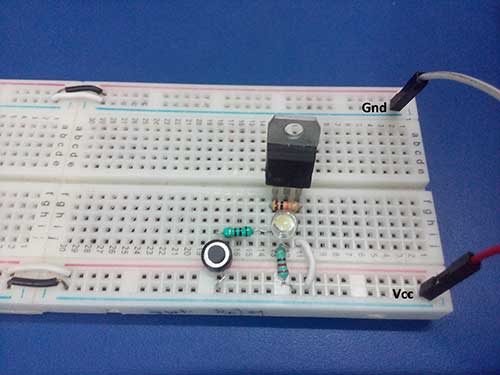
Prototype of MOSFET Test Circuit
Fig. 10: Prototype of MOSFET Test Circuit

In the next tutorial, bootstrap circuit for driving the high side MOSFET will be discussed.


You may also like:
  • beginners guide
    Basic Electronics 01 – Beginners guide to setting up an…

  • What are the different types of EV charging connectors?

  • What is Wireless Electric Vehicle Charging System (WEVCS)?

  • What is the role of embedded software in electric vehicles?

  • What are hardware filters and their types?

  • What is an SoC?

Project Video


Filed Under: Power, Tutorials


Next Article

← Previous Article
Next Article →

Questions related to this article?
👉Ask and discuss on EDAboard.com and Electro-Tech-Online.com forums.


Tell Us What You Think!! Cancel reply

You must be logged in to post a comment.

EE TECH TOOLBOX

“ee
Tech Toolbox: Internet of Things
Explore practical strategies for minimizing attack surfaces, managing memory efficiently, and securing firmware. Download now to ensure your IoT implementations remain secure, efficient, and future-ready.

EE Learning Center

EE Learning Center
“engineers
EXPAND YOUR KNOWLEDGE AND STAY CONNECTED
Get the latest info on technologies, tools and strategies for EE professionals.

HAVE A QUESTION?

Have a technical question about an article or other engineering questions? Check out our engineering forums EDABoard.com and Electro-Tech-Online.com where you can get those questions asked and answered by your peers!


RSS EDABOARD.com Discussions

  • Voltage mode pushpull is a nonsense SMPS?
  • Input impedance matching network
  • High Side current sensing
  • The comparison of different Tcl script checkers
  • Reducing "shoot-through" in offline Full Bridge SMPS?

RSS Electro-Tech-Online.com Discussions

  • Back to the old BASIC days
  • Parts required for a personal project
  • PIC KIT 3 not able to program dsPIC
  • Failure of polypropylene motor-run capacitors
  • Siemens large industrial PLC parts

Featured – RPi Python Programming (27 Part)

  • RPi Python Programming 21: The SIM900A AT commands
  • RPi Python Programming 22: Calls & SMS using a SIM900A GSM-GPRS modem
  • RPi Python Programming 23: Interfacing a NEO-6MV2 GPS module with Raspberry Pi
  • RPi Python Programming 24: I2C explained
  • RPi Python Programming 25 – Synchronous serial communication in Raspberry Pi using I2C protocol
  • RPi Python Programming 26 – Interfacing ADXL345 accelerometer sensor with Raspberry Pi

Recent Articles

  • What is AWS IoT Core and when should you use it?
  • AC-DC power supply extends voltage range to 800 V DC
  • Infineon’s inductive sensor integrates coil system driver, signal conditioning circuits and DSP
  • Arm Cortex-M23 MCU delivers 87.5 µA/MHz active mode
  • STMicroelectronics releases automotive amplifiers with in-play open-load detection

EE ENGINEERING TRAINING DAYS

engineering

Submit a Guest Post

submit a guest post
Engineers Garage
  • Analog IC TIps
  • Connector Tips
  • Battery Power Tips
  • DesignFast
  • EDABoard Forums
  • EE World Online
  • Electro-Tech-Online Forums
  • EV Engineering
  • Microcontroller Tips
  • Power Electronic Tips
  • Sensor Tips
  • Test and Measurement Tips
  • 5G Technology World
  • Subscribe to our newsletter
  • About Us
  • Contact Us
  • Advertise

Copyright © 2025 WTWH Media LLC. All Rights Reserved. The material on this site may not be reproduced, distributed, transmitted, cached or otherwise used, except with the prior written permission of WTWH Media
Privacy Policy

Search Engineers Garage

  • Electronic Projects & Tutorials
    • Electronic Projects
      • Arduino Projects
      • AVR
      • Raspberry pi
      • ESP8266
      • BeagleBone
      • 8051 Microcontroller
      • ARM
      • PIC Microcontroller
      • STM32
    • Tutorials
      • Audio Electronics
      • Battery Management
      • Brainwave
      • Electric Vehicles
      • EMI/EMC/RFI
      • Hardware Filters
      • IoT tutorials
      • Power Tutorials
      • Python
      • Sensors
      • USB
      • VHDL
    • Circuit Design
    • Project Videos
    • Components
  • Articles
    • Tech Articles
    • Insight
    • Invention Stories
    • How to
    • What Is
  • News
    • Electronic Product News
    • Business News
    • Company/Start-up News
    • DIY Reviews
    • Guest Post
  • Forums
    • EDABoard.com
    • Electro-Tech-Online
    • EG Forum Archive
  • DigiKey Store
    • Cables, Wires
    • Connectors, Interconnect
    • Discrete
    • Electromechanical
    • Embedded Computers
    • Enclosures, Hardware, Office
    • Integrated Circuits (ICs)
    • Isolators
    • LED/Optoelectronics
    • Passive
    • Power, Circuit Protection
    • Programmers
    • RF, Wireless
    • Semiconductors
    • Sensors, Transducers
    • Test Products
    • Tools
  • Learn
    • eBooks/Tech Tips
    • Design Guides
    • Learning Center
    • Tech Toolboxes
    • Webinars & Digital Events
  • Resources
    • Digital Issues
    • EE Training Days
    • LEAP Awards
    • Podcasts
    • Webinars / Digital Events
    • White Papers
    • Engineering Diversity & Inclusion
    • DesignFast
  • Guest Post Guidelines
  • Advertise
  • Subscribe