Engineers Garage

  • Electronic Projects & Tutorials
    • Electronic Projects
      • Arduino Projects
      • AVR
      • Raspberry pi
      • ESP8266
      • BeagleBone
      • 8051 Microcontroller
      • ARM
      • PIC Microcontroller
      • STM32
    • Tutorials
      • Audio Electronics
      • Battery Management
      • Brainwave
      • Electric Vehicles
      • EMI/EMC/RFI
      • Hardware Filters
      • IoT tutorials
      • Power Tutorials
      • Python
      • Sensors
      • USB
      • VHDL
    • Circuit Design
    • Project Videos
    • Components
  • Articles
    • Tech Articles
    • Insight
    • Invention Stories
    • How to
    • What Is
  • News
    • Electronic Product News
    • Business News
    • Company/Start-up News
    • DIY Reviews
    • Guest Post
  • Forums
    • EDABoard.com
    • Electro-Tech-Online
    • EG Forum Archive
  • DigiKey Store
    • Cables, Wires
    • Connectors, Interconnect
    • Discrete
    • Electromechanical
    • Embedded Computers
    • Enclosures, Hardware, Office
    • Integrated Circuits (ICs)
    • Isolators
    • LED/Optoelectronics
    • Passive
    • Power, Circuit Protection
    • Programmers
    • RF, Wireless
    • Semiconductors
    • Sensors, Transducers
    • Test Products
    • Tools
  • Learn
    • eBooks/Tech Tips
    • Design Guides
    • Learning Center
    • Tech Toolboxes
    • Webinars & Digital Events
  • Resources
    • Digital Issues
    • EE Training Days
    • LEAP Awards
    • Podcasts
    • Webinars / Digital Events
    • White Papers
    • Engineering Diversity & Inclusion
    • DesignFast
  • Guest Post Guidelines
  • Advertise
  • Subscribe

TV remote hack using Arduino and IR sensor

By Usman ali Butt April 13, 2021

In this tutorial, we will learn how to hack a TV (television) remote using Arduino. TV remote communicates with TV using infrared rays. Encoded commands and transmitted by remote, TV internal circuitry decodes them and performs an action on received commands.

On the front of the remote, we have an IR led which emits IR rays carrying data. Each key on the remote is mapped to a single command. When we press a particular key, IR’s associated command is transmitted on IR rays by IR led. At the receiver(television) side, an IR decoder decodes the received command and passes it to the television controller for further action (switch on/off, change the channel, etc.)

The above communication process seems straightforward. But there is a lot of things going on inside. Let’s take a deeper look.

Both the transmitter and receiver are operating on a fixed frequency IR signal. That’s because other IR signals are always present in surroundings. IR Receiver is made sensitive to only one frequency. Different vendors have specified the frequency ranging from 30KHz to 40KHz. 38KHz is popular. This range is selected for remote control because IR rays in this frequency are rare. Let’s take 38KHz for this project. So, IR led transmits data at 38KHz, and the IR receiver is only sensitive to 38KHz frequency.

Data is transferred in bursts. Each burst at 38KHz represents one bit. Notice in the below picture that carrier frequency is translated into data bits by the receiver.
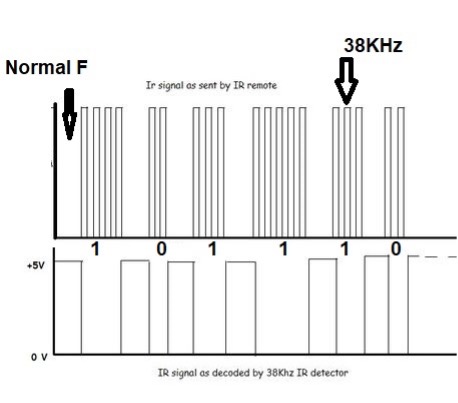
Since plenty of vendors are in the market, each vendor has defined its instruction format differently. Start from the start signal, followed by command/data, address, and at last stop bits, for vendor-specific instruction format (IRremote Protocols).

Decoding the IR data

The IR detector which I am going to use is tsop1738. It is sensitive to 38KHz frequency. The circuit diagram of the project is below.
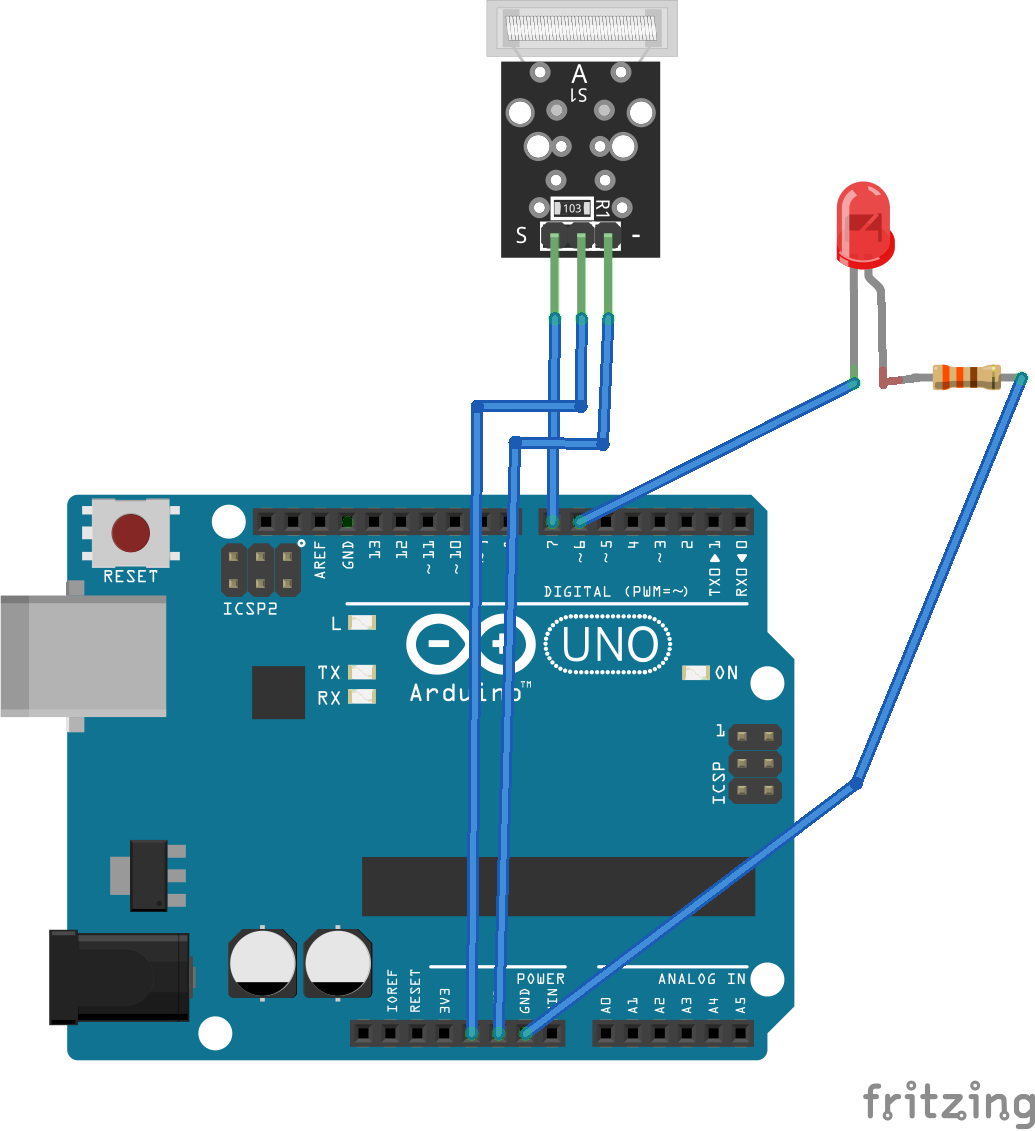
Digital pin 11 of Arduino is receiving the data bits from the IR detector. I am using the IRremote library in the project. A timer interrupt is reading the pin 11 status every 50us. Decoding is a little complicated, but you can easily understand the reading and decoding logic if you study the library documentation.

In the code, I first imported the library. Then defined the digital pin will be read after the specified internal set in the timer. Next, the onboard Arduino led is made to blink when data is received. The serial monitor started at a 115200-bit rate. IR module is started. To see the decoded commands, open the serial monitor at 115200 bps and press the remote buttons. Associated commands with each button will be decoded and displayed on the serial monitor.

You’re own remote

To build your own remote, the decoded commands can be inputted back and send using IR led. Just connect the IR led to any PWM pin of Arduino and specify the IR remote library code pin. A circuit diagram of the project is given below.
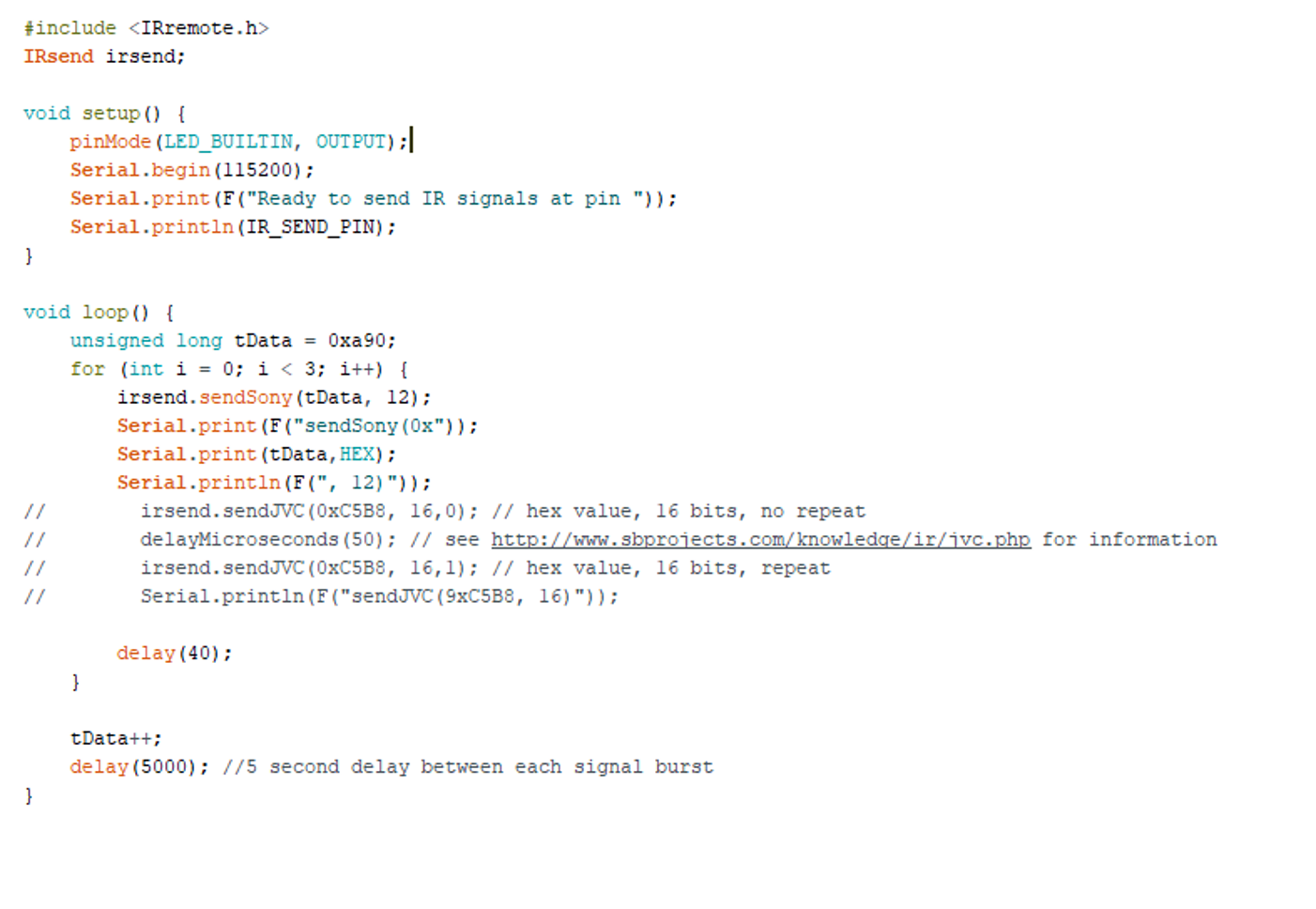
IR remote library outputs the data signal at 38KHz frequency using the timer, and PWM is used for burst. In the below example, I am sending out Sony remote control commands to the Sony TV. Commands can be seen on the serial monitor.

Arduino IR remote library is playing a huge part in the code. I would encourage all to go through the library. Timer configuration and time stamp for data decoding is a complex task.

Let’s DIY the above project: Where to purchase parts?

Arduino: Mouser
TSOP1738 IR detector: Mouse
IR LED: Mouser


You may also like:

  • Gesture sensor using Arduino

  • How to build a metal detector using an inductive proximity…

  • Object follower robot using Arduino

  • Analyzing different proximity sensor technologies

Filed Under: Arduino Projects, Microcontroller Projects


Next Article

← Previous Article
Next Article →

Questions related to this article?
👉Ask and discuss on Electro-Tech-Online.com and EDAboard.com forums.


Tell Us What You Think!! Cancel reply

You must be logged in to post a comment.

EE TECH TOOLBOX

“ee
Tech Toolbox: Internet of Things
Explore practical strategies for minimizing attack surfaces, managing memory efficiently, and securing firmware. Download now to ensure your IoT implementations remain secure, efficient, and future-ready.

EE Learning Center

EE Learning Center
“engineers
EXPAND YOUR KNOWLEDGE AND STAY CONNECTED
Get the latest info on technologies, tools and strategies for EE professionals.

HAVE A QUESTION?

Have a technical question about an article or other engineering questions? Check out our engineering forums EDABoard.com and Electro-Tech-Online.com where you can get those questions asked and answered by your peers!


RSS EDABOARD.com Discussions

  • Voltage mode pushpull is a nonsense SMPS?
  • Input impedance matching network
  • High Side current sensing
  • The comparison of different Tcl script checkers
  • Reducing "shoot-through" in offline Full Bridge SMPS?

RSS Electro-Tech-Online.com Discussions

  • Back to the old BASIC days
  • Parts required for a personal project
  • PIC KIT 3 not able to program dsPIC
  • Failure of polypropylene motor-run capacitors
  • Siemens large industrial PLC parts

Featured – RPi Python Programming (27 Part)

  • RPi Python Programming 21: The SIM900A AT commands
  • RPi Python Programming 22: Calls & SMS using a SIM900A GSM-GPRS modem
  • RPi Python Programming 23: Interfacing a NEO-6MV2 GPS module with Raspberry Pi
  • RPi Python Programming 24: I2C explained
  • RPi Python Programming 25 – Synchronous serial communication in Raspberry Pi using I2C protocol
  • RPi Python Programming 26 – Interfacing ADXL345 accelerometer sensor with Raspberry Pi

Recent Articles

  • What is AWS IoT Core and when should you use it?
  • AC-DC power supply extends voltage range to 800 V DC
  • Infineon’s inductive sensor integrates coil system driver, signal conditioning circuits and DSP
  • Arm Cortex-M23 MCU delivers 87.5 µA/MHz active mode
  • STMicroelectronics releases automotive amplifiers with in-play open-load detection

EE ENGINEERING TRAINING DAYS

engineering

Submit a Guest Post

submit a guest post
Engineers Garage
  • Analog IC TIps
  • Connector Tips
  • Battery Power Tips
  • DesignFast
  • EDABoard Forums
  • EE World Online
  • Electro-Tech-Online Forums
  • EV Engineering
  • Microcontroller Tips
  • Power Electronic Tips
  • Sensor Tips
  • Test and Measurement Tips
  • 5G Technology World
  • Subscribe to our newsletter
  • About Us
  • Contact Us
  • Advertise

Copyright © 2025 WTWH Media LLC. All Rights Reserved. The material on this site may not be reproduced, distributed, transmitted, cached or otherwise used, except with the prior written permission of WTWH Media
Privacy Policy

Search Engineers Garage

  • Electronic Projects & Tutorials
    • Electronic Projects
      • Arduino Projects
      • AVR
      • Raspberry pi
      • ESP8266
      • BeagleBone
      • 8051 Microcontroller
      • ARM
      • PIC Microcontroller
      • STM32
    • Tutorials
      • Audio Electronics
      • Battery Management
      • Brainwave
      • Electric Vehicles
      • EMI/EMC/RFI
      • Hardware Filters
      • IoT tutorials
      • Power Tutorials
      • Python
      • Sensors
      • USB
      • VHDL
    • Circuit Design
    • Project Videos
    • Components
  • Articles
    • Tech Articles
    • Insight
    • Invention Stories
    • How to
    • What Is
  • News
    • Electronic Product News
    • Business News
    • Company/Start-up News
    • DIY Reviews
    • Guest Post
  • Forums
    • EDABoard.com
    • Electro-Tech-Online
    • EG Forum Archive
  • DigiKey Store
    • Cables, Wires
    • Connectors, Interconnect
    • Discrete
    • Electromechanical
    • Embedded Computers
    • Enclosures, Hardware, Office
    • Integrated Circuits (ICs)
    • Isolators
    • LED/Optoelectronics
    • Passive
    • Power, Circuit Protection
    • Programmers
    • RF, Wireless
    • Semiconductors
    • Sensors, Transducers
    • Test Products
    • Tools
  • Learn
    • eBooks/Tech Tips
    • Design Guides
    • Learning Center
    • Tech Toolboxes
    • Webinars & Digital Events
  • Resources
    • Digital Issues
    • EE Training Days
    • LEAP Awards
    • Podcasts
    • Webinars / Digital Events
    • White Papers
    • Engineering Diversity & Inclusion
    • DesignFast
  • Guest Post Guidelines
  • Advertise
  • Subscribe