Engineers Garage

  • Electronic Projects & Tutorials
    • Electronic Projects
      • Arduino Projects
      • AVR
      • Raspberry pi
      • ESP8266
      • BeagleBone
      • 8051 Microcontroller
      • ARM
      • PIC Microcontroller
      • STM32
    • Tutorials
      • Audio Electronics
      • Battery Management
      • Brainwave
      • Electric Vehicles
      • EMI/EMC/RFI
      • Hardware Filters
      • IoT tutorials
      • Power Tutorials
      • Python
      • Sensors
      • USB
      • VHDL
    • Circuit Design
    • Project Videos
    • Components
  • Articles
    • Tech Articles
    • Insight
    • Invention Stories
    • How to
    • What Is
  • News
    • Electronic Product News
    • Business News
    • Company/Start-up News
    • DIY Reviews
    • Guest Post
  • Forums
    • EDABoard.com
    • Electro-Tech-Online
    • EG Forum Archive
  • DigiKey Store
    • Cables, Wires
    • Connectors, Interconnect
    • Discrete
    • Electromechanical
    • Embedded Computers
    • Enclosures, Hardware, Office
    • Integrated Circuits (ICs)
    • Isolators
    • LED/Optoelectronics
    • Passive
    • Power, Circuit Protection
    • Programmers
    • RF, Wireless
    • Semiconductors
    • Sensors, Transducers
    • Test Products
    • Tools
  • Learn
    • eBooks/Tech Tips
    • Design Guides
    • Learning Center
    • Tech Toolboxes
    • Webinars & Digital Events
  • Resources
    • Digital Issues
    • EE Training Days
    • LEAP Awards
    • Podcasts
    • Webinars / Digital Events
    • White Papers
    • Engineering Diversity & Inclusion
    • DesignFast
  • Guest Post Guidelines
  • Advertise
  • Subscribe

Gesture sensor using Arduino

By Usman ali Butt April 13, 2021

Gesture recognition is a heavily studied and experimented topic around the globe. Tech companies are aggressively spending resources to get a breakthrough. Pushbutton and touch technology is in use for quite a long time. New and better technology is key to capture the market. This made the entire tech industry focus on new technologies. Among them, gesture recognition is most likely to be seen in usage in the coming decades.

This tutorial will learn how gesture sensors work and DIY a small project involving Arduino and gesture sensors. So far, gesture recognition is tried to accomplish using the following:

  • Image recognition/Video input through the camera…
    • can recognize the gestures but too slow. Latency is way too much. Since a series of images are processed to recognize the gesture, this technique is not feasible for end devices. Also, it consumes a lot of processing power and resources for gesture recognition.
  • Radar waves
    • Developed and studied by Google inc. This technique is by far the most successful. Google even launched few products using the technology. It works by emitting radar waves and responding to the received waves when bounced back from objects, in our case gesture. Each gesture bounced waves are different but symmetric for the same gesture. The drawback is not all gestures can be covered through radar.
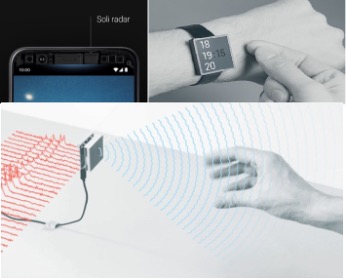
      • Google named the technology as project soli
  • IR(Infrared)
    • Through multiple IR sensors, it’s possible to predict a gesture. It’s the cheapest and low-power technique. Requires low processing power and consumes no extra resources.

Gesture sensor APDS-9960 is going to be part of this tutorial. It’s an IR gesture sensor. It communicates with an external controller on the I2C protocol. 3.3v is required for powering it. It’s not only a gesture sensor; you can use it for proximity and RGB color detection.

APDS-9960 and its various versions can be found on mobile phones. You might notice a small red led on the top front of your mobile; it’s actually the same APDS-9960 sensor.
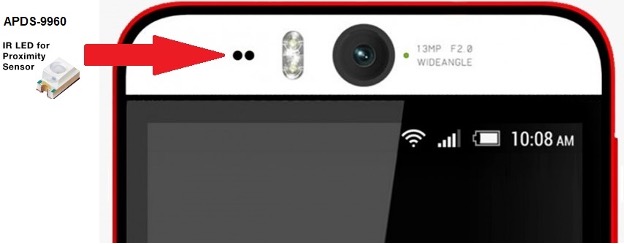
 

The sensor has an IR led and four photodiodes. IR led emits IR waves. Photodiodes are continuously looking for IR radiation. When an object moves in front of the sensor. IR energy is reflected in photodiodes. Received energy by photodiodes is processed. The object movement’s direction and velocity are calculated, and based on this calculation; the gesture is computed. Limitations are only a few gestures (RIGHT, LEFT, TOP, DOWN, etc.) can be predicted.

On mobile, it is used to turn off the mobile screen during a call. Notice when you bring the mobile near your ear during a call. The mobile screen switches off. To prevent the ear not interfacing with the touch screen. The ear is sensitive to touch, and if the ear hits the call end button, then the call will be dropped. As soon as you move it away from your ear, the screen becomes live again. So, the sensor is working as a proximity sensor. Few vendors also enabled the gesture to move the application windows on mobile left or right or for closing moving the hand up.

The breakout board for APDS-9960 is available online. We can interface it with any microcontroller. In this tutorial, we will interface it with Arduino. The sensor is 3.3v tolerant. I decided to interface it with the Arduino nano, which is also 3.3v tolerant. The circuit diagram of the project is below.
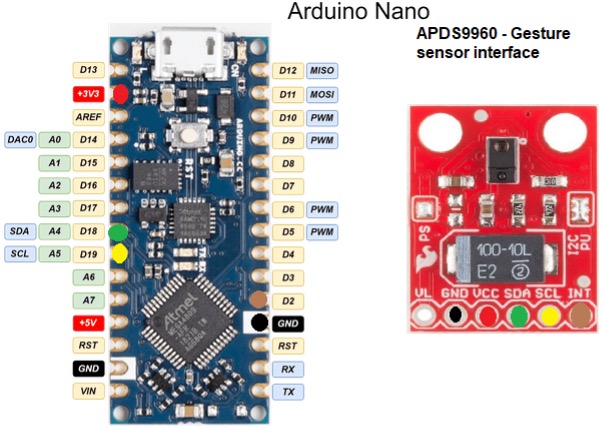
The sensor is powered through 3.3v output of Arduino nano. Arduino nano power regular can easily manage the sensor power requirements.  I2c pins of sensor and Arduino nano are connected. The sensor has an interrupt (INT) pin. Normally, the interrupt pin is high; on an external interrupt, it becomes low, indicating an external event. The interrupt pin is connected with pin#2 of Arduino nano.

Project code:

https://github.com/UsmanAliButt/Arduino-Projects/blob/NewBranch/Arduino%20nano%20and%20Gesture%20sensor/code.ino

I used SparkFun APDS9960 predefined library in the code. The library is easy to use and equipped with all the configurations required for sensor startup. The library can be downloaded from the Arduino library manager. The sensor can detect only a few gestures UP, DOWN, LEFT, RIGHT, NEAR, FAR none.

attachInterrupt(0, interruptRoutine, FALLING);

Pin#2 is declared as an interrupt pin. Any falling edge on input is a trigger, and Arduino calculates the gesture from the data arrived at the I2C port.

Let’s DIY the above project. Where to buy parts?

Mouser: Arduino Nano
Mouser: Gesture sensor APDS-9600

You may also like:


  • How human-robot interactions are improving
  • humanoid robots
    Living with humanoid robots

  • How To Add Gesture Control To A Surgical Robot?

  • Controlling your Television with Hand Gestures

  • Gesture Recognition Technology

Filed Under: Microcontroller Projects


Next Article

← Previous Article
Next Article →

Questions related to this article?
👉Ask and discuss on Electro-Tech-Online.com and EDAboard.com forums.


Tell Us What You Think!! Cancel reply

You must be logged in to post a comment.

EE TECH TOOLBOX

“ee
Tech Toolbox: Internet of Things
Explore practical strategies for minimizing attack surfaces, managing memory efficiently, and securing firmware. Download now to ensure your IoT implementations remain secure, efficient, and future-ready.

EE Learning Center

EE Learning Center
“engineers
EXPAND YOUR KNOWLEDGE AND STAY CONNECTED
Get the latest info on technologies, tools and strategies for EE professionals.

HAVE A QUESTION?

Have a technical question about an article or other engineering questions? Check out our engineering forums EDABoard.com and Electro-Tech-Online.com where you can get those questions asked and answered by your peers!


RSS EDABOARD.com Discussions

  • Voltage mode pushpull is a nonsense SMPS?
  • Input impedance matching network
  • High Side current sensing
  • The comparison of different Tcl script checkers
  • Reducing "shoot-through" in offline Full Bridge SMPS?

RSS Electro-Tech-Online.com Discussions

  • Back to the old BASIC days
  • Parts required for a personal project
  • PIC KIT 3 not able to program dsPIC
  • Failure of polypropylene motor-run capacitors
  • Siemens large industrial PLC parts

Featured – RPi Python Programming (27 Part)

  • RPi Python Programming 21: The SIM900A AT commands
  • RPi Python Programming 22: Calls & SMS using a SIM900A GSM-GPRS modem
  • RPi Python Programming 23: Interfacing a NEO-6MV2 GPS module with Raspberry Pi
  • RPi Python Programming 24: I2C explained
  • RPi Python Programming 25 – Synchronous serial communication in Raspberry Pi using I2C protocol
  • RPi Python Programming 26 – Interfacing ADXL345 accelerometer sensor with Raspberry Pi

Recent Articles

  • What is AWS IoT Core and when should you use it?
  • AC-DC power supply extends voltage range to 800 V DC
  • Infineon’s inductive sensor integrates coil system driver, signal conditioning circuits and DSP
  • Arm Cortex-M23 MCU delivers 87.5 µA/MHz active mode
  • STMicroelectronics releases automotive amplifiers with in-play open-load detection

EE ENGINEERING TRAINING DAYS

engineering

Submit a Guest Post

submit a guest post
Engineers Garage
  • Analog IC TIps
  • Connector Tips
  • Battery Power Tips
  • DesignFast
  • EDABoard Forums
  • EE World Online
  • Electro-Tech-Online Forums
  • EV Engineering
  • Microcontroller Tips
  • Power Electronic Tips
  • Sensor Tips
  • Test and Measurement Tips
  • 5G Technology World
  • Subscribe to our newsletter
  • About Us
  • Contact Us
  • Advertise

Copyright © 2025 WTWH Media LLC. All Rights Reserved. The material on this site may not be reproduced, distributed, transmitted, cached or otherwise used, except with the prior written permission of WTWH Media
Privacy Policy

Search Engineers Garage

  • Electronic Projects & Tutorials
    • Electronic Projects
      • Arduino Projects
      • AVR
      • Raspberry pi
      • ESP8266
      • BeagleBone
      • 8051 Microcontroller
      • ARM
      • PIC Microcontroller
      • STM32
    • Tutorials
      • Audio Electronics
      • Battery Management
      • Brainwave
      • Electric Vehicles
      • EMI/EMC/RFI
      • Hardware Filters
      • IoT tutorials
      • Power Tutorials
      • Python
      • Sensors
      • USB
      • VHDL
    • Circuit Design
    • Project Videos
    • Components
  • Articles
    • Tech Articles
    • Insight
    • Invention Stories
    • How to
    • What Is
  • News
    • Electronic Product News
    • Business News
    • Company/Start-up News
    • DIY Reviews
    • Guest Post
  • Forums
    • EDABoard.com
    • Electro-Tech-Online
    • EG Forum Archive
  • DigiKey Store
    • Cables, Wires
    • Connectors, Interconnect
    • Discrete
    • Electromechanical
    • Embedded Computers
    • Enclosures, Hardware, Office
    • Integrated Circuits (ICs)
    • Isolators
    • LED/Optoelectronics
    • Passive
    • Power, Circuit Protection
    • Programmers
    • RF, Wireless
    • Semiconductors
    • Sensors, Transducers
    • Test Products
    • Tools
  • Learn
    • eBooks/Tech Tips
    • Design Guides
    • Learning Center
    • Tech Toolboxes
    • Webinars & Digital Events
  • Resources
    • Digital Issues
    • EE Training Days
    • LEAP Awards
    • Podcasts
    • Webinars / Digital Events
    • White Papers
    • Engineering Diversity & Inclusion
    • DesignFast
  • Guest Post Guidelines
  • Advertise
  • Subscribe