Engineers Garage

  • Electronic Projects & Tutorials
    • Electronic Projects
      • Arduino Projects
      • AVR
      • Raspberry pi
      • ESP8266
      • BeagleBone
      • 8051 Microcontroller
      • ARM
      • PIC Microcontroller
      • STM32
    • Tutorials
      • Audio Electronics
      • Battery Management
      • Brainwave
      • Electric Vehicles
      • EMI/EMC/RFI
      • Hardware Filters
      • IoT tutorials
      • Power Tutorials
      • Python
      • Sensors
      • USB
      • VHDL
    • Circuit Design
    • Project Videos
    • Components
  • Articles
    • Tech Articles
    • Insight
    • Invention Stories
    • How to
    • What Is
  • News
    • Electronic Product News
    • Business News
    • Company/Start-up News
    • DIY Reviews
    • Guest Post
  • Forums
    • EDABoard.com
    • Electro-Tech-Online
    • EG Forum Archive
  • DigiKey Store
    • Cables, Wires
    • Connectors, Interconnect
    • Discrete
    • Electromechanical
    • Embedded Computers
    • Enclosures, Hardware, Office
    • Integrated Circuits (ICs)
    • Isolators
    • LED/Optoelectronics
    • Passive
    • Power, Circuit Protection
    • Programmers
    • RF, Wireless
    • Semiconductors
    • Sensors, Transducers
    • Test Products
    • Tools
  • Learn
    • eBooks/Tech Tips
    • Design Guides
    • Learning Center
    • Tech Toolboxes
    • Webinars & Digital Events
  • Resources
    • Digital Issues
    • EE Training Days
    • LEAP Awards
    • Podcasts
    • Webinars / Digital Events
    • White Papers
    • Engineering Diversity & Inclusion
    • DesignFast
  • Guest Post Guidelines
  • Advertise
  • Subscribe

How to play musical notes on Arduino

By Nikhil Agnihotri May 17, 2023

Adding sound to Arduino is fun, and interfacing speakers with Arduino is relatively straightforward. You can directly attach a speaker to Arduino or connect a speaker through an amplifier circuit. In both cases, Arduino can output digital audio from any GPIO. Whether or not one needs an amplifier circuit depends entirely on the selected speaker. An amplifier circuit is not required if the speaker is powerful enough to generate hearable sounds.

Arduino cannot process audio files independently; it can still generate digital audio for many musical notes. An external audio decoding circuit is required to play audio files from a source like WAV or MP3 files on an SD card. No additional circuit is needed except for a suitable speaker for playing melody tones. In this project, we will play musical notes on Arduino and compose music for a song on Arduino.

Components required    

  1. Arduino UNO x1
  2. Speaker 4Ω 50W x1
  3. Connecting wires/jumper wires

Circuit connections
In this project, we are interfacing a speaker directly to Arduino. The speaker used in this project is 4-ohm 50Watt 3-inch speaker that produces enough audible sounds. The speaker has two terminals. Connect one terminal to Arduino’s ground pin and the other terminal to any GPIO. Here, the other terminal is connected to pin D8 of Arduino UNO.
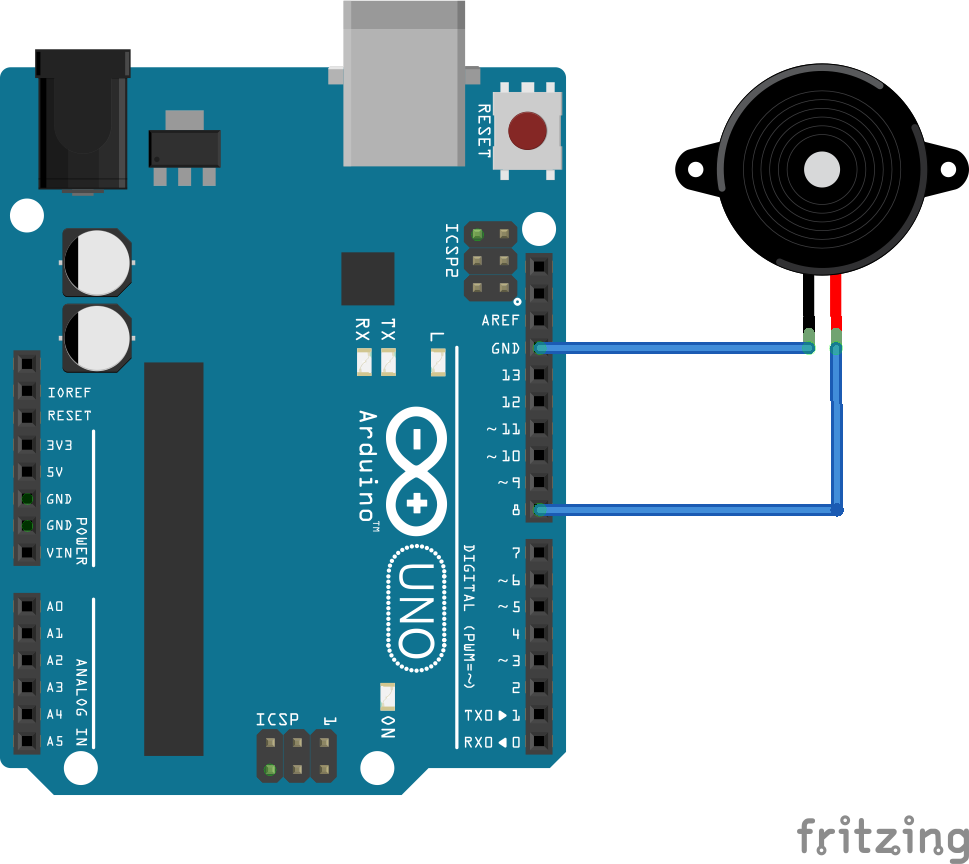
Tone() function
The tone() function is used to play musical tones on Arduino. The function generates a square wave of the specified frequency on a pin with a 50 percent duty cycle. The square wave from a GPIO can be used to play tones on a speaker or buzzer. The function allows playing tones at only one pin at a time. It is not possible to generate tones lower than 31Hz from Arduino. The function is known to interfere with PWM output at pins D3 and D11, so it must be used carefully when using along PWM output. The function has the following prototypes.

tone(pin, frequency)
tone(pin, frequency, duration)

If the duration is not specified, tone plays until a call to noTone() function is made. If the duration is set, the tone is terminated in the specified period in milliseconds.

Playing C Major scale on Arduino
C Major is a major scale based on C. It comprises pitches C, D, E, F, G, A, and B. In Hindustani vocal music, these tones are known as Sa, Re, Ga, Ma, Pa, Da, Ni, and Sa. These pitches have the following frequencies:

C4/Sa: 262
D4/Re: 294
E4/Ga: 330
F4/Ma: 349
G4/Pa: 392
A4/Da: 440
B4/Ni:  494
C5/Sa: 532

Get the circuit connections done and upload the following sketch to Arduino.

The sketch begins with defining constants for C major scale pitches. The pitches are stored in an array. The pitches are generated by calling the tone() function keeping half notes for each pitch. The tone duration is set to half note for all pitches, i.e., 1000/2 = 500 milliseconds. In the setup () function, pin 8 is set as digital output for generating square waves for the pitches. The tones are terminated by calling the noTone() function after all pitches are played. The following video demonstrates playing C major pitches on Arduino.

Playing more notes on Arduino
It is possible to play many different notes for the same pitch by changing the duration of the pitch. All possible notes, like full note, half note, quarter note, eighth note, 6th note, etc., can be played for each pitch by simply changing the duration of the pitch. All pitches were played at half note in the above example for C major scale. Upload the following sketch to Arduino, who plays the same C major scale pitches but at different notes to produce music for the Star Wars movie theme.


The sketch plays the same C major scale pitches but with different notes or tone durations. This way, Arduino played music for the Star Wars movie theme. The following video demonstrates playing pitches with note variation on Arduino.


Playing continuous audio frequencies
Arduino does not just play discreet musical notes. It can play continuous frequencies like that of a police siren. The following sketch generates a continuously varying sound wave rather than generating discreet musical notes.

The sketch continuously changes the output frequency to generate sound for a police siren. The following video demonstrates playing a police siren on Arduino.

https://www.engineersgarage.com/wp-content/uploads/2023/05/PoliceSiren.mp4

Playing musical notes for a song on Arduino
Playing different pitches at different notes can generate music for any song on Arduino. The following sketch generates music for a song on Arduino by playing different pitches at different notes.

The above sketch generates music for a song by playing many different pitches at different notes as per the piano note sheet of the song. Similarly, music for any song can be synthesized on Arduino by playing individual notes. However, it is not possible to play piano chords on Arduino. The piano chords have more than one individual notes played at once, and the tone() function can play only one tone or note at a time. The following video demonstrates playing music for a song composed of single notes.

Conclusion
It is possible to generate a variety of melody tones on Arduino by playing different pitches at different notes. This way, Arduino can synthesize any music provided it comprises single notes.


You may also like:


  • How to convert Arduino into USB Rubber Ducky for automatic…

  • How to make a decorative coconut tree using a digital…

  • How to build an Arduino lie detector based on electrodermal…

  • How to schedule embedded tasks in Arduino using FreeRTOS

  • How to build a Node.js server to control Arduino from…

  • How to get input from USB mouse on Arduino

Filed Under: Arduino Projects, Electronic Projects


Next Article

← Previous Article
Next Article →

Questions related to this article?
👉Ask and discuss on Electro-Tech-Online.com and EDAboard.com forums.


Tell Us What You Think!! Cancel reply

You must be logged in to post a comment.

EE TECH TOOLBOX

“ee
Tech Toolbox: Internet of Things
Explore practical strategies for minimizing attack surfaces, managing memory efficiently, and securing firmware. Download now to ensure your IoT implementations remain secure, efficient, and future-ready.

EE Learning Center

EE Learning Center
“engineers
EXPAND YOUR KNOWLEDGE AND STAY CONNECTED
Get the latest info on technologies, tools and strategies for EE professionals.

HAVE A QUESTION?

Have a technical question about an article or other engineering questions? Check out our engineering forums EDABoard.com and Electro-Tech-Online.com where you can get those questions asked and answered by your peers!


RSS EDABOARD.com Discussions

  • Voltage mode pushpull is a nonsense SMPS?
  • Input impedance matching network
  • High Side current sensing
  • The comparison of different Tcl script checkers
  • Reducing "shoot-through" in offline Full Bridge SMPS?

RSS Electro-Tech-Online.com Discussions

  • Back to the old BASIC days
  • Parts required for a personal project
  • PIC KIT 3 not able to program dsPIC
  • Failure of polypropylene motor-run capacitors
  • Siemens large industrial PLC parts

Featured – RPi Python Programming (27 Part)

  • RPi Python Programming 21: The SIM900A AT commands
  • RPi Python Programming 22: Calls & SMS using a SIM900A GSM-GPRS modem
  • RPi Python Programming 23: Interfacing a NEO-6MV2 GPS module with Raspberry Pi
  • RPi Python Programming 24: I2C explained
  • RPi Python Programming 25 – Synchronous serial communication in Raspberry Pi using I2C protocol
  • RPi Python Programming 26 – Interfacing ADXL345 accelerometer sensor with Raspberry Pi

Recent Articles

  • What is AWS IoT Core and when should you use it?
  • AC-DC power supply extends voltage range to 800 V DC
  • Infineon’s inductive sensor integrates coil system driver, signal conditioning circuits and DSP
  • Arm Cortex-M23 MCU delivers 87.5 µA/MHz active mode
  • STMicroelectronics releases automotive amplifiers with in-play open-load detection

EE ENGINEERING TRAINING DAYS

engineering

Submit a Guest Post

submit a guest post
Engineers Garage
  • Analog IC TIps
  • Connector Tips
  • Battery Power Tips
  • DesignFast
  • EDABoard Forums
  • EE World Online
  • Electro-Tech-Online Forums
  • EV Engineering
  • Microcontroller Tips
  • Power Electronic Tips
  • Sensor Tips
  • Test and Measurement Tips
  • 5G Technology World
  • Subscribe to our newsletter
  • About Us
  • Contact Us
  • Advertise

Copyright © 2025 WTWH Media LLC. All Rights Reserved. The material on this site may not be reproduced, distributed, transmitted, cached or otherwise used, except with the prior written permission of WTWH Media
Privacy Policy

Search Engineers Garage

  • Electronic Projects & Tutorials
    • Electronic Projects
      • Arduino Projects
      • AVR
      • Raspberry pi
      • ESP8266
      • BeagleBone
      • 8051 Microcontroller
      • ARM
      • PIC Microcontroller
      • STM32
    • Tutorials
      • Audio Electronics
      • Battery Management
      • Brainwave
      • Electric Vehicles
      • EMI/EMC/RFI
      • Hardware Filters
      • IoT tutorials
      • Power Tutorials
      • Python
      • Sensors
      • USB
      • VHDL
    • Circuit Design
    • Project Videos
    • Components
  • Articles
    • Tech Articles
    • Insight
    • Invention Stories
    • How to
    • What Is
  • News
    • Electronic Product News
    • Business News
    • Company/Start-up News
    • DIY Reviews
    • Guest Post
  • Forums
    • EDABoard.com
    • Electro-Tech-Online
    • EG Forum Archive
  • DigiKey Store
    • Cables, Wires
    • Connectors, Interconnect
    • Discrete
    • Electromechanical
    • Embedded Computers
    • Enclosures, Hardware, Office
    • Integrated Circuits (ICs)
    • Isolators
    • LED/Optoelectronics
    • Passive
    • Power, Circuit Protection
    • Programmers
    • RF, Wireless
    • Semiconductors
    • Sensors, Transducers
    • Test Products
    • Tools
  • Learn
    • eBooks/Tech Tips
    • Design Guides
    • Learning Center
    • Tech Toolboxes
    • Webinars & Digital Events
  • Resources
    • Digital Issues
    • EE Training Days
    • LEAP Awards
    • Podcasts
    • Webinars / Digital Events
    • White Papers
    • Engineering Diversity & Inclusion
    • DesignFast
  • Guest Post Guidelines
  • Advertise
  • Subscribe