In this project, we’ll design a unique door lock that can be operated without a keycard, input password, or biometric ID. A smartphone is the key to locking and unlocking the door via Bluetooth.
This door uses a solenoid lock, which relies on a latch for electrical locking and unlocking. It also has LEDs to indicate whether the door is locked or unlocked and initiates a buzzer for sound notifications. A vibration sensor produces a warning signal, protecting the door from unauthorized or forceful access.
We’ll use an Arduino NANO board and require a smartphone with Bluetooth connectivity for this project. Let’s begin with the block diagram, followed by the circuit diagram.
System block diagram
The primary building blocks of the system include:
- An Arduino NANO board
- The Bluetooth Module HC05
- A relay
- A solenoid lock
- A 12 V buzzer.
We’ll also use a few other blocks, with:
- LEDs
- A mini buzzer
- Vibration sensors

A block diagram of the smartphone-operated door lock.
1. The Smartphone with Bluetooth connectivity to transmit commands via the phone to lock or unlock the door.
2. The Bluetooth module sends commands from the user’s smartphone to lock or unlock the door. The Bluetooth app sends these signals to the Arduino board through serial communication.
3. A vibration sensor is used to detect movement or vibrations on the door when it’s locked. If the sensor detects strong vibrations, it sends an alert to the Arduino board.
4. The relays: Relay 1 activates (energizes) the solenoid lock. It requires 12 V to power the internal coil of the solenoid. Relay 2 also uses 12 V, but it’s used to power the big buzzer.
5. The solenoid lock is used to lock the door
6. The 12-V big buzzer generates an alert if anyone attempts to forcefully open the door when locked (without using the smartphone).
7. The mini buzzer alerts whenever the door is locked or unlocked by generating a long or short beeping sound, respectively.
8. LEDs: Green and red LEDs indicate if the door is locked or unlocked.
Required components:

The Solenoid lock.

The Bluetooth Module HC05.

The Arduino NANO board.
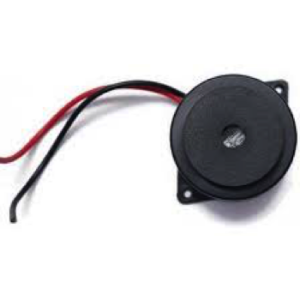
The big buzzer (12 V).
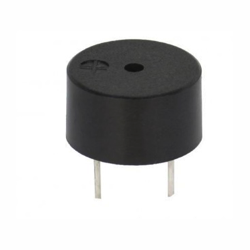
The mini buzzer (5 V).

The relay – 12V PCB mount.

The vibration sensor module.
Schematic diagram:

The complete circuit diagram of the smartphone-operated door lock.
Circuit connections:
The Bluetooth Module HC05 has four pin connections: VCC, GND, Tx, and Rx.
- Arduino provides the VCC pin with 5 V
- The GND pin connects to the common circuit ground
- The Tx and Rx pins connect to Arduino’s digital pins D11 and D12, respectively
- The red and green LEDs connect to the digital IO pins D9 and D10
- The digital IO pins, D7 and D8, drive the Relay 1 and Relay 2 coils through the transistors
- Both NPN transistors BC547 are connected in switch configuration and their collector output drives the relay coil
- The Relay 1 NO output drives the buzzers. The Relay 2 NO output energizes the solenoid coil
- The common (C) terminals of both relays are supplied with 12 V (which is provided to either the buzzer or the solenoid lock)
- The 5V mini buzzer connects to the digital pin D5
The vibration sensor module has three pin connections: VCC, GND, and D0.
- Arduino provides the VCC pin with 5 V
- The GND pin connects to the common circuit ground
- The D0 pin connects to Arduino’s digital pin D6
- Arduino’s VIN pin is given 12 V of input, thereby generating 5 V using its onboard 5 V voltage regulator. This 5V is then given to the other modules.
Circuit operation:
The circuit operation starts when it’s supplied with 12 V. Initially, the solenoid is in the locked position, and the red light is ON to indicate that the door is locked.
To begin, open the Bluetooth application in your smartphone and pair it with the HC05 module (enter the default passkey, 1234). Once complete, the HC05 module blinks at a slow rate and is ready to receive commands.
Next, send the command “ULCK” to unlock the door from your smartphone’s Bluetooth app. The HC05 module will receive this command and pass it onto Arduino serially through the Tx-Rx pins.
When Arduino receives the command, it will send Logic 1 to D8 pin, switching on Relay 2. This activates the solenoid and the door unlocks. At the same time, Arduino sends:
- Logic 1 to the D9 pin, turning on the green LED, signaling that the door is unlocked
- Logic 0 to the D10 pin, turning off the red LED (used only when the door is locked)
- Logic 1 to the D5 pin for one second, indicating to the mini buzzer to generate a long beep, signaling that the door is unlocked
To lock the door, send the command “LOCK.” The HC05 module will receive this command and pass it onto Arduino. Arduino then switches off Relay 2 by sending Logic 0 to the D8 pin, which deactivates the solenoid and locks the door.
Arduino also sends:
- Logic 1 to the D5 pin for half a second, which generates a short beep from the mini buzzer, indicating the door is locked. It turns off green led by
- Logic 1 to the D10 pin, turning on the red LED, signaling that the door is locked
- Logic 0 to the D9 pin, turning off the green LED (used only when the door is unlocked)
When the door is locked and the vibration sensor detects any kind of shock, force, or vibration, it provides an alert signal via Logic 1 to Arduino. Once received, Arduino will send Logic 1 to the D7 pin, which switches on Relay 1, producing an alarm from the 12 V big buzzer,
This circuit operation works because of the program that’s downloaded into the internal FLASH of Arduino’s ATMega328. The program is written in C/C++ language and compiled in the Arduino IDE software.
The program’s file (code) must be downloaded (uploaded) in the 32 KB program memory (FLASH) of the ATMega328.
Software program:
#include <SoftwareSerial.h>
SoftwareSerial BT_serial(11,12);
char recved_code[5];
char lock_code[5] = “LOCK”;
char unlock_code[5] = “ULCK”;
int i=0,siren_rly=7,buz=5;
int lock_rly=8,lock_led=10,unlock_led=9;
int door_vibr_sensor=6;
int lock_flag=0,unlock_flag=1;
void setup()
{
// put your setup code here, to run once:
BT_serial.begin(9600);
Serial.begin(9600);
pinMode(siren_rly,OUTPUT);
pinMode(buz,OUTPUT);
pinMode(lock_led,OUTPUT);
pinMode(lock_rly,OUTPUT);
pinMode(unlock_led,OUTPUT);
pinMode(door_vibr_sensor,INPUT);
digitalWrite(lock_rly,LOW);
digitalWrite(unlock_led,LOW);
digitalWrite(lock_led,1);
digitalWrite(buz,0);
digitalWrite(siren_rly,LOW);
}
void loop()
{
int door_vib_sensor_stat,lock_sensor_stat;
door_vib_sensor_stat = digitalRead(door_vibr_sensor);
if((door_vib_sensor_stat==0) && (lock_flag==1))
{
digitalWrite(siren_rly,HIGH);
Serial.println(“attempt to break the door”);
}
if(BT_serial.available())
{
recved_code[i] = BT_serial.read();
Serial.print(recved_code[i]);
i++;
}
if(i==4)
{
Serial.print(recved_code);
if(strcmp(lock_code,recved_code)==0)
{
digitalWrite(lock_rly,LOW);
digitalWrite(buz,1);
delay(1000);
digitalWrite(buz,0);
lock_flag=1;
unlock_flag=0;
BT_serial.print(“Door Locked”);
digitalWrite(lock_led,HIGH);
digitalWrite(unlock_led,LOW);
}
if(strcmp(unlock_code,recved_code)==0)
{
digitalWrite(lock_rly,HIGH);
digitalWrite(buz,1);
delay(500);
digitalWrite(buz,0);
unlock_flag=1;
lock_flag=0;
BT_serial.print(“Door UNLocked”);
digitalWrite(lock_led,LOW);
digitalWrite(unlock_led,HIGH);
}
i=0;
}
}
Video link:
You may also like:

Filed Under: Electronic Projects
Questions related to this article?
👉Ask and discuss on EDAboard.com and Electro-Tech-Online.com forums.
Tell Us What You Think!!
You must be logged in to post a comment.