Engineers Garage

  • Electronic Projects & Tutorials
    • Electronic Projects
      • Arduino Projects
      • AVR
      • Raspberry pi
      • ESP8266
      • BeagleBone
      • 8051 Microcontroller
      • ARM
      • PIC Microcontroller
      • STM32
    • Tutorials
      • Audio Electronics
      • Battery Management
      • Brainwave
      • Electric Vehicles
      • EMI/EMC/RFI
      • Hardware Filters
      • IoT tutorials
      • Power Tutorials
      • Python
      • Sensors
      • USB
      • VHDL
    • Circuit Design
    • Project Videos
    • Components
  • Articles
    • Tech Articles
    • Insight
    • Invention Stories
    • How to
    • What Is
  • News
    • Electronic Product News
    • Business News
    • Company/Start-up News
    • DIY Reviews
    • Guest Post
  • Forums
    • EDABoard.com
    • Electro-Tech-Online
    • EG Forum Archive
  • DigiKey Store
    • Cables, Wires
    • Connectors, Interconnect
    • Discrete
    • Electromechanical
    • Embedded Computers
    • Enclosures, Hardware, Office
    • Integrated Circuits (ICs)
    • Isolators
    • LED/Optoelectronics
    • Passive
    • Power, Circuit Protection
    • Programmers
    • RF, Wireless
    • Semiconductors
    • Sensors, Transducers
    • Test Products
    • Tools
  • Learn
    • eBooks/Tech Tips
    • Design Guides
    • Learning Center
    • Tech Toolboxes
    • Webinars & Digital Events
  • Resources
    • Digital Issues
    • EE Training Days
    • LEAP Awards
    • Podcasts
    • Webinars / Digital Events
    • White Papers
    • Engineering Diversity & Inclusion
    • DesignFast
  • Guest Post Guidelines
  • Advertise
  • Subscribe

How to interface GPS with AVR microcontroller (ATmega16)- (Part 43/46)

By Ashutosh Bhatt March 1, 2011

GPS modem is a device which receives signals from satellite and provides information about latitude, longitude, altitude, time etc. The GPS navigator is more famous in mobiles to track the road maps. The GPS modem has an antenna which receives the satellite signals and transfers them to the modem. The modem in turn converts the data into useful information and sends the output in serial RS232 logic level format. The information about latitude, longitude etc is sent continuously and accompanied by an identifier string.

This article shows how to interface the GPS modem with ATmega16 and extract the location (latitude and longitude) from the GPGGA string and display it on LCD.


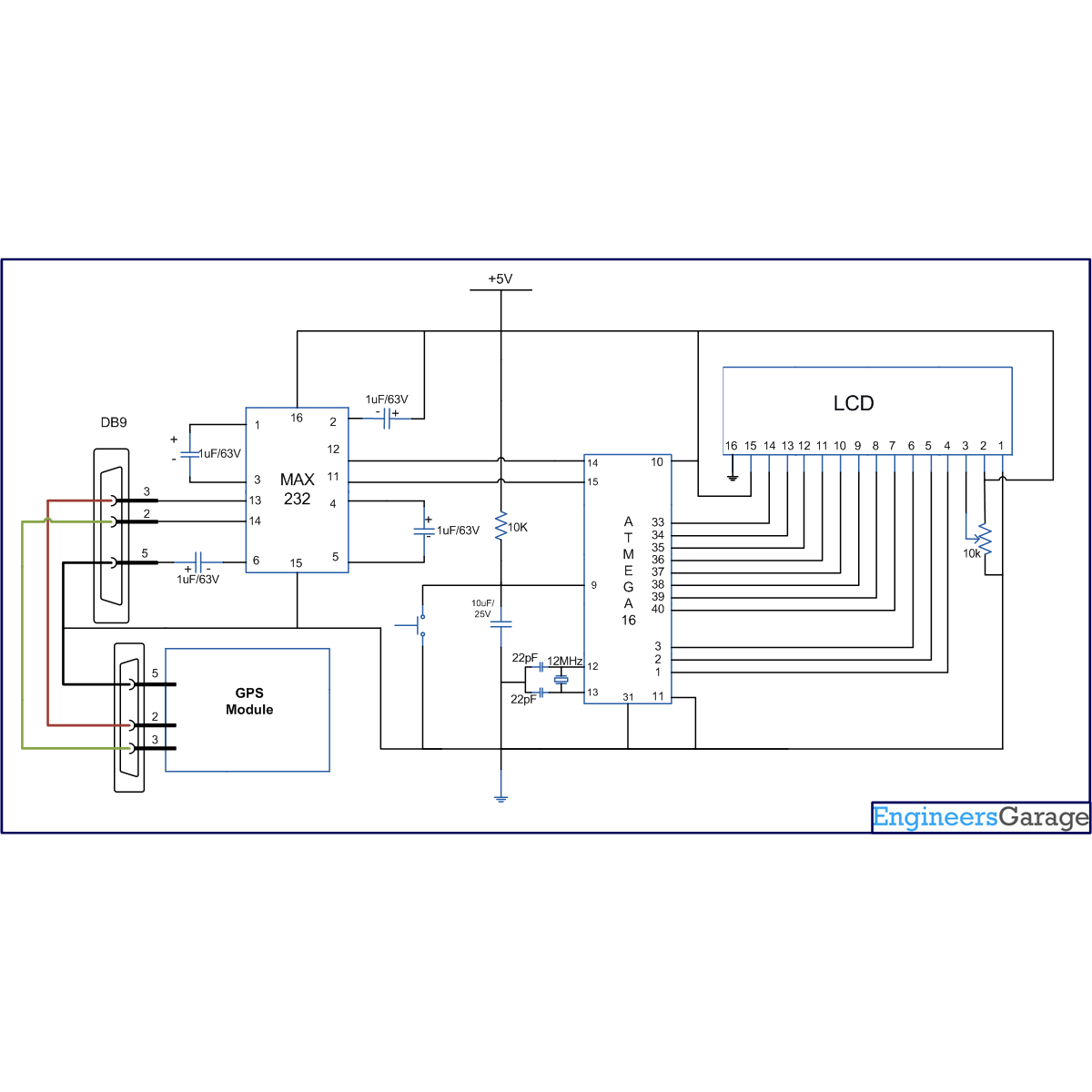
The connection of GPS modem with AVR microcontroller (ATmega 16) is shown in the circuit diagram. The ground pin of max 232 and serial o/p of GPS modem is made common. Pin2 of MAX232 is connected to pin 3 of GPS modem and pin 3 of max 232 is connected to pin 2 of modem. This type of connection is called a serial cross cable.
 
Pin 2 of MAX232
Pin 3 of GPS Modem
Pin 3 of MAX232
Pin 2 of GPS Modem
Pin 5 Ground Pin of MAX232
Pin 5 Ground of GPS Modem
The commonly available GPS modem gives output in serial (RS232) form. The output consists of a series of string.
 
String format:
The following is an example of the output string from the GPS module with its explanation. This output strings contains information about latitude, longitude, time etc and will always start with $GPGGA. Refer NMEA Standards for more details on string formats.

An example string has been given and explained below:

 $GPGGA,100156.000,2650.9416,N,07547.8441,E,1,08,1.0,442.8,M,-42.5,M,,0000*71
1.      A string always start from ‘$’ sign
2.      GPGGA :Global Positioning System Fix Data
3.      ‘,’ Comma indicates the separation between two values
4.      100156.000 : GMT time as 10(hr):01(min):56(sec):000(ms)
5.      2650.9416,N: Latitude 26(degree) 50(minutes) 9416(sec) NORTH
6.      07547.8441,E: Longitude 075(degree) 47(minutes) 8441(sec) EAST
7.      1 : Fix Quantity 0= invalid data, 1= valid data, 2=DGPS fix
8.      08 :  Number of satellites currently viewed.
9.      1.0: HDOP
10.  442.8,M : Altitude (Height above sea level in meter)
11. -42.5,M :         Geoids height
12.    __ , DGPS data
13. 0000 : DGPS data
14. *71 : checksum
 
The following algorithm is used to extract the latitude and longitude information from the GPS module using $GPGGA string and display it on a LCD:
1.      Get data in UDR and check weather that data is equal to $. If the data matches go to step(2) else get a new data.
2.      Get data byte by byte and check if the received byte is equal to GPGGA
3.      If the step (2) matches completely then  go to step (4) else go back to step(1)
4.      Leave first comma and wait till second comma (since we not looking for time).
5.      Start taking data in an array lati_value[ ] till the next comma.
6.      Get latitude direction in lati_dir
7.      Do the same for longitude
8.      Display the values on LCD and go back to step (1).
 

Project Source Code

###


// Program to get latitude and longitude value from GPS modem and display it on LCD:
/*
LCD DATA port----PORT A
signal port------PORT B
rs-------PB0
rw-------PB1
en-------PB2
*/
 
#define F_CPU 12000000UL
 
#include<avr/io.h>
#include<util/delay.h>
 
#define USART_BAUDRATE 4800
#define BAUD_PRESCALE (((F_CPU / (USART_BAUDRATE * 16UL))) - 1)
 
 
#define LCD_DATA PORTA //LCD data port
 
#define ctrl PORTB
#define en PB2 //enable signal
#define rw PB1 //read/write signal
#define rs PB0 //resister select signal
 
void LCD_cmd(unsigned char cmd);
void init_LCD(void);
void LCD_write(unsigned char data);
void LCD_write_string(unsigned char *str);
 
void usart_init();
unsigned int usart_getch();
 
unsigned char value,i,lati_value[15],lati_dir, longi_value[15], longi_dir, alti[5] ;
 
int main(void)
{
DDRA=0xff; //LCD_DATA port as out put port
DDRB=0x07; //ctrl as out put
init_LCD(); //initialization of LCD
_delay_ms(50); // delay of 50 mili seconds
LCD_write_string("we at");
LCD_cmd(0xC0);
usart_init(); // initialization of USART
while(1)
{
value=usart_getch();
if(value=='$')
{
value=usart_getch();
if(value=='G')
{
value=usart_getch();
if(value=='P')
{
value=usart_getch();
if(value=='G')
{
value=usart_getch();
if(value=='G')
{
value=usart_getch();
if(value=='A')
{
value=usart_getch();
if(value==',')
{
value=usart_getch();
while(value!=',')
{
value=usart_getch();
}
lati_value[0]=usart_getch();
value=lati_value[0];
for(i=1;value!=',';i++)
{
lati_value[i]=usart_getch();
value=lati_value[i];
}
lati_dir=usart_getch();
value=usart_getch();
while(value!=',')
{
value=usart_getch();
}
longi_value[0]=usart_getch();
value=longi_value[0];
for(i=1;value!=',';i++)
{
longi_value[i]=usart_getch();
value=longi_value[i];
}
longi_dir=usart_getch();
LCD_cmd(0x01);
_delay_ms(1);
LCD_cmd(0x80);
_delay_ms(1000);
i=0;
while(lati_value[i]!=' ')
{
LCD_write(lati_value[j]);
j++;
}
LCD_write(lati_dir);
LCD_cmd(0xC0);
_delay_ms(1000);
i=0;
while(longi_value[i]!=' ')
{
LCD_write(longi_value[i]);
i++;
}
LCD_write(longi_dir);
_delay_ms(1000);
 
}
}
}
}
}
}
}
}
}
 
void init_LCD(void)
{
LCD_cmd(0x38); //initialization of 16X2 LCD in 8bit mode
_delay_ms(1);
 
LCD_cmd(0x01); //clear LCD
_delay_ms(1);
 
LCD_cmd(0x0E); //cursor ON
_delay_ms(1);
 
LCD_cmd(0x80); // ---8 go to first line and --0 is for 0th position
_delay_ms(1);
return;
}
 
 
void LCD_cmd(unsigned char cmd)
{
LCD_DATA=cmd;
ctrl =(0<<rs)|(0<<rw)|(1<<en);
_delay_us(40);
ctrl =(0<<rs)|(0<<rw)|(0<<en);
//_delay_ms(50);
return;
}
 
 
void LCD_write(unsigned char data)
{
LCD_DATA= data;
ctrl = (1<<rs)|(0<<rw)|(1<<en);
_delay_us(40);
ctrl = (1<<rs)|(0<<rw)|(0<<en);
//_delay_ms(50);
return ;
}
 
 
void usart_init()
{
   
UCSRB |= (1<<RXCIE) | (1 << RXEN) | (1 << TXEN);   // Turn on the transmission and reception circuitry
UCSRC |= (1 << URSEL) | (1 << UCSZ0) | (1 << UCSZ1); // Use 8-bit character sizes
 
UBRRL = BAUD_PRESCALE; // Load lower 8-bits of the baud rate value into the low byte of the UBRR register
UBRRH = (BAUD_PRESCALE >> 8); // Load upper 8-bits of the baud rate value into the high byte of the UBRR register
}
 
 
unsigned int usart_getch()
{
 
while ((UCSRA & (1 << RXC)) == 0); // Do nothing until data have been recieved and is ready to be read from UDR
return(UDR); // return the byte
}
 
void LCD_write_string(unsigned char *str) //take address vaue of the string in pionter *str
{
int i=0;
while(str[i]!=' ') // loop will go on till the NULL charaters is soon in string 
{
LCD_write(str[i]); // sending data on CD byte by byte
i++;
}
return;
}

###


Circuit Diagrams

Circuit-Diagram-of-How-to-interface-GPS-with-AVR-microcontroller-ATmega16

Project Components

  • ATmega16
  • LCD
  • MAX232

Project Video


Filed Under: AVR
Tagged With: atmega16, avr, gps, microcontroller
 

Next Article

← Previous Article
Next Article →

Questions related to this article?
👉Ask and discuss on EDAboard.com and Electro-Tech-Online.com forums.


Tell Us What You Think!! Cancel reply

You must be logged in to post a comment.

EE TECH TOOLBOX

“ee
Tech Toolbox: Internet of Things
Explore practical strategies for minimizing attack surfaces, managing memory efficiently, and securing firmware. Download now to ensure your IoT implementations remain secure, efficient, and future-ready.

EE Learning Center

EE Learning Center
“engineers
EXPAND YOUR KNOWLEDGE AND STAY CONNECTED
Get the latest info on technologies, tools and strategies for EE professionals.

HAVE A QUESTION?

Have a technical question about an article or other engineering questions? Check out our engineering forums EDABoard.com and Electro-Tech-Online.com where you can get those questions asked and answered by your peers!


RSS EDABOARD.com Discussions

  • Voltage mode pushpull is a nonsense SMPS?
  • Input impedance matching network
  • High Side current sensing
  • The comparison of different Tcl script checkers
  • Reducing "shoot-through" in offline Full Bridge SMPS?

RSS Electro-Tech-Online.com Discussions

  • Is AI making embedded software developers more productive?
  • Back to the old BASIC days
  • Parts required for a personal project
  • PIC KIT 3 not able to program dsPIC
  • Failure of polypropylene motor-run capacitors

Featured – RPi Python Programming (27 Part)

  • RPi Python Programming 21: The SIM900A AT commands
  • RPi Python Programming 22: Calls & SMS using a SIM900A GSM-GPRS modem
  • RPi Python Programming 23: Interfacing a NEO-6MV2 GPS module with Raspberry Pi
  • RPi Python Programming 24: I2C explained
  • RPi Python Programming 25 – Synchronous serial communication in Raspberry Pi using I2C protocol
  • RPi Python Programming 26 – Interfacing ADXL345 accelerometer sensor with Raspberry Pi

Recent Articles

  • What is AWS IoT Core and when should you use it?
  • AC-DC power supply extends voltage range to 800 V DC
  • Infineon’s inductive sensor integrates coil system driver, signal conditioning circuits and DSP
  • Arm Cortex-M23 MCU delivers 87.5 µA/MHz active mode
  • STMicroelectronics releases automotive amplifiers with in-play open-load detection

EE ENGINEERING TRAINING DAYS

engineering

Submit a Guest Post

submit a guest post
Engineers Garage
  • Analog IC TIps
  • Connector Tips
  • Battery Power Tips
  • DesignFast
  • EDABoard Forums
  • EE World Online
  • Electro-Tech-Online Forums
  • EV Engineering
  • Microcontroller Tips
  • Power Electronic Tips
  • Sensor Tips
  • Test and Measurement Tips
  • 5G Technology World
  • Subscribe to our newsletter
  • About Us
  • Contact Us
  • Advertise

Copyright © 2025 WTWH Media LLC. All Rights Reserved. The material on this site may not be reproduced, distributed, transmitted, cached or otherwise used, except with the prior written permission of WTWH Media
Privacy Policy

Search Engineers Garage

  • Electronic Projects & Tutorials
    • Electronic Projects
      • Arduino Projects
      • AVR
      • Raspberry pi
      • ESP8266
      • BeagleBone
      • 8051 Microcontroller
      • ARM
      • PIC Microcontroller
      • STM32
    • Tutorials
      • Audio Electronics
      • Battery Management
      • Brainwave
      • Electric Vehicles
      • EMI/EMC/RFI
      • Hardware Filters
      • IoT tutorials
      • Power Tutorials
      • Python
      • Sensors
      • USB
      • VHDL
    • Circuit Design
    • Project Videos
    • Components
  • Articles
    • Tech Articles
    • Insight
    • Invention Stories
    • How to
    • What Is
  • News
    • Electronic Product News
    • Business News
    • Company/Start-up News
    • DIY Reviews
    • Guest Post
  • Forums
    • EDABoard.com
    • Electro-Tech-Online
    • EG Forum Archive
  • DigiKey Store
    • Cables, Wires
    • Connectors, Interconnect
    • Discrete
    • Electromechanical
    • Embedded Computers
    • Enclosures, Hardware, Office
    • Integrated Circuits (ICs)
    • Isolators
    • LED/Optoelectronics
    • Passive
    • Power, Circuit Protection
    • Programmers
    • RF, Wireless
    • Semiconductors
    • Sensors, Transducers
    • Test Products
    • Tools
  • Learn
    • eBooks/Tech Tips
    • Design Guides
    • Learning Center
    • Tech Toolboxes
    • Webinars & Digital Events
  • Resources
    • Digital Issues
    • EE Training Days
    • LEAP Awards
    • Podcasts
    • Webinars / Digital Events
    • White Papers
    • Engineering Diversity & Inclusion
    • DesignFast
  • Guest Post Guidelines
  • Advertise
  • Subscribe