For a long time, humans have dreamt about virtual reality. When you think about a VR headset, you probably desire of something more hi-tech and practical.
You didn’t know that even the guys at Google are thinking the same. Though Facebook brought into VR or Virtual Reality technology for $2 billion, Google has settled things a little simpler. Nobody has ever imagined that Google could actually create a VR headset out of something that is simple, practical, and inexpensive, and this is a piece of cardboard!

Here comes Google Cardboard! It might sound like a joke to you, but yes it is a simple cardboard cutout that can turn your Android device into a virtual reality headset. So, if you are looking out for an inexpensive way to enhance your tech experience or you wish to explore the potential capabilities of this product, then here it’s worth checking.
What is Google Cardboard?

Google Cardboard was only a 20% project of company’s project, which allows employees to work on other important side projects along with their everyday duties. But this one happened to be a big success and presently innumerable companies are copying this design.
It is a virtual reality or VR platform developed by Google for use for an Android phone with a head mount. Known for its fold-out cardboard viewer, this platform intends as a low-cost system to enhance interest and development in virtual reality applications. You can either build your own viewer from low-cost and simple components using specifications published by Google, o buy a pre-manufactured one. In order to use Google Cardboard, users can run cardboard-compatible applications on their smartphone for which they need to place their phone into the back of viewer and view contents through lenses.
Google Cardboard was designed by Damien Henry and David Coz and a cardboard software development kit is available for iOS and Android operating systems. One put altogether, users set their phone into it and see through the lenses. This simple setup can be more interacting with your handset’s screen into a rich real-world experience.
How Does Google Cardboard Work?
The working of Google Cardboard is as simple as its price. It can work by placing your smartphone at an optimal distance away from the lenses and then using compatible apps the lenses generate a 3D effect when help up to your eyes. You can rotate your head around and the images will respond as if you are in the same area or place as what is displayed on the screen. For example, you can utilize the Street Vue Demo and explore the different streets of Paris while witnessing your surroundings in a virtual reality that reacts to the actual position in space.
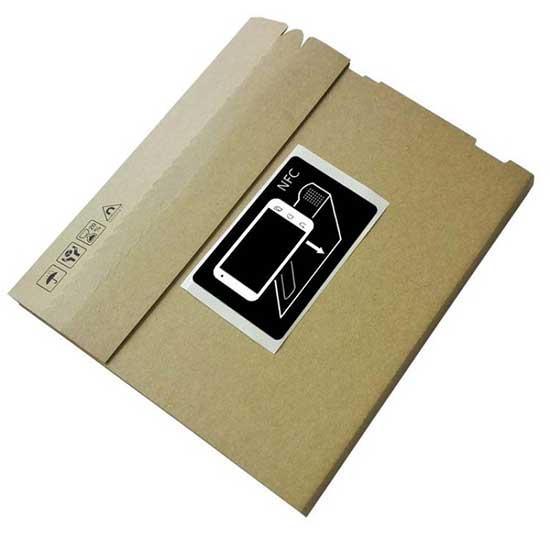
An added bonus of this product is that it incorporates an NFC chip that automatically launches your official Cardboard app when you place your smartphone into the headset. Another amazing aspect is the magnet on the side. If you are just folding a piece of cardboard and using it along with your phone, then for this you need a magnet. A magnet would help to hold the things together.

This magnet on the size is an ingenious design aspect of this product. It is actually a button! Since you cannot touch the screen of your phone when it is inside the Cardboard, Google has offered this magnet that when moved it acts as if you have pressed something on your screen. The magnet uses your phone’s magnetometer, which is mainly used for compass functions to sense it and control it while it is in the cardboard.
Google Cardboard Real-Time Applications
Google Cardboard can turn your Android into a really amazing virtual reality experience. If you are ready to experience the exhilarating world of VR or Virtual Reality, then here check the best Google cardboard real-time applications.
1. Google Street View

Another real-time Google app, which is not primarily designed for Cardboard, is Google Street View. It is an exciting app for much of the same reason as Google Earth is. At a bling, Google has altered its entire catalogue of the cities of world, previously a neat feature used for navigating into an exportable, interactive, and virtual reality playground.
If you wanted to visit the Eiffel Tower, but have not been able to, then now you can! Or, you can stroll down the Fifth Avenue gazing up at the Empire State Building with ease. With this app, the world will be an oyster for you.
Just load your preferred destination in the app, and the hit on the Cardboard icon in the corner.
2. Google Earth
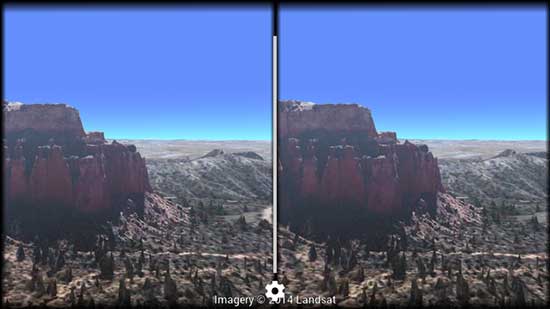
Accessible through the default Google Cardboard app, Google Earth offers a number of demos to the users. It is one of the finest and most exciting showcases of the possibilities of Virtual Reality. Yes, the textures are quite low resolution and the 3D models of cities generated by it are somewhat blocky, but the overall experience is truly awesome.
With Google Earth, you can fly anywhere in the world of Virtual Reality 3D, using your smartphone and a piece of cardboard.
3. Titans of Space

It is one of the popular VR apps for Google Cardboard that features a VR tour through the solar system so you can see everything and how that thing works. Moreover, you can compare the sizes of planets, explore more aspects about them, learn more, and roam around freely.
There is a soothing little soundtrack to enjoy while you travel the cosmos. Most of the features of this app are free, but if you want the special features, like voice narration, you need to buy it for $2.99.
4. YouTube

The venerable YouTube is one of the finest and spectacular VR apps to have in your Google’s Cardboard arsenal. It is one of the biggest sources of VR content on the Internet. There are innumerable channels and videos you can follow that offer everything from educational video to entertainment for you to watch.
This app is one of the few platforms where Virtual Reality has truly taken off. There is almost countless stuff that you can check out. For most of the features, YouTube is free. And if you use YouTube Red then you would be able to get rid of advertising and extra stuff and enjoy background listening.
5. Cardboard Camera
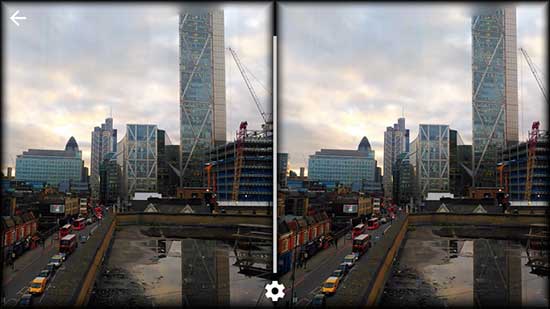
This is a relatively new app from Google designed especially for Cardboard. With the Google Cardboard Camera, you can take 360 degree panoramic 3D photographs and views, which can be then, viewed using the headset.
It is a neat tool but the only drawback is that you cannot share the photos with others yet. Might be this feature comes soon from the experts.
To Sum Up
Just remember – Google Cardboard cannot turn any app into a 3D experience as you would require a split screen optimized for Google Cardboard to create a 3D effect. But with apps compatible with Google Cardboard and more to come in the future, you can definitely dive into an interactive and mesmerizing world.
Getting Google Cardboard is super easy. You can select a manufacturer and get the kit under $20. Stay away from the spin-off products available at a cheap price. Just make sure you buy a size that perfectly lines up with your phone, otherwise you have to compromise on VR experience.
Google has again proven that you don’t need tons of bucks to be tech-savvy and enjoy technology. Just try Google Cardboard and you would yourself know why it is worth investing!
Filed Under: Tech Articles
Questions related to this article?
👉Ask and discuss on Electro-Tech-Online.com and EDAboard.com forums.
Tell Us What You Think!!
You must be logged in to post a comment.