Engineers Garage

  • Electronic Projects & Tutorials
    • Electronic Projects
      • Arduino Projects
      • AVR
      • Raspberry pi
      • ESP8266
      • BeagleBone
      • 8051 Microcontroller
      • ARM
      • PIC Microcontroller
      • STM32
    • Tutorials
      • Audio Electronics
      • Battery Management
      • Brainwave
      • Electric Vehicles
      • EMI/EMC/RFI
      • Hardware Filters
      • IoT tutorials
      • Power Tutorials
      • Python
      • Sensors
      • USB
      • VHDL
    • Circuit Design
    • Project Videos
    • Components
  • Articles
    • Tech Articles
    • Insight
    • Invention Stories
    • How to
    • What Is
  • News
    • Electronic Product News
    • Business News
    • Company/Start-up News
    • DIY Reviews
    • Guest Post
  • Forums
    • EDABoard.com
    • Electro-Tech-Online
    • EG Forum Archive
  • DigiKey Store
    • Cables, Wires
    • Connectors, Interconnect
    • Discrete
    • Electromechanical
    • Embedded Computers
    • Enclosures, Hardware, Office
    • Integrated Circuits (ICs)
    • Isolators
    • LED/Optoelectronics
    • Passive
    • Power, Circuit Protection
    • Programmers
    • RF, Wireless
    • Semiconductors
    • Sensors, Transducers
    • Test Products
    • Tools
  • Learn
    • eBooks/Tech Tips
    • Design Guides
    • Learning Center
    • Tech Toolboxes
    • Webinars & Digital Events
  • Resources
    • Digital Issues
    • EE Training Days
    • LEAP Awards
    • Podcasts
    • Webinars / Digital Events
    • White Papers
    • Engineering Diversity & Inclusion
    • DesignFast
  • Guest Post Guidelines
  • Advertise
  • Subscribe

Fingerprint Detection using Microcontroller- (Part 45/46)

By Gurmeet Singh March 17, 2015

REQUIREMENTS:

  1. AtMega 16 Microcontroller (development board)
  2. Fingerprint scanner module (R305)
  3. 16X2 Alphanumeric LCD (for user display)

DESCRIPTION:

In today’s secure world biometric safety is on the top. Unlike other techniques which make use of passwords and numbers, that are needed to be remembered, biometric techniques make use of human body parts like fingerprints or even iris of your eyes and as we know that these things are unique to all thus it makes biometric systems the most effective over others. In this project I have interfaced a very popular fingerprint scanner R305 with AtMega 16 microcontroller. This module communicates over UART protocol with microcontroller i.e. it makes use of Rx and Tx pin of microcontroller to interact with it.

Now talking about this module, it comes preloaded with scanner as well as detection section and we are left with 4 pins for connections. These 4 pins are: VCC, GND, Rx and Tx. It works over 3.3 to 5V supply and its Rx and Tx pin is connected to Tx and Rx pin of the microcontroller respectively. The mode is semi duplex asynchronism serial communication and the default baud rate is 57600bps but it can be changed between 9600~115200bps.

At power on, it takes about half a second for initialization, during this period the module can’t accept commands. The system sets aside a 512-bytes memory (16 pages X 32 bytes) for user’s notepad, where data requiring power-off protection can be stored. There is an image buffer and two 512-byte-character-file buffers within the RAM space of the module. This buffer serves for image storage and the image format is 256*288 pixels.  Two character file buffers can be used to store both character file and template file. System sets aside a certain space within Flash for fingerprint template storage, that’s fingerprint library. It is non volatile in nature. This module also serves the purpose for providing any 32 bit random number.

When communicating, the transferring and receiving of command/data/result are all wrapped in data package format.

Image showing format of Data Packet for communicating Commands, Result or Data from R305 Fingerprint Module

 Fig. 1: 

Image showing format of Data Packet for communicating Commands, Result or Data from R305 Fingerprint Module

ADDER: Default value is 0xFFFFFFFF, which can be modified by command. High byte transferred first and at wrong adder value, module will reject to transfer.HEADER: Fixed value of 0xEF01

PACKAGE IDENTIFIER: Its size is one byte. 01H for command packet and 07H for acknowledge packet.

PACKAGE LENGTH: Refers to the length of package content (command packets and data packets) plus the length of Checksum ( 2 bytes). Unit is byte. Max length is 256 bytes.

PACKAGE CONTENTS: It can be commands, data and command’s parameters, acknowledge result, etc. (fingerprint character value, templates are all deemed as data)

CHECKSUM: The arithmetic sum of package identifier, package length and all packages contends. Overflowing bits are omitted. High byte is transferred first.

Let me clear this concept with an example:-

To change the Modules Address, a command package like this is needed to be sent to it:

Image showing format of Data Packet used for sending command to change address of R305 Fingerprint Module

Fig. 2: Image showing format of Data Packet used for sending command to change address of R305 Fingerprint Module

If change becomes successful this type of acknowledge package will be received by it:

Image showing format of Data Packet received on success of change in address of R305 Fingerprint Module

Fig. 3: Image showing format of Data Packet received on success of change in address of R305 Fingerprint Module

*If there will be any error while doing this task, this CODE will change to 0x01.

If change becomes successful this type of acknowledge package will be received by it:

Coming back to this project I have made use of only few functions out of several. These are:

  1. Collecting finger image
  2. Generating character file from that image
  3. Generating template for this character file
  4. Storing template in Flash library
  5. Deleting template from Flash library
  6. Searching finger library

When enrolling, user needs to enter the finger two times. The system will process the two time finger images, generate a template of the finger based on processing results and store the template. When matching, user enters the finger through optical sensor and system will generate a template of the finger and compare it with templates of the finger library. For 1:1 matching, system will compare the live finger with specific template designated in the Module; for 1:N matching, or searching, system will search the whole finger library for the matching finger. In both circumstances, system will return the matching result, success or failure.

Here N is the maximum number of templates flash library can store. Mine has 1000.

I would recommend going through its datasheet and understanding how to communicate with it and see what all functions it can perform. I have attached the PDF file of the same in this folder itself.

In this project you will see that on powering up the microcontroller the fingerprint module will take certain time to initialize itself, thus I have given it plenty of delay time to do so. Also the status will be shown on a 16X2 LCD and some LEDS as well.

LCD is connected to PORTB and will work under 4 bit mode. LEDs are connected with PORTC.
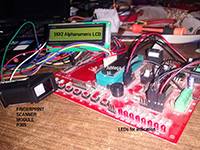
Prototype of AVR ATMega16 and R305 Module based Fingerprint Scanner
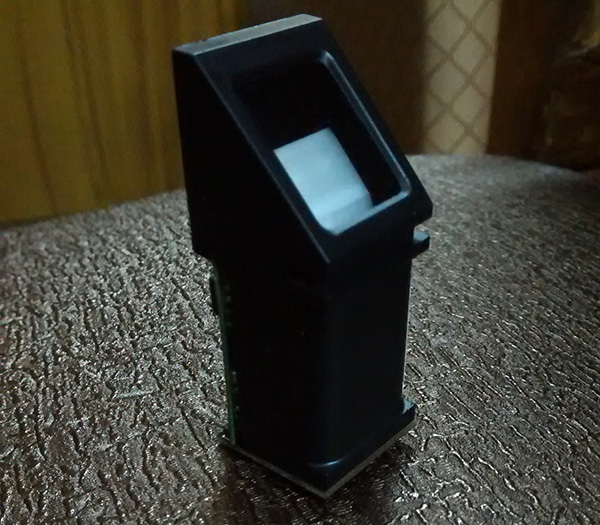
Fig. 4: Prototype of AVR ATMega16 and R305 Module based Fingerprint Scanner

Typical Image of R305 Fingerprint Module
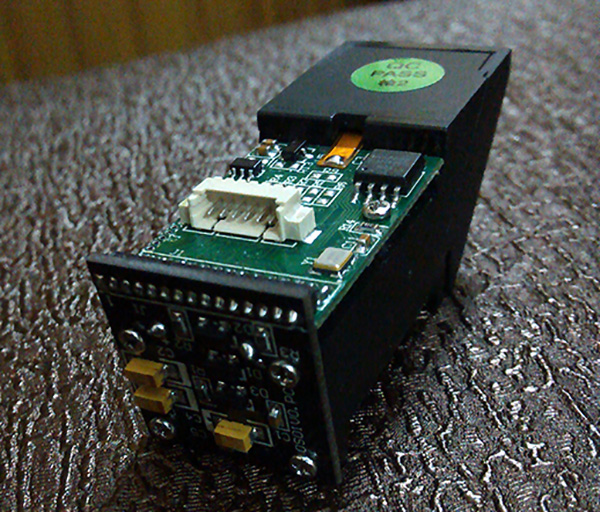
Fig. 5: Typical Image of R305 Fingerprint Module

Image showing pin connections of R305 Fingerprint Module

Fig. 6: Image showing pin connections of R305 Fingerprint Module

Header files used in my coding part have been attached inside this folder itself.

APPLICATIONS:

  1. Can be used in biometric attendance systems
  2. Can be used for security purposes where high level security is desired

Project Source Code

#include<avr/io.h>

#include<util/delay.h>

#include<uart.h>

#include<lcd.h>


void read_finger_1()          //for char_buffer1

{

      int i=0;

      char k=1,ch=1;


      sendchar_uart(239);

      sendchar_uart(1);

      sendchar_uart(255);

      sendchar_uart(255);

      sendchar_uart(255);

      sendchar_uart(255);

      sendchar_uart(1);

      sendchar_uart(0);

      sendchar_uart(3);

      sendchar_uart(1);

      sendchar_uart(0);

      sendchar_uart(5);


      for(i=0;i<10;i++)

      {

            k=getchar_uart();

            if(i==9)

            {

                  ch=k;

                  k=getchar_uart();

                  k=getchar_uart();

                  if(ch==0x00)

                  {

                        PORTC|=(1<<0);

                        k=1;

                        sendchar_uart(239);

                        sendchar_uart(1);

                        sendchar_uart(255);

                        sendchar_uart(255);

                        sendchar_uart(255);

                        sendchar_uart(255);

                        sendchar_uart(1);

                        sendchar_uart(0);

                        sendchar_uart(4);

                        sendchar_uart(2);

                        sendchar_uart(1);

                        sendchar_uart(0);

                        sendchar_uart(8);

                        i=0;

                        for(i=0;i<10;i++)

                        {

                              k=getchar_uart();

                              if(i==9)

                              {

                                    ch=k;

                                    k=getchar_uart();

                                    k=getchar_uart();

                                    if(ch==0x00)

                                    {

                                          PORTC|=(1<<1);

                                    }

                              }

                        }

                  }

            }

      }

}


void read_finger_2()          //for char_buffer2

{

      int i=0;

      char k=1,ch=1;


      sendchar_uart(239);

      sendchar_uart(1);

      sendchar_uart(255);

      sendchar_uart(255);

      sendchar_uart(255);

      sendchar_uart(255);

      sendchar_uart(1);

      sendchar_uart(0);

      sendchar_uart(3);

      sendchar_uart(1);

      sendchar_uart(0);

      sendchar_uart(5);


      for(i=0;i<10;i++)

      {

            k=getchar_uart();

            if(i==9)

            {

                  ch=k;

                  k=getchar_uart();

                  k=getchar_uart();

                  if(ch==0x00)

                  {

                        PORTC|=(1<<2);

                        k=1;

                        sendchar_uart(239);

                        sendchar_uart(1);

                        sendchar_uart(255);

                        sendchar_uart(255);

                        sendchar_uart(255);

                        sendchar_uart(255);

                        sendchar_uart(1);

                        sendchar_uart(0);

                        sendchar_uart(4);

                        sendchar_uart(2);

                        sendchar_uart(2);

                        sendchar_uart(0);

                        sendchar_uart(9);

                        i=0;

                        for(i=0;i<10;i++)

                        {

                              k=getchar_uart();

                              if(i==9)

                              {

                                    ch=k;

                                    k=getchar_uart();

                                    k=getchar_uart();

                                    if(ch==0x00)

                                    {

                                          PORTC|=(1<<3);

                                    }

                              }

                        }

                  }

            }

      }

}


void make_template()

{

      int i=0;

      char k=1,ch=1;


      k=1;

      sendchar_uart(239);

      sendchar_uart(1);

      sendchar_uart(255);

      sendchar_uart(255);

      sendchar_uart(255);

      sendchar_uart(255);

      sendchar_uart(1);

      sendchar_uart(0);

      sendchar_uart(3);

      sendchar_uart(5);

      sendchar_uart(0);

      sendchar_uart(9);


      for(i=0;i<10;i++)

      {

            k=getchar_uart();

            if(i==9)

            {

                  ch=k;

                  k=getchar_uart();

                  k=getchar_uart();

                  if(ch==0x00)

                        PORTC|=(1<<4);

            }

      }


}


void check_finger()

{

int i=0;

char k=1,ch=1;


sendchar_uart(239);

sendchar_uart(1);

sendchar_uart(255);

sendchar_uart(255);

sendchar_uart(255);

sendchar_uart(255);

sendchar_uart(1);

sendchar_uart(0);

sendchar_uart(8);

sendchar_uart(4);

sendchar_uart(1);

sendchar_uart(0);

sendchar_uart(0);

sendchar_uart(0);

sendchar_uart(10);

sendchar_uart(0);

sendchar_uart(24);


for(i=0;i<10;i++)

      {

            k=getchar_uart();

            if(i==9)

            {

                  ch=k;

                  k=getchar_uart();

                  k=getchar_uart();

                  k=getchar_uart();

                  k=getchar_uart();

                  k=getchar_uart();

                  k=getchar_uart();

                  LCDclr();

                  if(ch==0x00)

                        {

                              PORTC|=(1<<5);

                              LCDdisplay("FINGER FOUND");

                        }

                  else

                        LCDdisplay("FINGER NOT FOUND");

            }

      }

}


void store(int ID)

{

      int i=0,sum=14+ID;

      char k=1,ch=1;


      sendchar_uart(239);

      sendchar_uart(1);

      sendchar_uart(255);

      sendchar_uart(255);

      sendchar_uart(255);

      sendchar_uart(255);

      sendchar_uart(1);

      sendchar_uart(0);

      sendchar_uart(6);

      sendchar_uart(6);

      sendchar_uart(1);

      sendchar_uart(0);

      sendchar_uart(ID);

      sendchar_uart(0);//C

      sendchar_uart(sum);//C


      for(i=0;i<10;i++)

            {

                  k=getchar_uart();

                  if(i==9)

                  {

                        ch=k;

                        k=getchar_uart();

                        k=getchar_uart();

                        if(ch==0x00)

                              PORTC|=(1<<6);

                  }

            }

}


void empty()

{

      int i=0;

      char k=1,ch=1;


      sendchar_uart(239);

      sendchar_uart(1);

      sendchar_uart(255);

      sendchar_uart(255);

      sendchar_uart(255);

      sendchar_uart(255);

      sendchar_uart(1);

      sendchar_uart(0);

      sendchar_uart(3);

      sendchar_uart(13);

      sendchar_uart(0);

      sendchar_uart(17);


      for(i=0;i<10;i++)

            {

                  k=getchar_uart();

                  if(i==9)

                  {

                        ch=k;

                        k=getchar_uart();

                        k=getchar_uart();

                        if(ch==0x00)

                              PORTC|=(1<<7);

                  }

            }

}


void main()

{

      DDRC=0xff;

      PORTC=0;


      enable_uart(9600);

      LCDinit();

      LCDclr();

      _delay_ms(5000);  //plenty of delay for modules initialization

      LCDdisplay("Scanning.....");

      read_finger_1();  //scans and stores in char_buffer1

      read_finger_2();  //scans and stores in char_buffer2

      make_template();  //makes the template with info in char_buffer1 & char_buffer2 and stores it in char_buffer1

      check_finger();         //checks for the finger authentication

//    store(0);               //stores the scanned value to the given parametric location in flash library

//    empty();                //empties the flash library

}


Circuit Diagrams

Circuit-Diagram-AVR-ATMega16-R305-Module-Based-Fingerprint-Scanner

Project Video


Filed Under: Electronic Projects
Tagged With: avr
 

Next Article

← Previous Article
Next Article →

Questions related to this article?
👉Ask and discuss on EDAboard.com and Electro-Tech-Online.com forums.


Tell Us What You Think!! Cancel reply

You must be logged in to post a comment.

EE TECH TOOLBOX

“ee
Tech Toolbox: Internet of Things
Explore practical strategies for minimizing attack surfaces, managing memory efficiently, and securing firmware. Download now to ensure your IoT implementations remain secure, efficient, and future-ready.

EE Learning Center

EE Learning Center
“engineers
EXPAND YOUR KNOWLEDGE AND STAY CONNECTED
Get the latest info on technologies, tools and strategies for EE professionals.

HAVE A QUESTION?

Have a technical question about an article or other engineering questions? Check out our engineering forums EDABoard.com and Electro-Tech-Online.com where you can get those questions asked and answered by your peers!


RSS EDABOARD.com Discussions

  • Voltage mode pushpull is a nonsense SMPS?
  • Input impedance matching network
  • High Side current sensing
  • The comparison of different Tcl script checkers
  • Reducing "shoot-through" in offline Full Bridge SMPS?

RSS Electro-Tech-Online.com Discussions

  • Is AI making embedded software developers more productive?
  • Back to the old BASIC days
  • Parts required for a personal project
  • PIC KIT 3 not able to program dsPIC
  • Failure of polypropylene motor-run capacitors

Featured – RPi Python Programming (27 Part)

  • RPi Python Programming 21: The SIM900A AT commands
  • RPi Python Programming 22: Calls & SMS using a SIM900A GSM-GPRS modem
  • RPi Python Programming 23: Interfacing a NEO-6MV2 GPS module with Raspberry Pi
  • RPi Python Programming 24: I2C explained
  • RPi Python Programming 25 – Synchronous serial communication in Raspberry Pi using I2C protocol
  • RPi Python Programming 26 – Interfacing ADXL345 accelerometer sensor with Raspberry Pi

Recent Articles

  • What is AWS IoT Core and when should you use it?
  • AC-DC power supply extends voltage range to 800 V DC
  • Infineon’s inductive sensor integrates coil system driver, signal conditioning circuits and DSP
  • Arm Cortex-M23 MCU delivers 87.5 µA/MHz active mode
  • STMicroelectronics releases automotive amplifiers with in-play open-load detection

EE ENGINEERING TRAINING DAYS

engineering

Submit a Guest Post

submit a guest post
Engineers Garage
  • Analog IC TIps
  • Connector Tips
  • Battery Power Tips
  • DesignFast
  • EDABoard Forums
  • EE World Online
  • Electro-Tech-Online Forums
  • EV Engineering
  • Microcontroller Tips
  • Power Electronic Tips
  • Sensor Tips
  • Test and Measurement Tips
  • 5G Technology World
  • Subscribe to our newsletter
  • About Us
  • Contact Us
  • Advertise

Copyright © 2025 WTWH Media LLC. All Rights Reserved. The material on this site may not be reproduced, distributed, transmitted, cached or otherwise used, except with the prior written permission of WTWH Media
Privacy Policy

Search Engineers Garage

  • Electronic Projects & Tutorials
    • Electronic Projects
      • Arduino Projects
      • AVR
      • Raspberry pi
      • ESP8266
      • BeagleBone
      • 8051 Microcontroller
      • ARM
      • PIC Microcontroller
      • STM32
    • Tutorials
      • Audio Electronics
      • Battery Management
      • Brainwave
      • Electric Vehicles
      • EMI/EMC/RFI
      • Hardware Filters
      • IoT tutorials
      • Power Tutorials
      • Python
      • Sensors
      • USB
      • VHDL
    • Circuit Design
    • Project Videos
    • Components
  • Articles
    • Tech Articles
    • Insight
    • Invention Stories
    • How to
    • What Is
  • News
    • Electronic Product News
    • Business News
    • Company/Start-up News
    • DIY Reviews
    • Guest Post
  • Forums
    • EDABoard.com
    • Electro-Tech-Online
    • EG Forum Archive
  • DigiKey Store
    • Cables, Wires
    • Connectors, Interconnect
    • Discrete
    • Electromechanical
    • Embedded Computers
    • Enclosures, Hardware, Office
    • Integrated Circuits (ICs)
    • Isolators
    • LED/Optoelectronics
    • Passive
    • Power, Circuit Protection
    • Programmers
    • RF, Wireless
    • Semiconductors
    • Sensors, Transducers
    • Test Products
    • Tools
  • Learn
    • eBooks/Tech Tips
    • Design Guides
    • Learning Center
    • Tech Toolboxes
    • Webinars & Digital Events
  • Resources
    • Digital Issues
    • EE Training Days
    • LEAP Awards
    • Podcasts
    • Webinars / Digital Events
    • White Papers
    • Engineering Diversity & Inclusion
    • DesignFast
  • Guest Post Guidelines
  • Advertise
  • Subscribe