Engineers Garage

  • Electronic Projects & Tutorials
    • Electronic Projects
      • Arduino Projects
      • AVR
      • Raspberry pi
      • ESP8266
      • BeagleBone
      • 8051 Microcontroller
      • ARM
      • PIC Microcontroller
      • STM32
    • Tutorials
      • Audio Electronics
      • Battery Management
      • Brainwave
      • Electric Vehicles
      • EMI/EMC/RFI
      • Hardware Filters
      • IoT tutorials
      • Power Tutorials
      • Python
      • Sensors
      • USB
      • VHDL
    • Circuit Design
    • Project Videos
    • Components
  • Articles
    • Tech Articles
    • Insight
    • Invention Stories
    • How to
    • What Is
  • News
    • Electronic Product News
    • Business News
    • Company/Start-up News
    • DIY Reviews
    • Guest Post
  • Forums
    • EDABoard.com
    • Electro-Tech-Online
    • EG Forum Archive
  • DigiKey Store
    • Cables, Wires
    • Connectors, Interconnect
    • Discrete
    • Electromechanical
    • Embedded Computers
    • Enclosures, Hardware, Office
    • Integrated Circuits (ICs)
    • Isolators
    • LED/Optoelectronics
    • Passive
    • Power, Circuit Protection
    • Programmers
    • RF, Wireless
    • Semiconductors
    • Sensors, Transducers
    • Test Products
    • Tools
  • Learn
    • eBooks/Tech Tips
    • Design Guides
    • Learning Center
    • Tech Toolboxes
    • Webinars & Digital Events
  • Resources
    • Digital Issues
    • EE Training Days
    • LEAP Awards
    • Podcasts
    • Webinars / Digital Events
    • White Papers
    • Engineering Diversity & Inclusion
    • DesignFast
  • Guest Post Guidelines
  • Advertise
  • Subscribe

Mobile – Gesture Controlled Car

By Gurmeet Singh December 24, 2014

DESCRIPTION:

Have you ever wondered of operating a toy car with you own mobile phone? Yes, I have made such a thing. This project involves the communication between your mobile phone and the car with the help of internal accelerometer fitted inside the mobile. For this project reader needs to have knowledge of how to start with AVR.

REQUIREMENT:

1. ATMega 16 microcontroller
2. L293D motor driver IC
3. Bluetooth module (HC05)
4. Chassis
5. Motors & Wheels
6. Mobile phone (Android + Bluetooth compatibility)
7. Battery (for car section)
The system communicates wirelessly over Bluetooth interface, thus we require a phone with Bluetooth compatibility. Moreover, I have made an Android Application for the same task, therefore the phone must have ANDROID operating system.
Now this project deals with two sections:
• CAR section
• Mobile phone (ANDROID APP)
Let’s first talk about the Car section. It comprises AtMega 16 microcontroller, L293D motor driver IC and most importantly the Bluetooth module which makes this whole task work wirelessly. I have used an 11.1 V LI-PO battery (Lithium Polymer) to assure long working duration.
The same 11.1 volts is given to the motors for working properly while a 7805 voltage regulator regulates this voltage to 5V so that the remaining circuit functions properly without any risk of being damaged.
The next important part of this section is the Bluetooth module: HC05. These modules follow the Bluetooth protocol to get the job done wirelessly. Bluetooth  carries ultra high frequency radio waves which cover a larger area and work quite well as compared to the RF 343 Hz modules.
Besides, these Bluetooth modules provide a chance to interact with other Bluetooth compatible devices like mobile phone etc.
The communication is done with UART interface at 9600 baud rate.
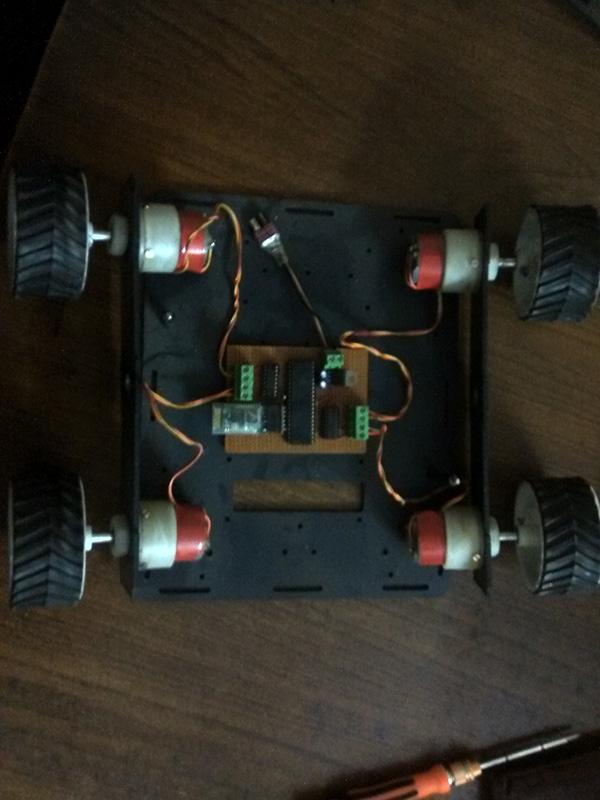
The assembling of the car section is shown below:

Prototype of AVR ATMega based Gesture Controlled Robotic Car
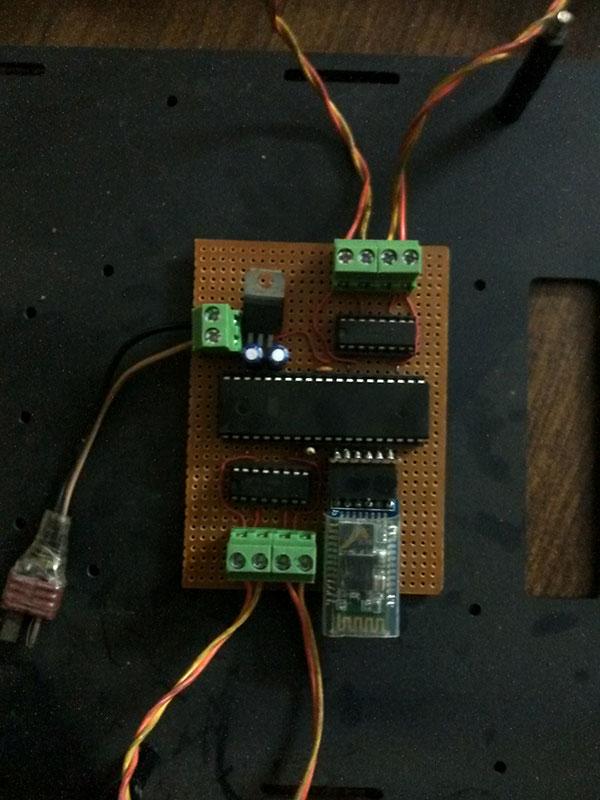
Fig. 1: Prototype of AVR ATMega based Gesture Controlled Robotic Car

Image of AVR ATMega16 based Control Circuitry on Gesture Controlled Robotic Car

Fig. 2: Image of AVR ATMega16 based Control Circuitry on Gesture Controlled Robotic Car
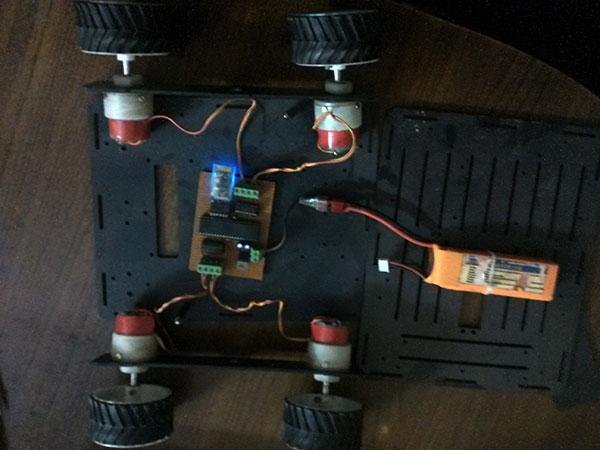
Image showing battery placement on AVR ATMega16 based Gesture Controlled Robotic Car

Fig. 3: Image showing battery placement on AVR ATMega16 based Gesture Controlled Robotic Car
Now talking about the mobile part nowadays every mobile has an accelerometer sensor; I have used this sensor to give me the orientation vales for further processing. I have made an ANDROID APP which extracts this data and sends it over to the Bluetooth module present in the CAR section. This data is then processed in my AtMega 16 IC to tell L293D IC what to do to the motors connected to it. Like if I get “W”, this tells the microcontroller to move the car forward similarly “S”, “A”, ”D” and “ ” make the car move in backward, left, right and stop positions.
The most interesting thing about this section is that we first need to calibrate the phone’s accelerometer data into our microcontroller IC so that perfect results are obtained each time this car is turned on.
I have made this ANDROID APP using freeware software known as APP INVENTOR 2. This has been developed by the students of MIT for those who find it difficult to learn android programming. They make use of simple block arrangements to perform any android based task.

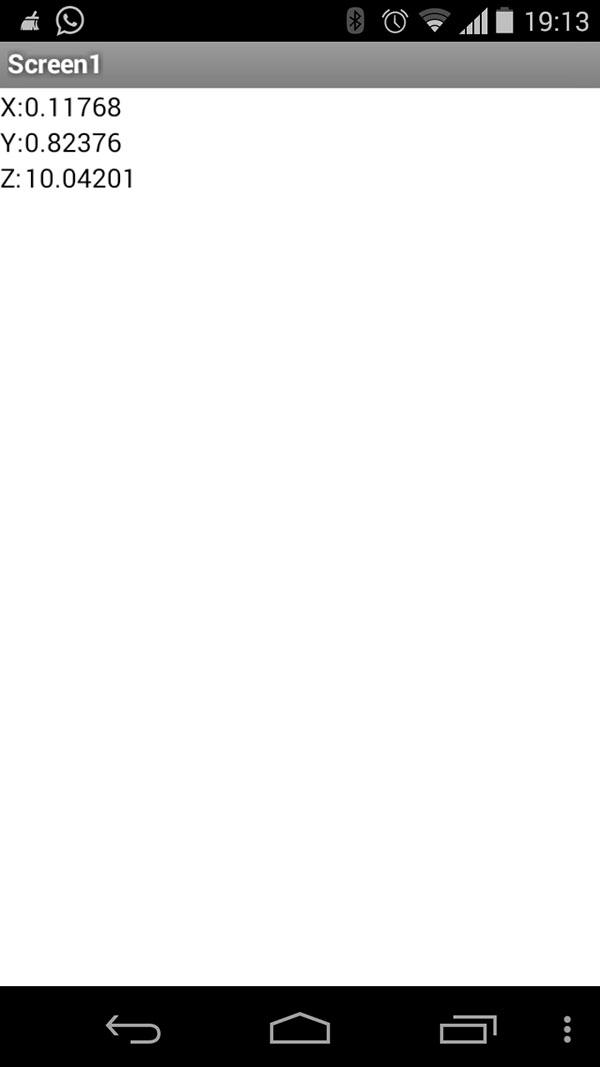
Screenshot of Android App displaying Accelerometer Orientation

Fig. 4: Screenshot of Android App displaying Accelerometer Orientation

Here’s a look of my ANDROID APP. It gives me the data for 3  axes: X, Y and Z.

This data,  received via Bluetooth is then analysed in the microcontroller. This project is interesting because it involves electronics as well as android stuff.
In the coding part I have made use of the header file : <uart.h> to deal with UART functions. UART=Universal Asynchronous Receiver Transmitter. In this header file getchar_uart() function feeds microcontroller with the Bluetooth received data.

Project Source Code

###


#include

#include

void stop()

{

PORTC=0;

}

void left()

{

PORTC|=(1<<0)|(1<<3);

PORTC&=~(1<<1)&~(1<<2);

}

void right()

{

PORTC|=(1<<1)|(1<<2);

PORTC&=~(1<<0)&~(1<<3);

}


void forward()

{

PORTC|=(1<<0)|(1<<2);

PORTC&=~(1<<1)&~(1<<3);

}

void back()

{

PORTC|=(1<<1)|(1<<3);

PORTC&=~(1<<0)&~(1<<2);

}

char c=0;

void main()

{

      enable_uart(9600);

      DDRC=0x0f;             

      PORTC=0;

      while(1)

      {

            c=getchar_uart();

if(c=='w')

                  forward();

            else if(c=='s')

                  back();

            else if(c=='a')

                  left();

            else if(c=='d')

                  right();

            else if(c==' ')

                  stop();

      }

}

###


Circuit Diagrams
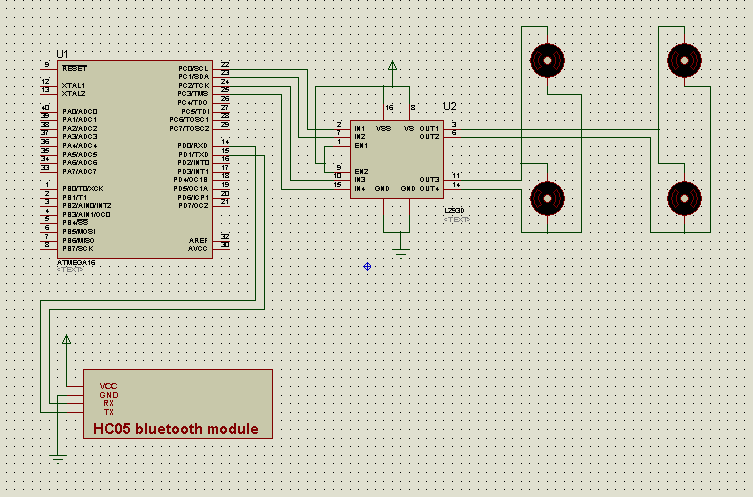
Circuit-Diagram-AVR-ATMega16-Based-Gesture-Controlled-Robotic-Car

Project Video


Filed Under: Electronic Projects
Tagged With: avr
 

Next Article

← Previous Article
Next Article →

Questions related to this article?
👉Ask and discuss on Electro-Tech-Online.com and EDAboard.com forums.


Tell Us What You Think!! Cancel reply

You must be logged in to post a comment.

EE TECH TOOLBOX

“ee
Tech Toolbox: Internet of Things
Explore practical strategies for minimizing attack surfaces, managing memory efficiently, and securing firmware. Download now to ensure your IoT implementations remain secure, efficient, and future-ready.

EE Learning Center

EE Learning Center
“engineers
EXPAND YOUR KNOWLEDGE AND STAY CONNECTED
Get the latest info on technologies, tools and strategies for EE professionals.

HAVE A QUESTION?

Have a technical question about an article or other engineering questions? Check out our engineering forums EDABoard.com and Electro-Tech-Online.com where you can get those questions asked and answered by your peers!


RSS EDABOARD.com Discussions

  • Voltage mode pushpull is a nonsense SMPS?
  • Input impedance matching network
  • High Side current sensing
  • The comparison of different Tcl script checkers
  • Reducing "shoot-through" in offline Full Bridge SMPS?

RSS Electro-Tech-Online.com Discussions

  • Is AI making embedded software developers more productive?
  • Back to the old BASIC days
  • Parts required for a personal project
  • PIC KIT 3 not able to program dsPIC
  • Failure of polypropylene motor-run capacitors

Featured – RPi Python Programming (27 Part)

  • RPi Python Programming 21: The SIM900A AT commands
  • RPi Python Programming 22: Calls & SMS using a SIM900A GSM-GPRS modem
  • RPi Python Programming 23: Interfacing a NEO-6MV2 GPS module with Raspberry Pi
  • RPi Python Programming 24: I2C explained
  • RPi Python Programming 25 – Synchronous serial communication in Raspberry Pi using I2C protocol
  • RPi Python Programming 26 – Interfacing ADXL345 accelerometer sensor with Raspberry Pi

Recent Articles

  • What is AWS IoT Core and when should you use it?
  • AC-DC power supply extends voltage range to 800 V DC
  • Infineon’s inductive sensor integrates coil system driver, signal conditioning circuits and DSP
  • Arm Cortex-M23 MCU delivers 87.5 µA/MHz active mode
  • STMicroelectronics releases automotive amplifiers with in-play open-load detection

EE ENGINEERING TRAINING DAYS

engineering

Submit a Guest Post

submit a guest post
Engineers Garage
  • Analog IC TIps
  • Connector Tips
  • Battery Power Tips
  • DesignFast
  • EDABoard Forums
  • EE World Online
  • Electro-Tech-Online Forums
  • EV Engineering
  • Microcontroller Tips
  • Power Electronic Tips
  • Sensor Tips
  • Test and Measurement Tips
  • 5G Technology World
  • Subscribe to our newsletter
  • About Us
  • Contact Us
  • Advertise

Copyright © 2025 WTWH Media LLC. All Rights Reserved. The material on this site may not be reproduced, distributed, transmitted, cached or otherwise used, except with the prior written permission of WTWH Media
Privacy Policy

Search Engineers Garage

  • Electronic Projects & Tutorials
    • Electronic Projects
      • Arduino Projects
      • AVR
      • Raspberry pi
      • ESP8266
      • BeagleBone
      • 8051 Microcontroller
      • ARM
      • PIC Microcontroller
      • STM32
    • Tutorials
      • Audio Electronics
      • Battery Management
      • Brainwave
      • Electric Vehicles
      • EMI/EMC/RFI
      • Hardware Filters
      • IoT tutorials
      • Power Tutorials
      • Python
      • Sensors
      • USB
      • VHDL
    • Circuit Design
    • Project Videos
    • Components
  • Articles
    • Tech Articles
    • Insight
    • Invention Stories
    • How to
    • What Is
  • News
    • Electronic Product News
    • Business News
    • Company/Start-up News
    • DIY Reviews
    • Guest Post
  • Forums
    • EDABoard.com
    • Electro-Tech-Online
    • EG Forum Archive
  • DigiKey Store
    • Cables, Wires
    • Connectors, Interconnect
    • Discrete
    • Electromechanical
    • Embedded Computers
    • Enclosures, Hardware, Office
    • Integrated Circuits (ICs)
    • Isolators
    • LED/Optoelectronics
    • Passive
    • Power, Circuit Protection
    • Programmers
    • RF, Wireless
    • Semiconductors
    • Sensors, Transducers
    • Test Products
    • Tools
  • Learn
    • eBooks/Tech Tips
    • Design Guides
    • Learning Center
    • Tech Toolboxes
    • Webinars & Digital Events
  • Resources
    • Digital Issues
    • EE Training Days
    • LEAP Awards
    • Podcasts
    • Webinars / Digital Events
    • White Papers
    • Engineering Diversity & Inclusion
    • DesignFast
  • Guest Post Guidelines
  • Advertise
  • Subscribe