All the micro controllers have built in timer-counter. Timer means counting internal clock pulses and counter means counting external pulses. It can be used to generate time delay or PWM or counting. AVR micro controllers ATMega16 and ATMega32 have also three timer-counters. They have one 16 bit (T1) and two 8 bit (T0 and T2) timer-counters. Today we will learn how to use these T0/T1/T2 as counter – means how it can count external pulses or any other event. This article explains how to use T0 as counter. It counts frequency of external pulses connected to T0 pin (1).
To use T0 as counter first it must be configured to count external pulses. This is done by setting CS0 – CS2 (clock select) bits in TCCR0 register. Here is the TCCR0 (timer counter control register) register of ATMega16.

Fig. 1: Bit Values of Timer Counter Control Register (TCCR) in AVR ATMega 16
TCCR0 is 8 bit register and its all 8 bits are used for different purpose like wave form generation, PWM generation, timer operation, counter operation etc. Here I will explain only last three bits because they will configure T0 as timer or counter. These last 3 bits are clock select bits. They will select clock source either internal or external as per following table.
|
CS2 |
CS1 |
CS0 |
Clock |
|
0 |
0 |
0 |
Timer stop |
|
0 |
0 |
1 |
FCPU – crystal frequency |
|
0 |
1 |
0 |
FCPU/8 |
|
0 |
1 |
1 |
FCPU/64 |
|
1 |
0 |
0 |
FCPU/256 |
|
1 |
0 |
1 |
FCPU/1024 |
|
1 |
1 |
0 |
External clock on T0 pin. Clock on falling edge |
|
1 |
1 |
1 |
External clock on T0 pin. Clock on rising edge |
So to set T0 to count external clock we have to set CS2-CS0 bits as 110 or 111. We will set it 110. So TCCR0 setting will be 0000 0110 = 06h. The T0 pin (1) is externally pulled high using pull up reregister and when high to low transition occurs the count increments in TCNT0 register. The count can be displayed on LCD or seven segment.
Now let us see how this 8 bit counter can be used as frequency counter. It counts frequency of external pulses and displays it on LCD
Circuit description:
External pulses are given as input to T0 pin (1) as shown. the data pins of LCD D0-D7 are connected to PORTA. Two control pins RS and En are connected to PORTB pins PB6 and PB7 respectively. RW pin is connected to ground to make always write enable. A pot is connected to VEE pin of LCD to control its brightness. Reset pin is pulled high using resistor R1 and a push button is connected with it for manual reset. A 8 MHz crystal is connected between crystal terminals along with two capacitors to provide basic clock to micro controller.
Circuit operation:
· Initially the count in TCNT0 is cleared to 0
· Then the counter starts and external pulses are counted exactly for 1 sec
· External pulses can be applied from function generator. Here for this experiment I have applied pulses from astable multivibrator build using IC NE555
· After 1 sec counter is stopped
· The count in TCNT0 is frequency of pulses because its pulses/sec
· It is in HEX. So it is converted into decimal and displayed on LCD
· After delay of 1 sec the count in TCNT0 is cleared and counter starts for 1 sec to count external pulses and the same above process repeats
The circuit is tested on AVR development board with external LCD. Astable multivibrator circuit is build on bread board. The pot is used to vary the frequency. For testing purpose the multivibrator frequency is limited to 250 Hz. It varies from 45 Hz to 254 Hz. Here is the snap of running project
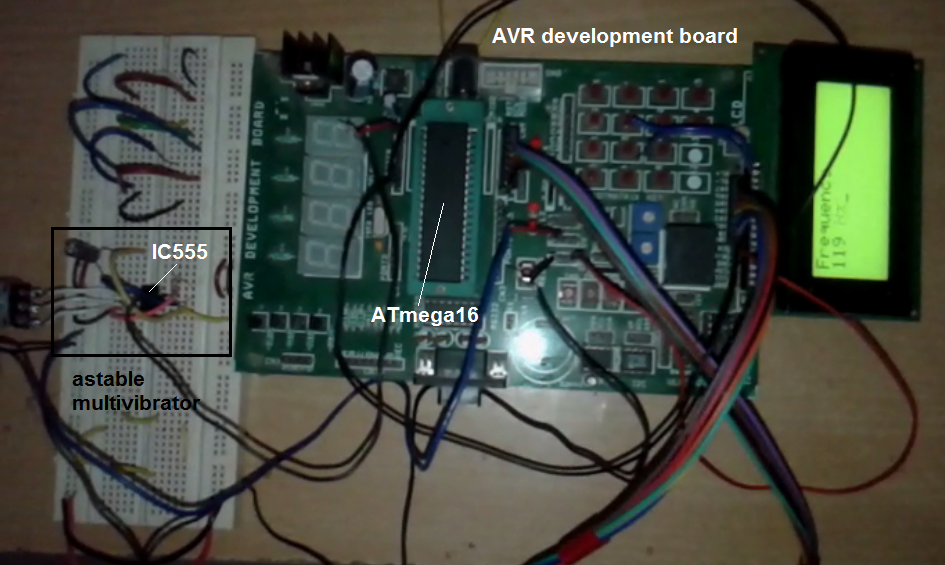
Fig. 3: Image showing ATMega16 Timer Circuit with AVR Development Board and LCD
Project Source Code
###
Software program:
The program is written in C language. It is compiled using AVR studio software. The complete program is a combination of different functions.
main() function configures T0 as counter, PORTA and PORTB as output ports and starts counting process.
Rest all the functions are for LCD handling.
lcd_senddata() function sends data to LCD that is to be displayed
lcd_sendcmd() function sends command to LCD that is to configure LCD
lcd_printstr() function prints message or string on LCD
lcd_disp_num() function displays 3 digit number on LCD. It separates all digits of number and convert them in to ASCII
disp_count() function converts HEX value in TCNT0 into decimal
# include <avr/io.h>
#include <util/delay.h>
#include <string.h>
#define lcd_databus PORTA // PORTA is LCD data bus
#define lcd_cntr_port PORTB // PORTB is LCD control port
#define rs PB6
#define en PB7
void lcd_senddata(unsigned char data)
{
_delay_ms(2); // wait till LCD is busy
lcd_cntr_port=(1<<rs); // for data make rs=1
lcd_databus=data; // send data
lcd_cntr_port=(1<<rs)|(1<<en); // apply strobe to en pin
lcd_cntr_port =(1<<rs)|(0<<en);
}
/////////////////// function to send command to LCD /////////////////////
void lcd_sendcmd(unsigned char cmd)
{
_delay_ms(2); // wait till LCD is busy
lcd_cntr_port = (0<<rs); // for command make rs=0
lcd_databus=cmd; // send command
lcd_cntr_port = (1<<en); // apply strobe to en pin
lcd_cntr_port = (0<<en);
}
////////////////////// function to print string on LCD ////////////////
void lcd_printstr(char *s)
{
unsigned int l,i;
l = strlen(s); // get the length of string
for(i=0;i<l;i++)
{
lcd_senddata(*s); // write every char one by one
s++;
}
}
/////////////////// function to print integer value on LCD ///////////////
void lcd_disp_num(unsigned int value)
{
unsigned char ascii_value[3];
unsigned int tmp,t;
if(value>=100) // if value is of 3 digits
{
tmp = value%10; // do same
ascii_value[2] = tmp+0x30;
value = value/10;
tmp = value%10;
ascii_value[1] = tmp+0x30;
value = value/10;
ascii_value[0] = value+0x30;
}
else if (value>=10)
{
tmp = value%10; // else if value is of 2 digits
ascii_value[1] = tmp+0x30;
value = value/10;
ascii_value[0] = value+0x30;
ascii_value[2] = 0x20; // last digit space
}
else if(value<10)
{
ascii_value[0] = value+0x30;
ascii_value[2] = 0x20; // last two digits are space
ascii_value[1] = 0x20;
}
lcd_sendcmd(0xC0);
for(t=0;t<3;t++) lcd_senddata(ascii_value[t]); // print value
lcd_printstr(" Hz");
}
////////////////// function to initialize LCD //////////////////////
void lcd_init()
{
lcd_sendcmd(0x3C); // 8 bit/char, 5x11 dots/char
lcd_sendcmd(0x0E); // screen ON cursor ON
lcd_sendcmd(0x01); // clear LCD home cursor
lcd_printstr("Frequency");// display string
}
//////////////////// function to display count ////////////////////////
void display_count()
{
unsigned char byt,byt1;
unsigned int value;
byt = TCNT0 & 0x0F; // get lower nibble of count
byt1 = TCNT0 & 0xF0;
byt1 = byt1>>4; // get higher nibble of count
value = byt1*16+byt; // convert it into decimal
lcd_disp_num(value); // display it
}
////////////////////////////// main function ////////////////////////////
int main()
{
DDRA = 0xFF; // POARTA and PORTB pins as output
DDRB = 0xC0;
PORTA = 0x00;
PORTB = 0x01;
lcd_init(); // initialize LCD
while(1) // repeat process in continuous loop
{
TCNT0 = 0x00; // clear count
TCCR0 = 0x06; // start counter
_delay_ms(1000); // delay for 1 sec
TCCR0 = 0x00; // stop counter
display_count(); // display frequency count
_delay_ms(1000); // wait for 1 sec
}
}
###
Circuit Diagrams

Project Video
Filed Under: Electronic Projects
Filed Under: Electronic Projects
Questions related to this article?
👉Ask and discuss on EDAboard.com and Electro-Tech-Online.com forums.
Tell Us What You Think!!
You must be logged in to post a comment.