Many IoT applications are controlled with the help of a webpage or an HTML website running within a Local Area Network (LAN) or Wireless Local Area Network (WLAN). Some examples of such IoT applications include home automation, office automation, and smart farming. The HTML webpage or website controlling the things is hosted on a microcomputer or microcontroller. The WiFi development boards like ESP8266 and ESP32 provide a WiFi networking interface where the board can act as both a WiFi station or WiFi access point. Check out how to connect ESP8266/ESP32 to a WiFi connection using MicroPython network module. Whether configured as a WiFi station or WiFi access point, MicroPython ports, including ESP8266 and ESP32 can host HTML webpages using the MicroPython socket module. You can check out how to configure ESP8266/ESP32 or other MicroPython ports as TCP server and TCP clients. As a TCP server, ESP8266/ESP32/any MicroPython port can host a webpage.
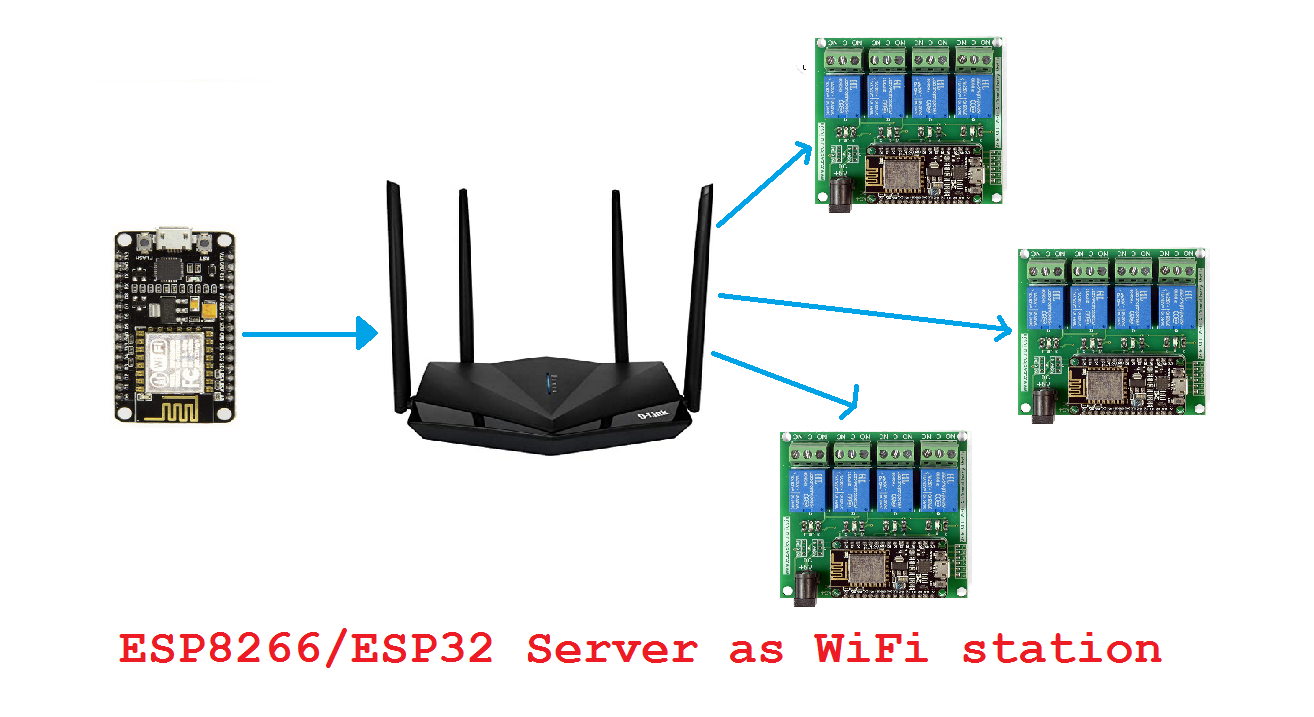
As a TCP server, we connected ESP8266/ESP32 to a WiFi modem/router where other devices could access the webpage hosted by ESP8266/ESP32 via the internet. The devices could receive commands or sensor data from the ESP8266/ESP32 hosting server all through the internet. In this case, the host web application for home automation or any IoT project is routed by the modem/router between the ESP8266/ESP32 server and the other nodes of the IoT network.
For an IoT application in which all the nodes of the IoT network are deployed locally or are within the range of LAN or WLAN, this network configuration can lead to an avoidable failure. In case the modem/router gets faulty, or the internet connection from your internet service provider (ISP) is suspended due to some fault, the complete IoT application will shut down because the IoT devices could not communicate with each other in the absence or failure of internet connection.
However, we can avoid such failure by making the ESP8266/ESP32 or other MicroPython port as an independent WiFi access point hosting the web application, so that various nodes could access the IoT application directly with the hosting server( i.e. ESP8266/ESP32, instead of accessing the IoT application via the internet).
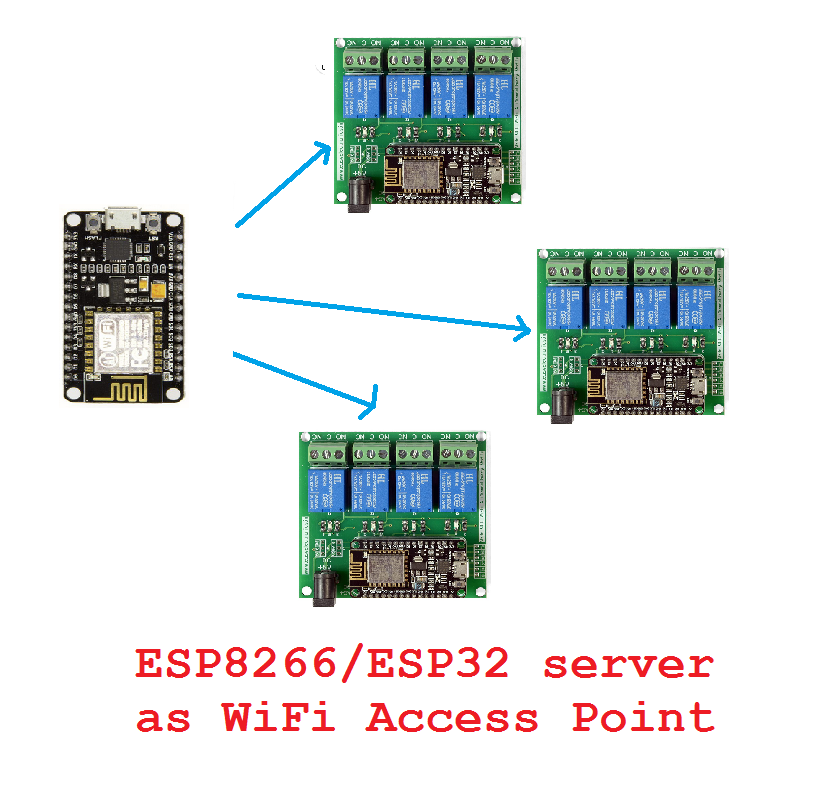 In this project, we will demonstrate how to configure ESP8266/ESP32 or any MicroPython port as a WiFi access point and host a webpage directly from the access point.
Components required
- ESP8266/ESP32 x1
- ESP8266/ESP32 USB cable x1
- Computer/Laptop (for programming ESP) x1
- Smartphone (to access web application) x1
Circuit connections
You do not need to make any circuit connections. You only need to have a MicroPython software development tool like uPyCraft IDE or Thonny IDE ready and upload MicroPython firmware to ESP8266/ESP32. Finally, you need to upload MicroPython script for this project to ESP8266/ESP32. The script itself will handle both making ESP8266/ESP32 as a WiFi access point and hosting an HTML webpage. Once the script is loaded, the board can be secured in a case and deployed within an IoT application intended to run within WLAN.
Getting ESP8266/ESP32 ready
Before continuing, you must have a MicroPython IDE ready to write, edit and upload codes. You may use uPyCraft IDE or Thonny IDE for software development. With the help of the respective IDE, you must have uploaded the MicroPython firmware to ESP8266 or ESP32. Check out how to get uPyCraft IDE ready and upload MicroPython firmware to ESP8266/ESP32.
MicroPython script
How project works
With the help of a network module, the ESP8266/ESP32 is configured as a WiFi access point instead of a WiFi station. When ESP8266/ESP32 is configured as a WiFi access point, the board can be directly accessed by the other IoT nodes using a WiFi networking interface instead of accessing the board via the internet.
A sample HTML page is designed within the MicroPython script. The HTML page is stored as a string enclosed in double quotations. Since double-quoted strings in both standard Python and MicroPython are immutable, we can host static webpage using such MicroPython structures. Then, the only way we can make an HTML page interact with the hosting server is using HTML form elements like buttons.
Finally, the ESP8266/ESP32 access point is configured as a TCP server using sockets that delivers the webpage whenever the local IP address of ESP8266/ESP32 is requested using an HTTP header by a device connected ESP8266/ESP32 access point.
The code
The MicroPython script begins with importing the socket module in the event the socket module is not found. Next, the network module is imported for configuring the WiFi interface on ESP8266/ESP32. The esp module is imported, and debug is set to none using esp.osdebug() method. The gc module is imported, and garbage collection is explicitly enabled using gc.collect() method.
The variables SSID and password are defined to store the SSID and Network key of the ESP8266/ESP32 server. An object of WiFi networking interface ap_if is instantiated using the network.WLAN() method, which is configured to the WiFi access point. The networking interface is activated by calling active() method and configured to create the SSID and password using config() method. Now, any device can connect to the ESP8266/ESP32 access point with the given SSID and network key. You can choose any SSID and network key of your choice. The SSID and network key are assigned ‘MicroPython-AP’ and ‘eeworldonline’, respectively, in this project. Note that both SSID and password are assigned mutable strings. The SSID will show as a WiFi connection in the WiFi tab of computers and smartphones. The embedded devices can connect to the ESP8266/ESP32 access point by explicitly programming them to connect with the given SSID and password.
The script is made to pass until the WiFi access point is activated. Once the access point is activated, a message ‘connection successful’ is printed to the console. Immediately next, the network parameters of the access point are printed to the console using ifconfig() method.
The function web_page() is defined to deliver the HTML page hosted by the ESP8266/ESP32. In this function, the HTML code of the webpage is stored as an immutable string in a variable HTML. A socket object is instantiated with the socket.socket() method to use IPv4 internet protocol and TCP network at the networking layer of TCP/IP stack. The socket is bound to localhost and port number 80 using socket.bind() method. The socket is activated to listen for incoming TCP connections using the socket.listen() method.
In an infinite while() loop, the socket is made to accept connections from devices connected to the access point using the socket.accept() method. As the ESP8266/ESP32 server accepts a connection, the IP address of the connecting device is printed to the console. The HTTP GET request received from the accepted connection is stored in a variable request. The received HTTP request from the accepted connection is also printed to the console. The webpage returned by the function web_page() is stored in a variable response and sent to the requesting connection using send() method. The connection is closed using the close() method. The loop continues infinitely, looking for new devices requesting a connection with ESP8266/ESP32 TCP server and delivering the webpage as the localhost the connected device requests IP address.
Result
Upload and run the MicroPython code as a main.py file to ESP8266/ESP32. On running the ESP8266/ESP32 access point, It is displayed as one of the available WiFi connections on a smartphone or computer, as shown in the image below.
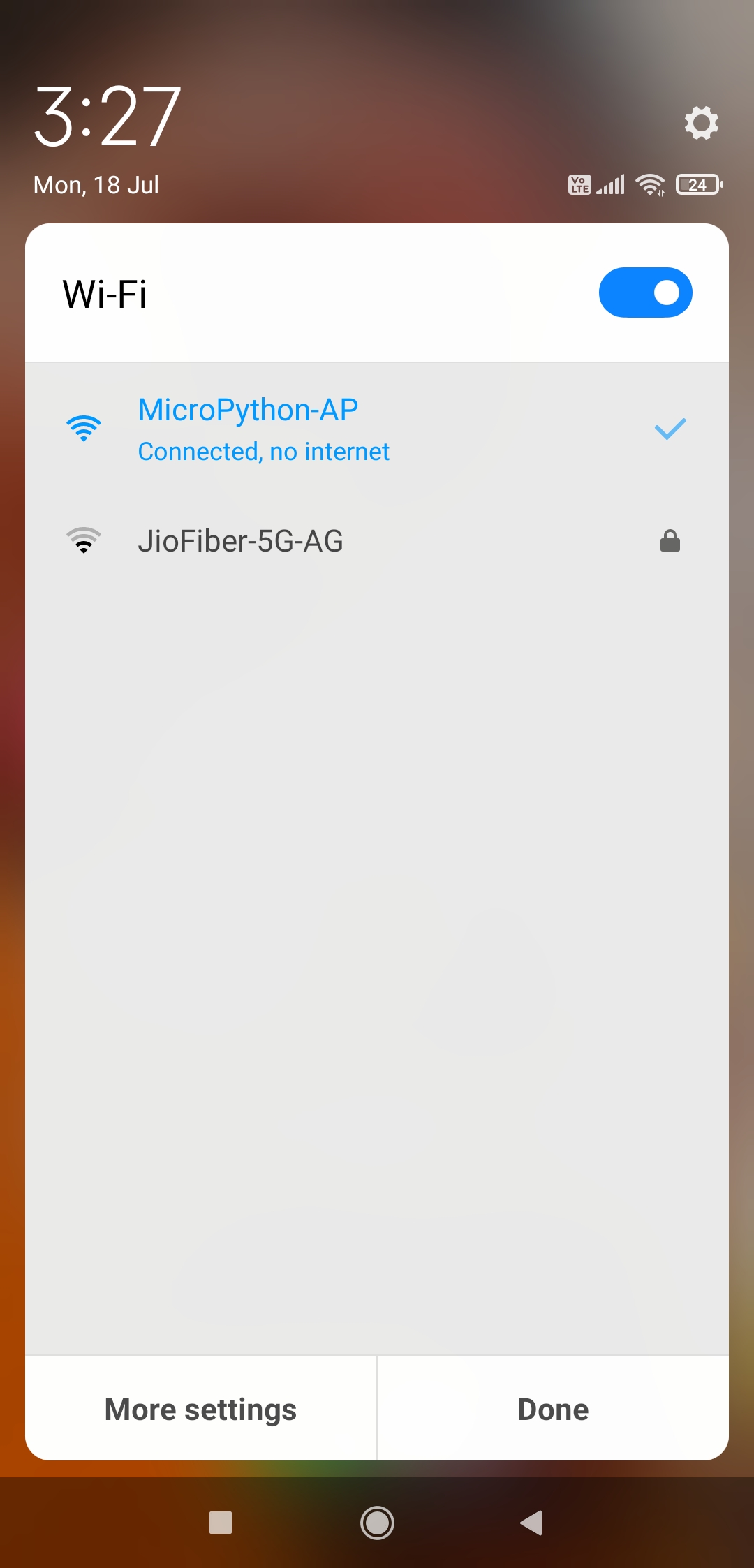
Connect the access point by entering the network key defined in the MicroPython code. The ESP8266/ESP32 server has printed the localhost IP address to the console, as shown in the image below.
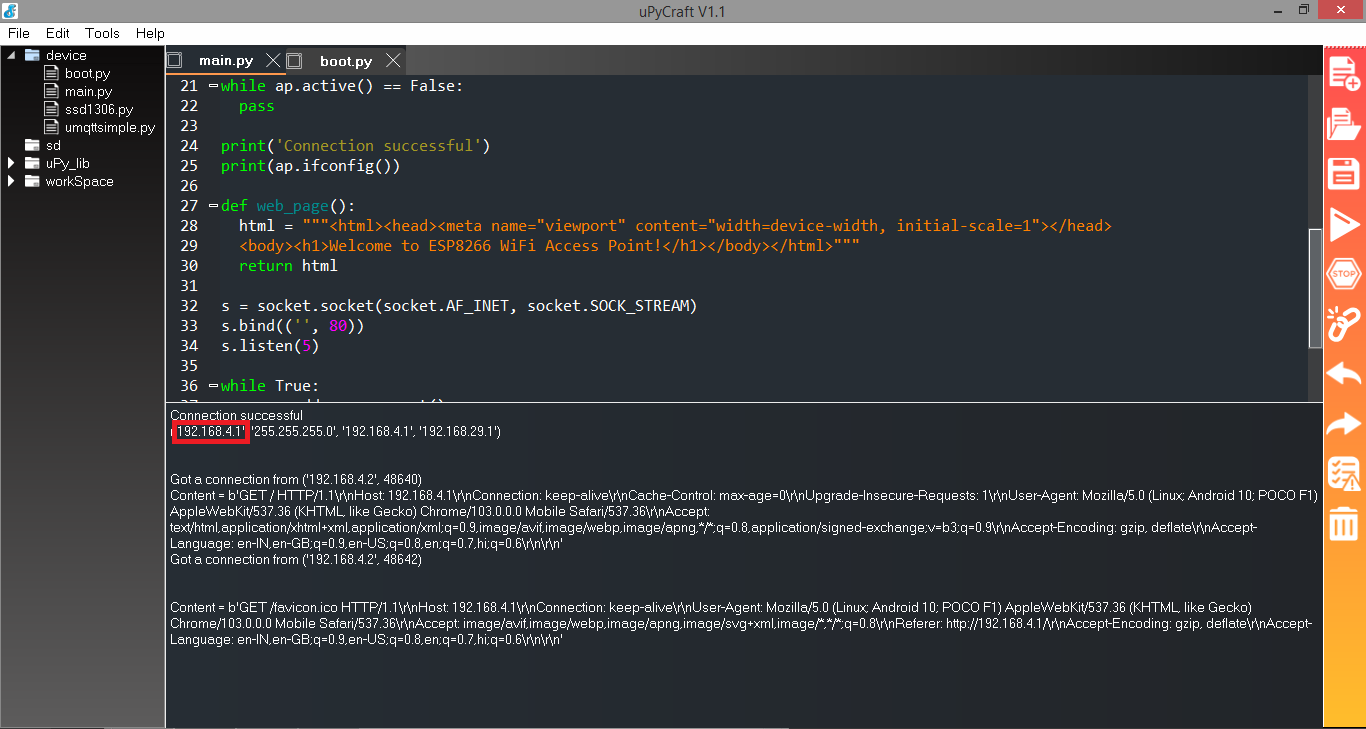
To open the webpage hosted by the ESP8266/ESP32 TCP server, open a web browser and write the IP address of ESP32/ESP8266 in the address bar, and press Enter. This will send a request from the web client (browser) on the smartphone or computer to the ESP8266/ESP32 server, as shown in the image below.

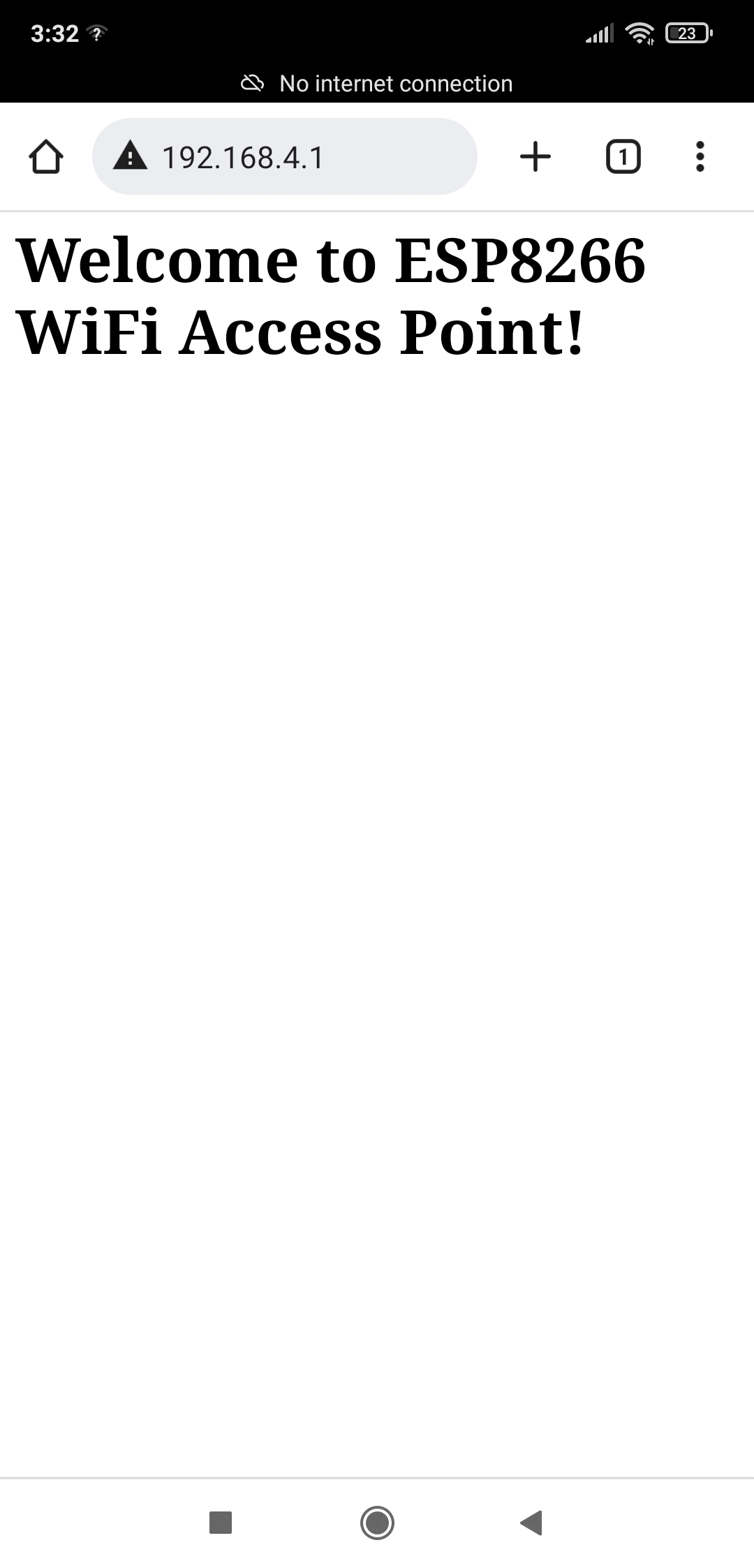
In response to the request, ESP8266/ESP32 sends the webpage to the web client (browser) of the smartphone/computer, which will be loaded as following.
Note that a WiFi access point on ESP8266/ESP32 using MicroPython cannot operate as a WiFi repeater. MicroPython does not support NAT or IP routing.
You may also like:

Filed Under: ARM, Electronic Projects, ESP8266, Python, Tech Articles, Tutorials
Questions related to this article?
👉Ask and discuss on EDAboard.com and Electro-Tech-Online.com forums.
Tell Us What You Think!!
You must be logged in to post a comment.