This tutorial is about reading and writing to whole gpio port of stm32 microcontrollers. While working with stm32f103 microcontroller using stm32cubemx codeconfigurator ide and ARM keil uvision-5 ide with HAL libraries I noticed that the examples provided in the HAL libraries did not contain any example which explains how to access individual ports of stm32 microcontrollers? I googled to find out any online tutorial on accessing the stm32 ports directly but ended up with no resourceful guide. So i decided to write this tutorial for the newbies and fill up the gap of writing and reading the individual ports of stm32 microcontrollers using HAL libraries.
I was interfacing 16×2 character lcd with stm32f103 microcontroller. 16×2 lcd can be interfaced with any microcontroller in 8 and 4 bit mode. The libraries that i was able to find for stm32 to interface 16×2 lcd with it can be found at https://stm32f4-discovery.net/2014/06/library-16-interfacing-hd44780-lcd-controller-with-stm32f4/ . The library works but it depends on many other custom libraries that are written by author himself. One thing which is disturbing in the library is, to write 4 bit data author is manipulating individual port pins of stm32 microcontroller one by one. 4-bit data or 8-bit can easily be written in just single iteration if using ports.
I was interfacing 16×2 character lcd with stm32f103 microcontroller. 16×2 lcd can be interfaced with any microcontroller in 8 and 4 bit mode. The libraries that i was able to find for stm32 to interface 16×2 lcd with it can be found at https://stm32f4-discovery.net/2014/06/library-16-interfacing-hd44780-lcd-controller-with-stm32f4/ . The library works but it depends on many other custom libraries that are written by author himself. One thing which is disturbing in the library is, to write 4 bit data author is manipulating individual port pins of stm32 microcontroller one by one. 4-bit data or 8-bit can easily be written in just single iteration if using ports.
How to access individual stm32 ports and write to them?
I could not find any official stm32 document that explains the registers associated with stm32 microcontrollers. Some tutorials are present on internet that explains some registers but not all the stm32 registers. These tutorials were made with SPL(Standard peripheral libraries) that are no more recommended by the stmicroelectronics. So i think that previously stm has released some information about the registers associated with the stm32 microcontrollers, but with the release of stm32cubemx code configurator they hide the registers part.
ODR(Output Data Register)
ODR is output data register of stm32 microcontrollers. It is a 16 bit register and it can be read and write to. Each stm32 microcontroller port has its own ODR register. So if your microcontroller has three ports A,B and C then it must has three ODR registers associated with each port. Each bit of ODR register represents the individual port bits.
ODR regsiter can be accessed with the statement. In example port-c of stm32 microcntroller is accessed.
ODR is output data register of stm32 microcontrollers. It is a 16 bit register and it can be read and write to. Each stm32 microcontroller port has its own ODR register. So if your microcontroller has three ports A,B and C then it must has three ODR registers associated with each port. Each bit of ODR register represents the individual port bits.
ODR regsiter can be accessed with the statement. In example port-c of stm32 microcntroller is accessed.
GPIOC->ODR
To write to the port the statement is simple. We can write data in hex form and in binary form. The examples are below.
GPIOC->ODR = 0xF0FE
GPIOC->ODR = 0b1111000011111110
We can also write to the individual pins with ODR but that is not useful if we are using HAL libraries. Since HAL has predefined statements that can easily read and write to individual pins. Such as
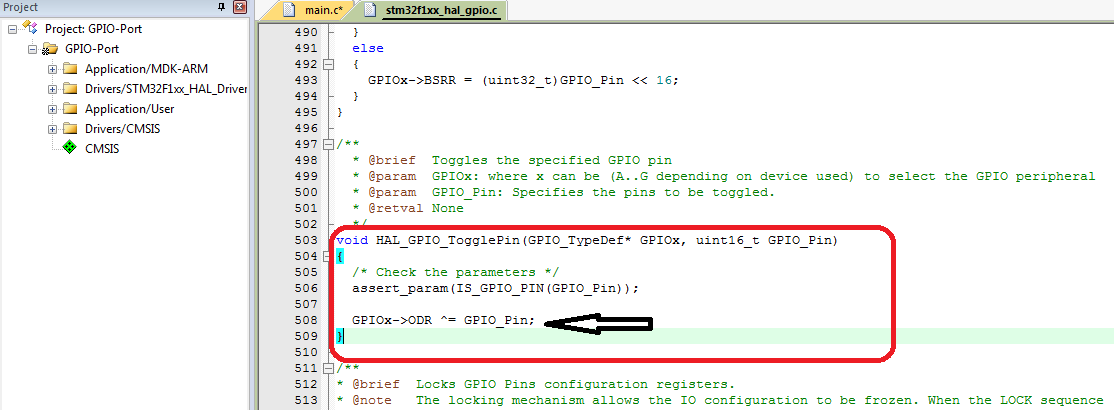
HAL_GPIO_TogglePin(Led_GPIO_Port,Led_Pin);
Let us look at the definition of the upper function in the HAL libraries. The definition is present in the stm32f1xx_hal_gpio.c function. In the definition, to write to pin and toggle the pin ODR register is accessed.
A simple stm32 gpio port accessing(reading writing) project
Stm32 accessing ports directly
|
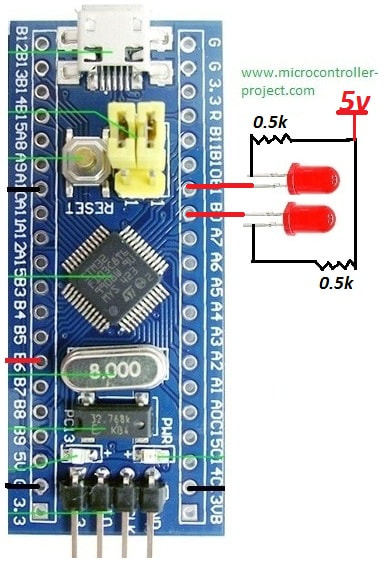
Lets now do a practical. I am going to access the stm32f103 port-b and write to its pins 0 and 1 using ODR register. At the output i connected 2 leds so the output binary pattern can easily be recognized. Since 2 pins are used so the binary pattern will be 00, 01,10 and 11.
If you don;t know how to initialize the stm32 gpio pins and ports here is a simple tutorial on initialing the stm32f103 microcontroller pins using stm32cubemx and generating code for keil arm ide.
After initializing the pins using stm32cubemx and generating code for keil arm. Its time to add the user code. The code will be like this.
|
GPIOB->ODR = 0x0001; //Write to port-b
HAL_Delay(1000); //Delay 1second
GPIOB->ODR = 0x0002; //Write to port-b
HAL_Delay(1000); //Delay 1second
GPIOB->ODR = 0x0003; //Write to port-b
HAL_Delay(1000); //Delay 1second
GPIOB->ODR = 0x0000; //Write to port-b
HAL_Delay(1000); //Delay 1second
GPIOB->ODR = 0x0001; means (0b0000000000000001) pin#0 is high; 0x0002 means pin#1 is high; 0x0003 means pin#0 and 1 are high.
Download the project code and please give us your feed back on the tutorial. Project video is on the right hand side.
Watch the project video here
Filed Under: Microcontroller Projects, STM32
Questions related to this article?
👉Ask and discuss on Electro-Tech-Online.com and EDAboard.com forums.
Tell Us What You Think!!
You must be logged in to post a comment.