Engineers Garage

  • Electronic Projects & Tutorials
    • Electronic Projects
      • Arduino Projects
      • AVR
      • Raspberry pi
      • ESP8266
      • BeagleBone
      • 8051 Microcontroller
      • ARM
      • PIC Microcontroller
      • STM32
    • Tutorials
      • Audio Electronics
      • Battery Management
      • Brainwave
      • Electric Vehicles
      • EMI/EMC/RFI
      • Hardware Filters
      • IoT tutorials
      • Power Tutorials
      • Python
      • Sensors
      • USB
      • VHDL
    • Circuit Design
    • Project Videos
    • Components
  • Articles
    • Tech Articles
    • Insight
    • Invention Stories
    • How to
    • What Is
  • News
    • Electronic Product News
    • Business News
    • Company/Start-up News
    • DIY Reviews
    • Guest Post
  • Forums
    • EDABoard.com
    • Electro-Tech-Online
    • EG Forum Archive
  • DigiKey Store
    • Cables, Wires
    • Connectors, Interconnect
    • Discrete
    • Electromechanical
    • Embedded Computers
    • Enclosures, Hardware, Office
    • Integrated Circuits (ICs)
    • Isolators
    • LED/Optoelectronics
    • Passive
    • Power, Circuit Protection
    • Programmers
    • RF, Wireless
    • Semiconductors
    • Sensors, Transducers
    • Test Products
    • Tools
  • Learn
    • eBooks/Tech Tips
    • Design Guides
    • Learning Center
    • Tech Toolboxes
    • Webinars & Digital Events
  • Resources
    • Digital Issues
    • EE Training Days
    • LEAP Awards
    • Podcasts
    • Webinars / Digital Events
    • White Papers
    • Engineering Diversity & Inclusion
    • DesignFast
  • Guest Post Guidelines
  • Advertise
  • Subscribe

Interfacing a Piezo Buzzer with Stm32 Microcontroller

By EG Projects June 6, 2019

In this tutorial i am going to teach you how to interface a piezo buzzer with 32-bit stm32 microcontroller? It seems to be an easy project but proper circuit configuration and electrical concepts are critical to become a successful embedded hardware engineer. I will elaborate each component used in the project and why it is part of the circuit? Also i will explain about stm32 microcontroller software code flow. 

Stm32 Buzzer Alarm – Project functionality

The functionality of the project is simple. One push button and a piezo buzzer is part of the project. When ever a user presses the push button buzzer sound will propagate or buzzer starts ringing. Its seems to be simple logic but implementing it is little hard especially for the newbies.

Stm32 Buzzer Project main skill development

Power requirements, use of transistor and pull up/pull down resistors plays a vital role in implementing the correct logic. What i want to deliver through this project is what i wrote in the previous sentence.

Piezo Buzzer with Stm32 microcontroller – Main Project

Stm32f103c8t6 microcontroller is used in the tutorial. I used a pre-assembled cheap stm32f103c8t6 microcontroller development board in this tutorial. Pre-fabricated development boards are a great resource for development and testing the hardware in a short amount of time.  I always prefer to use them in tutorials.

I write a getting started with stm32f103c8t6 development board tutorial and you can find it by clicking the below button. Button will lead you to a tutorial which explains about the board and how to configure and program it using stm32cubemx software utility.

Getting started with Stm32c8t6 and Stm32cubemx

The above tutorial is very important you can easily understand the project code below if you take the tutorial. The important step covered in the above tutorial which is not explained in this tutorial is

  • How to configure the GPIO pins of stm32 microcontroller in stm32cubemx code configurator and how to import the code in keil uvison arm ide.

Stm32 Piezo Buzzer – Project Circuit

 Push button is connected to microcontroller Port-A pin#10. Buzzer alarm is controller through microcontroller Port-C pin#13. 

Why i used transistor in the circuit?
Well stm32 microcontrollers are 3.3 volt tolerant devices. Their GPIO’s can output max voltage of 3.3 v and source about 20 mA to 40 mA of current at 3.3 volts. This voltage and current is not suitable for driving a piezo buzzer.  Small piezo buzzers operates on 3-5v and consumes about 15 mA of current. Average piezo buzzers works on about 5 volts and consumes 50 mA of current. So its a bad idea to directly drive a piezo sound buzzer with stm32 microcontroller or any general purpose microprocessor GPIO pin. 

Transistor on the other hand operates on a very small voltage and have the ability to drive heavy loads which are not possible to drive directly with GPIO’s of microcontrollers. To prevent stm32 microcontroller from any power related issues like power on reset and other potential errors buzzer is interfaced with transistor.  Now transistor controls the buzzer and transistor is controlled by stm32 microcontroller.  

An NPN transistor is used in the project. Buzzer is connected to collector side of the npn transistor with a 1 k ohm resistor. Resistor limits the current drained by buzzer and only lets the needed amount by buzzer to flow in the circuit.
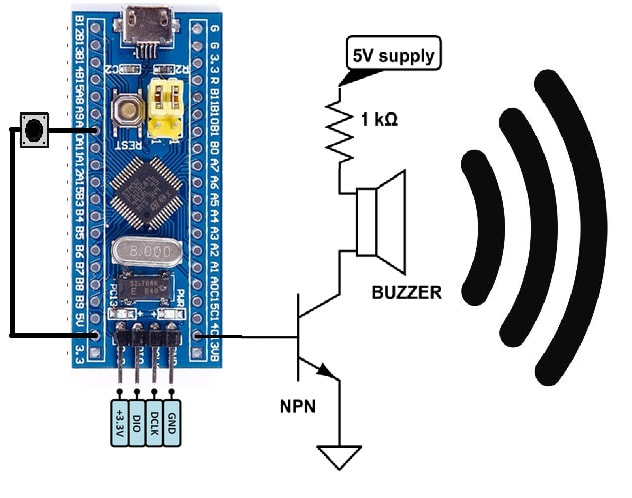
Buzzer with Stm32 Microcontroller

Buzzer with Stm32 Microcontroller

Pull up and pull down resistors activation

Stm32 microcontroller has built in pull up and pull down resistors associated with each gpio pins. We can activate or deactivate them when desired. By default they are in sleep mode we have to activate them if we want to use them in our circuit.

I activated resistors associated with each pin i used in the project. Push button is used as input. I activated its pull up resistor. One end of push button is connected to stm32 Port-A pin#10 and the other end is grounded. Pull up resistor is activated to normally make the input high. Now when ever the user presses the push button the input state changes from 5 volts to 0 volts and microcontroller will accept it as voltage transition and we can do our stuff when transition is recognized. I don’t want the input pin to be floating so i activated the pull up resistor. In code you can understand it easily. I will also explain it in code. Our input pin now behaves like the system below.   

Stm32 GPIO pull up resistor configuration

Stm32 GPIO pull up resistor configuration

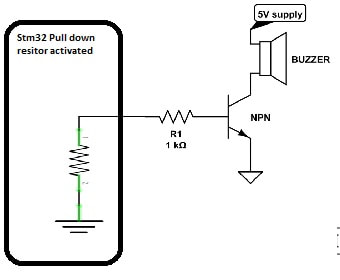
On output pin Port-C pin#13 i activated the pull down resistor. Why i activated it? At output of pin our NPN transistor base is connected. NPN transistor activates its channel when its base is made high. In our case we want to switch on the transistor when ever user presses the button. Normally we want the transistor to remain off. So instead to leave the transistor base floating its better to ground it. Ground it will ensure that the transistor will remain off when not in use. Our system will look some thing below. 
Picture

Stm32 microcontroller Pull down resistor activated

Buzzer with stm32 microcontroller – Project code
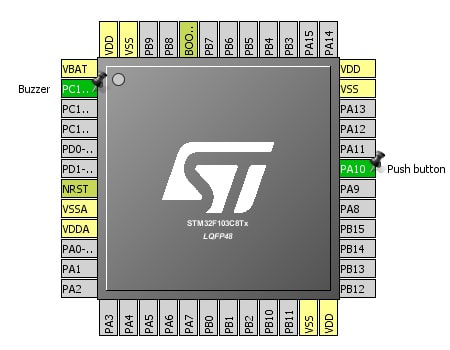
Stm32f103c8t6 is configured/initialed using stm32cubemx. I explained all the initialization steps in the tutorial which is recommend above. I hope you took the above tutorial and know how configuration is done in this project.   
Stm32 pins used in buzzer project - Stm32cubemx code configurator

Stm32 pins used in buzzer project – Stm32cubemx code configurator

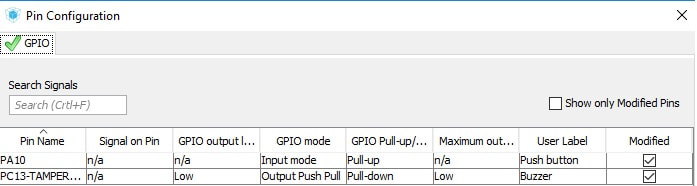
Stm32 gpio’s pull up and pull down resistors are also activated through gpios configuration window in stm32cubemx. I activated the resistor below and named the microcntroller pins. You can see the gpio screen settings window below.   
Stm32cubemx buzzer and push button GPIO declaration

Stm32cubemx buzzer and push button GPIO declaration

The main logic of code is in while(1) loop. The statement below is checking if the button is pressed or not. Statement is monitoring if the pin is grounded. Grounded case is possible only if we press the push button.  
if(HAL_GPIO_ReadPin(Push_button_GPIO_Port, Push_button_Pin)==GPIO_PIN_RESET)  
If button pressed then make the Port-C pin#13 high. Normally port-c pin#13 is low due to pull down resistor activation. When the stm32 pin is made high it sources 3 volts out. Which ultimately makes the base of transistor high and transistor channel activates making buzzer to produce sound.  
HAL_GPIO_WritePin(Buzzer_GPIO_Port, Buzzer_Pin,GPIO_PIN_SET);               
If no press remain low. 
HAL_GPIO_WritePin(Buzzer_GPIO_Port, Buzzer_Pin,GPIO_PIN_RESET);             
 The above project is just to teach you how you can interface a buzzer with stm32 microcontroller. More advance projects involving buzzer and stm32 microcontroller are in pipe line. In coming months i will definitely make a home automation or security system project using buzzer alarm, stm32 microcontroller and other sensors. 

Future Work:
You can design an alarm using buzzer and clock with stm32 microcontroller. A security system involving buzzer and other actuators will be a nice project to take one step a head from this buzzer with stm32 getting started tutorial.     

Download the project code. Folder contains project files of stm32cubemx and keil uvision arm ide. Please provide us your feed back on the project. Write your comments and quires below.
Project files/code


Filed Under: Microcontroller Projects, STM32


Next Article

← Previous Article
Next Article →

Questions related to this article?
👉Ask and discuss on Electro-Tech-Online.com and EDAboard.com forums.


Tell Us What You Think!! Cancel reply

You must be logged in to post a comment.

EE TECH TOOLBOX

“ee
Tech Toolbox: Internet of Things
Explore practical strategies for minimizing attack surfaces, managing memory efficiently, and securing firmware. Download now to ensure your IoT implementations remain secure, efficient, and future-ready.

EE Learning Center

EE Learning Center
“engineers
EXPAND YOUR KNOWLEDGE AND STAY CONNECTED
Get the latest info on technologies, tools and strategies for EE professionals.

HAVE A QUESTION?

Have a technical question about an article or other engineering questions? Check out our engineering forums EDABoard.com and Electro-Tech-Online.com where you can get those questions asked and answered by your peers!


RSS EDABOARD.com Discussions

  • How to simulate power electronics converter in PSpice?
  • Reducing "shoot-through" in offline Full Bridge SMPS?
  • High Side current sensing
  • Voltage mode pushpull is a nonsense SMPS?
  • Layout IRN reduction in Comparator

RSS Electro-Tech-Online.com Discussions

  • Back to the old BASIC days
  • Parts required for a personal project
  • PIC KIT 3 not able to program dsPIC
  • Failure of polypropylene motor-run capacitors
  • Siemens large industrial PLC parts

Featured – RPi Python Programming (27 Part)

  • RPi Python Programming 21: The SIM900A AT commands
  • RPi Python Programming 22: Calls & SMS using a SIM900A GSM-GPRS modem
  • RPi Python Programming 23: Interfacing a NEO-6MV2 GPS module with Raspberry Pi
  • RPi Python Programming 24: I2C explained
  • RPi Python Programming 25 – Synchronous serial communication in Raspberry Pi using I2C protocol
  • RPi Python Programming 26 – Interfacing ADXL345 accelerometer sensor with Raspberry Pi

Recent Articles

  • What is AWS IoT Core and when should you use it?
  • AC-DC power supply extends voltage range to 800 V DC
  • Infineon’s inductive sensor integrates coil system driver, signal conditioning circuits and DSP
  • Arm Cortex-M23 MCU delivers 87.5 µA/MHz active mode
  • STMicroelectronics releases automotive amplifiers with in-play open-load detection

EE ENGINEERING TRAINING DAYS

engineering

Submit a Guest Post

submit a guest post
Engineers Garage
  • Analog IC TIps
  • Connector Tips
  • Battery Power Tips
  • DesignFast
  • EDABoard Forums
  • EE World Online
  • Electro-Tech-Online Forums
  • EV Engineering
  • Microcontroller Tips
  • Power Electronic Tips
  • Sensor Tips
  • Test and Measurement Tips
  • 5G Technology World
  • Subscribe to our newsletter
  • About Us
  • Contact Us
  • Advertise

Copyright © 2025 WTWH Media LLC. All Rights Reserved. The material on this site may not be reproduced, distributed, transmitted, cached or otherwise used, except with the prior written permission of WTWH Media
Privacy Policy

Search Engineers Garage

  • Electronic Projects & Tutorials
    • Electronic Projects
      • Arduino Projects
      • AVR
      • Raspberry pi
      • ESP8266
      • BeagleBone
      • 8051 Microcontroller
      • ARM
      • PIC Microcontroller
      • STM32
    • Tutorials
      • Audio Electronics
      • Battery Management
      • Brainwave
      • Electric Vehicles
      • EMI/EMC/RFI
      • Hardware Filters
      • IoT tutorials
      • Power Tutorials
      • Python
      • Sensors
      • USB
      • VHDL
    • Circuit Design
    • Project Videos
    • Components
  • Articles
    • Tech Articles
    • Insight
    • Invention Stories
    • How to
    • What Is
  • News
    • Electronic Product News
    • Business News
    • Company/Start-up News
    • DIY Reviews
    • Guest Post
  • Forums
    • EDABoard.com
    • Electro-Tech-Online
    • EG Forum Archive
  • DigiKey Store
    • Cables, Wires
    • Connectors, Interconnect
    • Discrete
    • Electromechanical
    • Embedded Computers
    • Enclosures, Hardware, Office
    • Integrated Circuits (ICs)
    • Isolators
    • LED/Optoelectronics
    • Passive
    • Power, Circuit Protection
    • Programmers
    • RF, Wireless
    • Semiconductors
    • Sensors, Transducers
    • Test Products
    • Tools
  • Learn
    • eBooks/Tech Tips
    • Design Guides
    • Learning Center
    • Tech Toolboxes
    • Webinars & Digital Events
  • Resources
    • Digital Issues
    • EE Training Days
    • LEAP Awards
    • Podcasts
    • Webinars / Digital Events
    • White Papers
    • Engineering Diversity & Inclusion
    • DesignFast
  • Guest Post Guidelines
  • Advertise
  • Subscribe