Control Motor Speed using Meditation and Attention Level of Brain
SUMMARY
After controlling the brightness of LED with brain’s meditation and attention level, let’s move on to more applications on Brain Wave. Since the resolution in the earlier experiment was not clear, we will now try a different experiment to get a clearer picture.
In this article, I am again thinking of changing something which can give us a more clear understanding about the variations, say a DC motor. Here, we will control the speed of a motor using attention and meditation levels of our brain at any particular time. We will be using Arduino UNO and mindflex sensor to read brain waves and a MOTOR to show the results. We can also use an amplifier before the DC motor to see more variations in the speed.
DESCRIPTION
It is important to note that the speed of motor is controlled by PWM technique. It is the same technique we have used for the brightness control.
Quick Note: PWM technique is a technique to control analog devices by digital outputs. By digital outputs we are creating a square wave of ON and OFF patterns. This ON and OFF pattern is used to create analog voltage ranging between Low Voltage and High Voltage and we can vary the voltage by changing the duration of ON time with respect to OFF time.
If we pass this ON OFF pattern to the motor at a high speed, an analog voltage is received and the motor’s speed changes accordingly.
First, let us control the motor speed using the attention level.
So, now to control a motor speed, we will measure the attention level from e meters of the TGAM1 chip. Please note that this chip gives us the attention level on a scale of 0 – 100. It is also interesting to know that the chip transmits the meditation signals only when the sensor is accurately connected to the Brain and the sensor module is getting 100% signal strength. The signal strength ranges from 0 – 200.
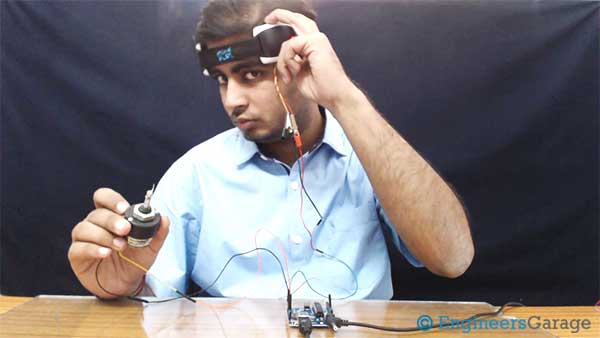
Fig. 1: Image showing speed of DC Motor being controlled by Meditation Level using Brainwave Sensor
Dramatically, when the signal strength is 100% then the sensor sends 0 value, and when the sensor sends 200 this means, there is no connection of the metal sensor to our brain. So, after confirming that our signal strength is 100% and our sensor is sending 0 serially for signal strength we can perform this experiment.
Now we know that the PWM has a duty cycle which determines the analog level. The duty cycle is basically the On time divided by total time period. To change the speed of the MOTOR on the basis of attention level, we will change the duty cycle of PWM.
Fig. 2: Image showing speed of DC Motor being controlled by Meditation Level using Brainwave Sensor
We are getting the meditation value from the sensor on a scale of 0 -100. So we will make the value of duty cycle equals to the meditation value subtracted from 100. For example, if the meditation value from the sensor is 40 than the duty cycle is 100 – 40 = 60. This will make the MOTOR speed parallel to the meditation level. You can check the code and the video for this experiment.
Now after the meditation level, we will do the same with the attention level. Just to remind you again, please check that the signal strength is coming 100% along with 0 value. We again need to take the attention values from the sensor and change the PWM duty cycle with respect to the attention values. Again make the value of duty cycle equals to the attention value subtracted from 100. For example, if the meditation value from the sensor is 40 than the duty cycle is 100 – 40 = 60.
.Fig. 3: Image showing speed of DC Motor being controlled by Meditation Level using Brainwave Sensor
Check out the software section to see how PWM is implemented in the code. We are also done with the speed control using attention values. Check out the code and video to perform the experiment yourself.

Fig. 4: Block Diagram of MindFlex Brainwave Sensor based DC Motor Speed Controller
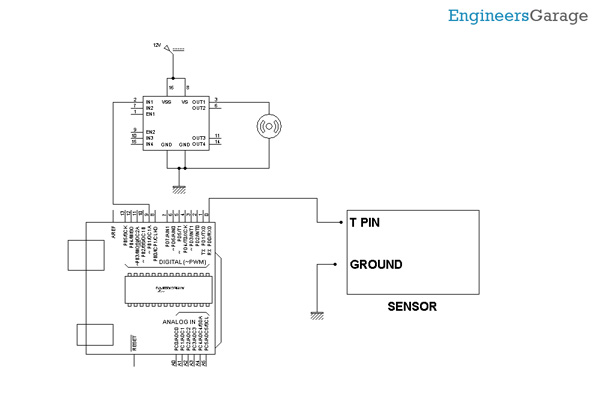
Hardware: Please find the attached circuit diagram of the connections that need to be established. We have taken a pin from T pin of the mindflex sensor and connected that pin to the Rx pin of our Arduino UNO. Also, we have shorted the ground of both the Sensor and UNO by a wire. Please take special care while soldering anything to the Mindflex sensor as pins are very close to each other. After establishing the connections, we have used an amplifier to amplify the output of arduino. Moreover, we have used an l293d to drive the motor. The arduino PINS are connected to the input of l293d and then the motor is attached to it.
Software: The software part is exactly same as the LED brightness experiment. Still I have explained everything again so that you don’t have to go back.
Sensor is sending us the e meters value through the T pin. Once we have received the value at any particular point, we just need to convert that value level to the speed of MOTOR. As discussed previously, we will use PWM techniques. The “analogWrite” function of arduino is used to implement the PWM technology
For example,
AnalogWrite(13,240);
AnalogWrite in arduino is use to write PWM wave to a pin. In above example, the first parameter is PIN Number and second is PIN value. So, we are writing 240 to pin 13. Now we can calculate the analog voltage at the value 240 easily. Total voltage range is 0v – 5v and value range is 0 – 255.
This means 240 = (5/255)*240 = ~4.70V.
Now the values we get from e meters are in range 0 – 100.
So let’s say we get evalue = 70.
We will multiply the e value by 2.55 to make it in the range of 0-255.
So it will be analogWrite(pin,evalue*2.55) in a loop.
Few points to Note:
The sensor usually gives the strength from 60 – 80% due to its orientation and the spot where we place it. Try to keep the metal sensor exactly above your left eye. I have also applied salt water at my forehead for better connectivity to the sensor. The signal strength also disrupts about how we solder the wire to the T pin. Try to shield this wire and also make sure that the references probes are correctly connected.
If you have any wire connected to the EEG pin of the sensor, please disconnect that wire as that will create a lot of disturbance in the sensor values. Try this experiment and let me know about your feedback. Stay tuned for our upcoming experiments that describes sending a message to detect if a person is sleeping.
You may also like:





Project Source Code
###
//Program to#include// Set up the brain parser, pass it the hardware serial object you want to listen on.Brain brain(Serial);//char a[400];String a,a1;int v = 0;int z=0,output;uint32_t num=0;uint32_t num1=0;void setup() {// Start the hardware serial.Serial.begin(9600);pinMode(9, OUTPUT);}void loop() {// Expect packets about once per second.// The .readCSV() function returns a string (well, char*) listing the most recent brain data, in the following format:// "signal strength, attention, meditation, delta, theta, low alpha, high alpha, low beta, high beta, low gamma, high gamma"if (brain.update()) {// Serial.println(brain.readErrors());// Serial.println(brain.readCSV());//sprintf(a, "%c",brain.readCSV());a = brain.readCSV();v = a.indexOf(',');v = a.indexOf(',',v+1);v = a.indexOf(',',v+1);v = a.indexOf(',',v+1);z = a.indexOf(',',v+1);a1 = a.substring(v+1,z);num = a1.toInt();v = a.indexOf(',',z+1);a = a.substring(z+1,v);num1 = a.toInt();//Serial.println(num);Serial.println(num1);analogWrite(9,output)//brain.readCSV().toCharArray(a,200);}}###
Circuit Diagrams
Project Video
Filed Under: Brainwave, Tech Articles, Tutorials
Filed Under: Brainwave, Tech Articles, Tutorials
Questions related to this article?
👉Ask and discuss on Electro-Tech-Online.com and EDAboard.com forums.
Tell Us What You Think!!
You must be logged in to post a comment.