Device to Device Communication has a great role in IOT. In context to IOT systems, this device to device communication usually voids human interaction and control over the devices and the devices are meant to communicate with each other autonomously. In this tutorial, a similar demonstration of Device to Device Communication is presented.
There are two ESP8266 boards taken with each board interfaced with an LED. When the boards power up, the LED interfaced with one board (Let it call ESP01) remains OFF by default and the LED interfaced with other board (Let it call ESP02) remains ON. The two boards connect with an MQTT broker which is HiveMQ in this case. They subscribe to one topic and publish to one another topic. The topic published by ESP01 is subscribed by ESP02 and the topic published by ESP02 is subscribed by ESP01. Then, the two boards initiate communication over MQTT protocol and start publishing messages. On receiving the messages, the LED interfaced at ESP01 switches ON which was OFF by default and the LED interfaced at ESP02 switches OFF which was ON by default. In this way, the two boards communicate with each other autonomously without any human intervention. This is a simple demonstration of Device to Device Communication in IOT.
So, there are two similar IOT devices designed in this project with a simple LED interfaced with the ESP-8266 Wi-Fi module. The Wi-Fi module as well as LED light are powered continuously with the help of a USB to Serial Converter. The Wi-Fi module needs to loaded with a firmware that could interpret data received over the internet and use that data to control the LED light. The Arduino UNO is used to flash the firmware code on the ESP8266 module. The ESP module can also be flashed with code using a FTDI converter like CP2102. The firmware itself is written in the Arduino IDE.
Components Required –
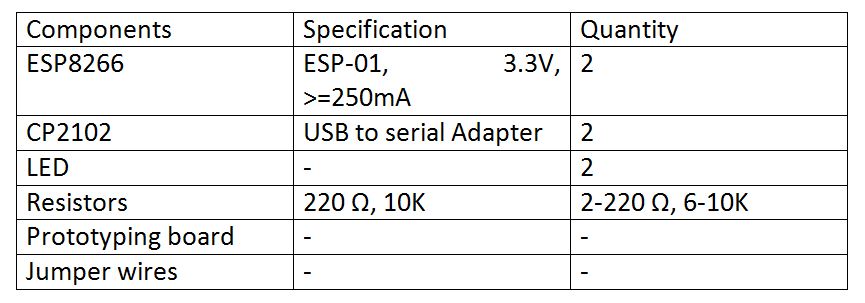
Fig. 1: List of components required for MQTT Protocol based ESP8266 to ESP8266 IoT Communication
Software Required –
• Arduino IDE
• HiveMQ broker
Block Diagram –
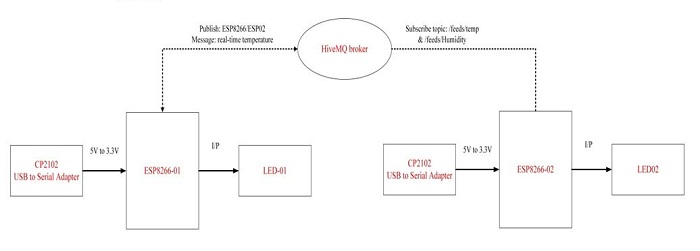
Fig. 2: Block Diagram of ESP8266 based Device to Device LED Control IOT Project
Circuit Connections –
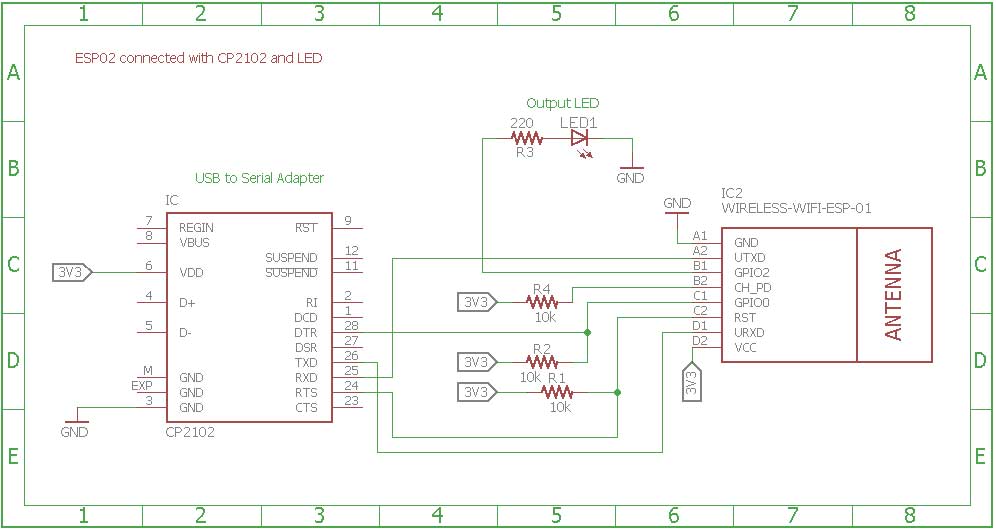
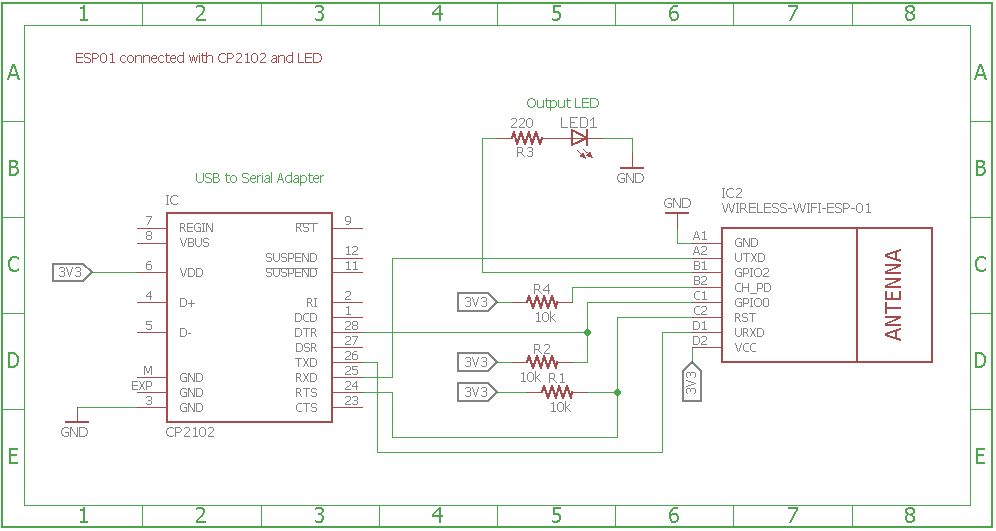
Fig. 3: Circuit Diagram of ESP8266 Device to Device LED Control MQTT Client 2
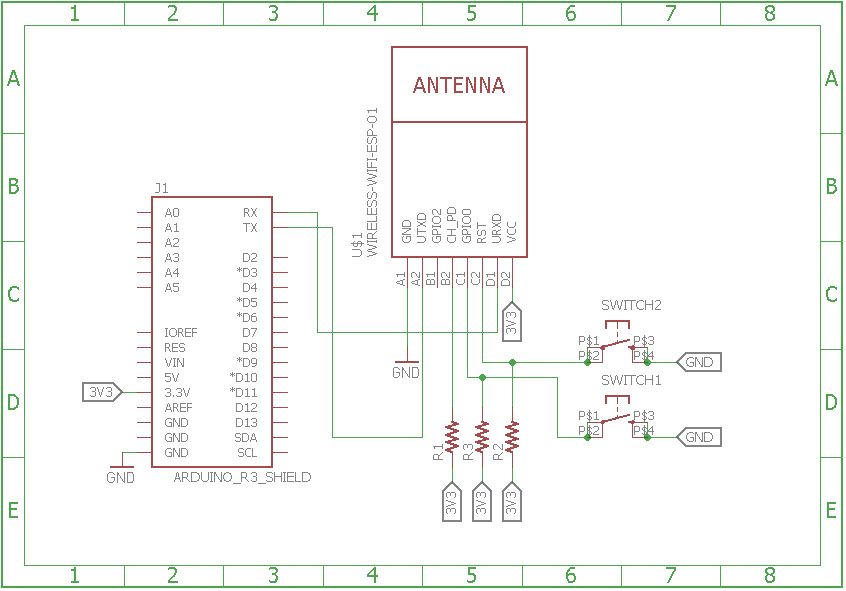
First of all, the ESP8266 boards need to be loaded with the firmware code. In this tutorial, the firmware code is written using Arduino IDE. It is loaded to the ESP8266 boards using the Arduino UNO. The generic ESP8266 boards are used in this project. The boards do not have any bootstrapping resistors, no voltage regulator, no reset circuit and no USB-serial adapter. The ESP8266 module operates on 3.3 V power supply with current greater than or equal to 250 mA. So, CP2102 USB to serial adapter is used to provide 3.3 V voltage with enough current to run ESP8266 modules reliably in every situation.
The ESP8266 Wi-Fi Module is a self contained SOC with integrated TCP/IP protocol stack that can access to a Wi-Fi network. The ESP8266 is capable of either hosting an application or off loading all Wi-Fi networking functions from another application processor. Each ESP8266 module comes pre-programmed with an AT command set firmware. The module comes available in two models – ESP-01 and ESP-12. ESP-12 has 16 pins available for interfacing while ESP-01 has only 8 pins available for use. The ESP-12 has the following pin configuration –
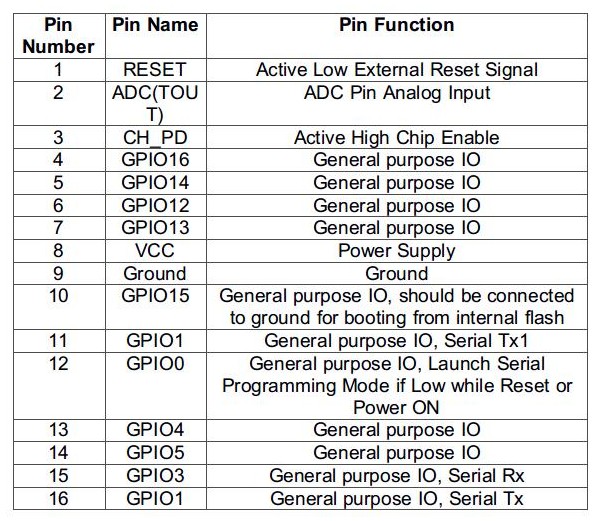
Fig. 4: Table listing pin configuration of ESP8266 ESP-12 Wi-Fi Modem
The ESP-01 models are used in the project. The ESP-01 model has the following pin configuration –
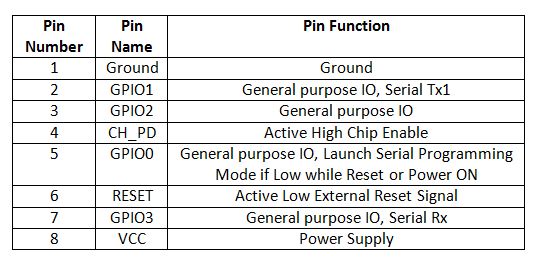
Fig. 5: Table listing pin configuration of ESP8266 ESP-01 Wi-Fi Modem
The Chip Enable and VCC pins of the modules are connected to the 3.3 V DC while Ground pin is connected to the common ground. The chip enable pin is connected to VCC via a 10K pull up resistor. The RESET pin is connected to the ground via a tactile switch where the pin is supplied VCC through a 10K pull up resistor by default. The Tx and Rx pins of the module are connected to the RX and TX pins of the Arduino UNO. The GPIO-0 pin of the modules is connected to ground via a tactile switch where the pin is supplied VCC through a 10K pull up resistor by default. These pull-up resistors act as voltage divider circuit which protects the ESP8266 board from high voltage. The Arduino board operates at 5V as well as 3.3 V while ESP8266 operates at 3.3 V. Though the Arduino board itself is powered via its 3.3 V supply pin, this voltage divider circuit further adds protection from any voltage surge. The use of pull-up resistors increases the stability of the circuit. With these circuit connections, the Arduino board itself act as USB to Serial Adaptor. The circuit connections between the Arduino UNO and ESP8266 module for boot loading can be summarized as follow –
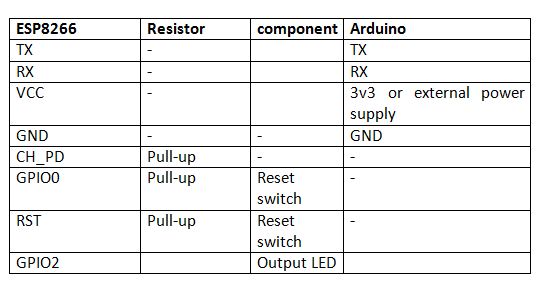
Fig. 6: Table listing circuit connections between ESP8266 Module and Arduino
During compilation of the code, the GPIO0 and RESET switches must be pressed. For uploading program, the RESET switch must be released while the GPIO0 programming switch must be left pressed, so that the ESP can enter in programming mode. After uploading the code, the programming switch should also be released as well.
Write the firmware code for both the ESP devices in the Arduino IDE and connect the Arduino board with the PC via USB cable. Open Arduino IDE and go to Tools->Port and select the Arduino board (Arduino UNO). It may look like /dev/ttyABM0 (Arduino/Genuino Uno). Select the correct port name. The port name can be different in different IDE setups. Then Open Serial monitor in the Arduino IDE by navigating to Tools->Serial Monitor and set the baud rate to 115200 bauds per second. Pass ‘AT’ and ‘AT+GMR’ commands to test the connection between the Arduino and ESP-01 module. Try different settings for the ‘Line ending’ option of the serial monitor like Both NL & CR. Try different combinations until the ESP module starts interacting correctly with the serial monitor.
Download Python, PIP and ESPtool. Erase the pre-loaded firmware if the ESP module has any. Flash the firmware code to the ESP-01 module by writing the commands in serial monitor as instructed for the ESPtool. Check out the following link to write proper command for flashing the firmware code using ESPtool-
For uploading program, the RESET switch must be released while the GPIO0 programming switch must be left pressed. After loading the code, the programming switch should also be released as well. In this way, the firmware code can be loaded to the ESP8266 using the Arduino board as FTDI converter. It must be noted that every GND needs to be common to complete the circuit. The GPIO2 is alternative TX for boot loader mode.
Remove the connections and repeat the same process for loading code on the other ESP module. Now the ESP modules are ready to be installed in the respective device circuits. Both the devices designed here have same circuit. In the circuits, the ESP8266 is interfaced with the CP2102 adapter and an LED.
The CP2102 is a single chip USB to UART Bridge. It is used to provide power supply to the ESP module. It can be used for boot loading as well. A CP2102 IC has the following pin configuration –
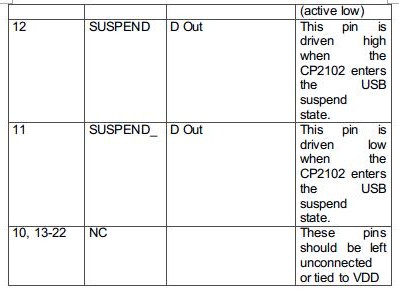
Fig. 7: Table listing pin configuration of CP2102 IC
Fig. 8: Table listing pin configuration of CP2102 IC
Fig. 9: Table listing pin configuration of CP2102 IC
The ESP board can be connected to the CP2102 for both boot loading mode and usage purpose. For boot loading, the ESP-01 TX pin should be connected to RX pin of CP2102 and ESP’s RX pin should be connected to the TX of CP2102 so that they both can send and receive the data. The ESP8266-01 needs 3.3 V power supply so ESP’s VCC must be connected to the 3V3 of CP2102 and GNDs of both need to be connected to each other. The reset pin of ESP8266 along with 10k pull-up resistor (bootstrap resistor) should be connected to the RTS pin of CP2102. The GPIO0 is a programming pin which is used to end the ESP boards into programming mode. The GPIO0 along with 10K pull-up resistor should be connected to DTR pin of CP2102. The CHPD pin of ES-01 must be pulled-up with 10K resistor. The circuit connections between the ESP module and the CP2102 are summarized in the following table –
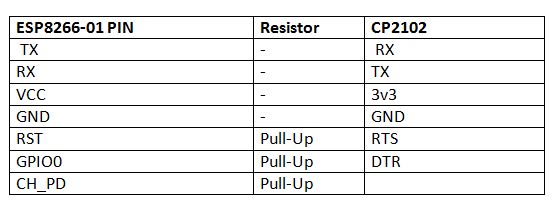
Fig. 10: Table listing circuit connections between ESP8266 Module and CP2102 IC
After connecting the ESP modules with the CP2102 adapters, the respective adaptors must be connected to the PC and the ESP modules must be loaded with the firmware code in the similar manner as is demonstrated with the Arduino.
After loading the code, the ESP modules will automatically access the Wi-Fi point with the SSID given in the firmware. If the two devices are kept co-located, they can access the same Wi-Fi Router. In case they are remotely located, they will have to access different Wi-Fi points and so will have to connect with respective SSIDs.
An LED is connected to the ESP module in each device. The LED’s anode pin is connected to the GPIO2 with 220 ohm series resistor and cathode pin is connected to the GND. The ESP modules are now ready to receive data from the internet via Wi-Fi Router and will control LEDs interfaced to each other.
The HiveMQ broker is used to connect the two boards. HiveMQ is a public broker and need not to be configured manually. In the firmware code, the broker’s IP address must be initialized to connect with this broker. This has been done in the firmware code as follow –

Fig. 11: Screenshot of Arduino Code initializing Broker’s IP Address
HiveMQ Broker Initialization in ESP8266 Firmware
The ESP boards can subscribe as publisher and subscriber from within the firmware code. Like in the code for ESP-01 device, the topics are subscribed as follow –

Fig. 12: Screenshot of Arduino Code setting ESP Module as Subscriber and Publisher
Topics Subscription on ESP Client 1
Similarly in the code for ESP-02 device, the topics are subscribed as follow –
Fig. 13: Screenshot of Arduino Code setting ESP Module as Subscriber and Publisher
Topics Subscription on ESP Client 2
The two devices interact with each other via HiveMQ broker independently. The ESP boards on the two devices are programmed to communicate this way.
The following precautions must be taken care while assembling the circuits –
1) The ESP8266 needs 3.3 V power to work, so do not provide 5V.
2) Some people say that ESP8266 does not have 5V tolerant Inputs but when Arduino was used as USB to Serial Adapter it successfully provided the serial communication. According to the datasheet of ESP8266, It has also written that the ESP8266 GPIOs can tolerate more power up to 6V.
3) If the error of espcomm_sync-failed.md is shown while uploading the firmware code, then first check the selected port on which the ESP module is connected and then check if the module is entering in boot loading mode or not. This can be checked by connecting RX and GND pin of converter to the TX and GND pin of ESP. Then open a terminal and check if the following message is received on serial window or not.
ets Jan 8 2017,rst cause:2, boot mode:(x,y).
4) Check if the module pins are getting proper voltage or not using multimeter.
5) If the module is working but it starts to burn after sometime then there can be an issue of current requirement. In that case, use an external power supply to provide 3.3 V to ESP8266.
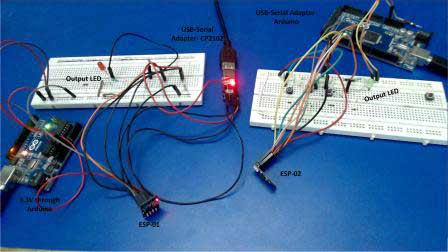
Fig. 14: Prototype of ESP8266 based Device to Device LED Control IOT Project
How the circuit works –
After loading firmware and circuit connections, the ESP8266 modules are ready to receive data over MQTT protocol from the available Wi-Fi access point. The ESP01 and ESP02 clients communicate and send messages to each other via a MQTT broker called HiveMQ.
The ESP01 client configures as publisher for the topic “ESP8266/ESP02” and as subscriber for the topic “ESP8266/ESP01”. The ESP02 client configures as publisher for the topic “ESP8266/ESP01” and as subscriber for the topic “ESP8266/ESP02”. The LED interfaced to ESP01 remains OFF by default and LED connected to ESP02 remains ON by default. The ESP01 Client initiates connection and start publishing a message ‘1’ to the MQTT broker. The ESP02 receives this message after the connection is established. On the receiving the message ‘1’ in the payload, the ESP02 set the GPIO2 pin to LOW and the LED interfaced at the respective pin stops glowing.
At the same time, ESP02 Client also initiates connection and start publishing a message ‘0’ to the MQTT broker. The ESP01 receives this message after the connection is established. On the receiving the message ‘0’ in the payload, the ESP01 set the GPIO2 pin to HIGH and the LED interfaced at the respective pin starts glowing. This way the two boards control the LEDs interfaced to each other.
Programming Guide –
The ESP8266 Clients are loaded with the Arduino sketch. An open source library for publish and subscription through ESP client is used. In those public libraries nothing is changed or modified.
The two ESP8266 Clients are connected to each other with the help of MQTT broker and controlling the LEDs of each other via publish and subscription model. The ESP8266 clients are connected to the home network by defining the SSID and Password of Wi-Fi router. The SSID and password of Wi-Fi access point are initialized in the Arduino code as follow –
//WIFI setup
const char* ssid = “qwerty”;
const char* password = “XXXXXX”;
This piece of code can be initialized in set up as well as by defining a separate function with some other testing cases. The following function is used to initiate the Wi-Fi connection.
WiFi.begin(ssid, password); //Start Wireless connection
The same procedure is to connect the ESP-02 Client with the Network. After connecting ESP8266 Clients with the Network, the ESP8266 Clients will initiate connection with the MQTT broker. The following code in the Arduino sketch is used to define the MQTT broker to which the ESP module has to communicate.
//The broker or server domain name
const char* mqtt_server = “broker.mqtt-dashboard.com”;
The ESP module based client is connected to the MQTT broker by calling the following function in the setup.
client.setServer(mqtt_server, 1883);
Now both ESP Clients are connected to the same MQTT broker and they can now start communication with each other. ESP01 registers a topic “ESP8266/ESP02” on the MQTT broker, the ESP02 subscribes to the same topic from MQTT broker. The ESP01 is continuously publishing the message “1” on MQTT broker, as ESP02 has subscribed to the same topic, it will receive the message “1” continuously. When ESP02 gets a message “1”, it will call a “receive_message” function. This is a callback function so whenever an even occur, this function will be called and things written in this function will be executed at that time. Whenever ESP01 publishes the message, this callback function is triggered and LED remains ON.
The following code at ESP01 is used to publish a message on the topic –
client.publish(“ESP8266/ESP02”, “1”);
The following code at ESP01 is used to subscribe message on the topic –
client.subscribe(“ESP8266/ESP02”);
The callback function for ESP02 is executed when it receives message –
// Handle the message we received
// Here, we are only looking at the characters of the received message (payload[0])
// If it is 1, turn the led will be on.
// If it is 0, turn the led will be off.
if((char)payload[0] == ‘1’) //on
digitalWrite(2,HIGH);
else if((char)payload[0] == ‘0’) //off
digitalWrite(2,LOW);
Similarly, ESP02 registers the topic “ESP8266/ESP01” on the MQTT broker and ESP01 subscribes to the same topic and receive a message whenever ESP01 publishes the message on the topic. The ESP02 also have callback function and whenever ESP01 publishes the message on that topic, this function is triggered and the code written in this function is executed. By default the LED on ESP02 is ON, so when it receives the message “0”, the LED switches OFF.
The following code at ESP02 is used to publish a message on the topic –
client.publish(“ESP8266/ESP01”, “0”);
The following code at ESP02 is used to subscribe message on the topic –
client.subscribe(“ESP8266/ESP01”);
The callback function for ESP01 is executed when it receives message –
// Handle the message we received
// Here, we are only looking at the characters of the received message (payload[0])
// If it is 1, turn the led will be on.
// If it is 0, turn the led will be off.
if((char)payload[0] == ‘1’) //on
digitalWrite(2,HIGH);
else if((char)payload[0] == ‘0’) //off
digitalWrite(2,LOW);
So, ESP01 controls the LED connected at ESP02 and keeps it OFF while the ESP02 controls the LED connected at ESP01 and keeps it ON.
This is a simple demonstration of independent Device to Device (D2D) communication. In the next tutorial, Ethernet technology will be discussed.
You may also like:



Project Source Code
### //Program to /* * File Name - esp-01_PUBSUB_esp-02.ino * Created: 20/3/2017 11:02:11 AM * Main Source Code for ESP to ESP clinets communication with HiveMQ broker */ /* * Output Pins of the ESP8266 *GPIO02 - ledPin */ #include//Include library for ESP8266 configuration #include //Include library for MQTT //WIFI setup const char* ssid = "Replace it with the SSID of the Wi-Fi Network"; const char* password = "Replace it with the password of the Wi-Fi Network"; //The broker or server domain name const char* mqtt_server = "broker.mqtt-dashboard.com"; // Create an ESP8266 WiFiClient class to connect to the MQTT server. WiFiClient espClient; //create the MQTT client objects PubSubClient client(espClient); void setup() { pinMode(2,OUTPUT); //configure the led pin as OUTPUT Serial.begin(115200); //Set the baudrate of ESP8266 to show the process on serial monitor setup_wifi(); //Initialize the Wifi //By setting server and messgae callback function, the client is ready to use & set 1883 for listener port for the broker client.setServer(mqtt_server, 1883); client.setCallback(Received_Message); } /* * Function Name = setup_wifi * To establish the WIFI connection with ESP8266 */ void setup_wifi(){ delay(10); // We start by connecting to a WiFi network Serial.println(); Serial.print("Connecting to "); Serial.println(ssid); //Connect to the WIFI WiFi.begin(ssid, password); // Wait until the connection has been confirmed before continuing while (WiFi.status() != WL_CONNECTED) { delay(500); Serial.print("."); } Serial.println(""); Serial.println("WiFi connected"); Serial.println("IP address: "); Serial.println(WiFi.localIP()); } /* * Function name = Received_message * Client receives the message and functions accordingly * Input parameter = Topic, Payload and message length * Output parameter = void */ void Received_Message(char* topic, byte* payload, unsigned int length) { Serial.print("Message arrived ["); Serial.print(topic); Serial.print("] "); for (int i = 0; i < length; i++) { Serial.print((char)payload[i]); } // Handle the message we received // Here, we are only looking at the characters of the received message (payload[0]) // If it is 1, turn the led will be on. // If it is 0, turn the led will be off. if((char)payload[0] == '1') //on digitalWrite(2,HIGH); else if((char)payload[0] == '0') //off digitalWrite(2,LOW); Serial.println(); } /* * Function Name = Reconnect * To establish the connection of ESP8266 with MQTT broker * and Will publish and subsribe to the topic */ void reconnect() { // Loop until we're reconnected while (!c lient.connected()) { Serial.print("Attempting MQTT connection..."); // Attempt to connect if (client.connect("ESP8266Client")) { Serial.println("connected"); // Once connected, publish an announcement... client.publish("ESP8266/ESP02", "1"); // ... and resubscribe client.subscribe("ESP8266/ESP01"); } else { Serial.print("failed, rc="); Serial.print(client.state()); Serial.println(" try again in 5 seconds"); // Wait 5 seconds before retrying delay(5000); } } } void loop() { //When ESP8266 client will be connected to the broker, //then call the function reconnect and publish and subscribe the data from broker. if (!client.connected()) { reconnect(); } client.loop(); } ###
Circuit Diagrams
Filed Under: IoT, IoT tutorials, Tutorials
could you provide the libraries used?