MicroPython is one of the best microcontroller firmware that supports a variety of embedded platforms. The WiFi development boards like ESP8266 and ESP32 are among the MicroPython-supported ports. With MicroPython, it is extremely simple to implement top-notch IoT applications. MicroPython has wide support for network programming along with implementing all basic hardware functions. It combines low-level hardware support with high-level programming features, which embedded C-based microcontroller ecosystems are usually void of. Plus, the Python syntax makes the embedded programming super simple, clean, and precise.
In this project, we will develop an online weather station configured over ESP8266/ESP32. The project utilizes ESP8266 as a microcontroller by getting sensor readings from DHT-11, while at the same time, it benefits from the network programming functions of MicroPython to connect and operate within an IoT network. This weather station is operational within the limits of a wireless LAN and broadcasts temperature and humidity as a working TCP server within the network.
Prerequisites
Before continuing, you must have set up uPyCraft IDE or Thonny IDE as a software development environment. Plus, you must have uploaded MicroPython firmware to ESP8266/ESP32. You can find a guide for both tasks from this link. For making this project, you must know how to connect ESP8266/ESP32 with a WiFi network using MicroPython. You also need to know how to configure ESP8266/ESP32 as a MicroPython TCP server.
Components required
- ESP8266/ESP32 x1
- USB cable to connect ESP with computer
- DHT11 x1
- Breadboard x1
- Connecting wires/Jumper wires
- Computer/Mobile x1
Circuit connections
In this project, ESP8266/ESP32 act as a TCP server hosting a simple HTML webpage. DHT11 sensor is interfaced with ESP8266/ESP32. The board reads temperature and humidity from DHT11 and publishes the readings over the hosted webpage. The circuit connections are required only to interface DHT11 with ESP8266/ESP32. DHT11 has the following pin diagram.
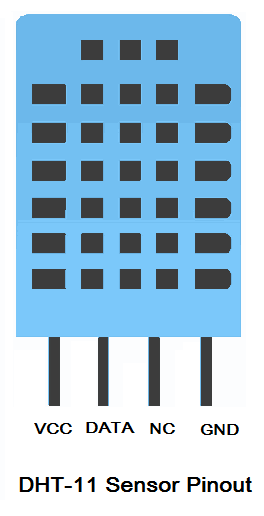
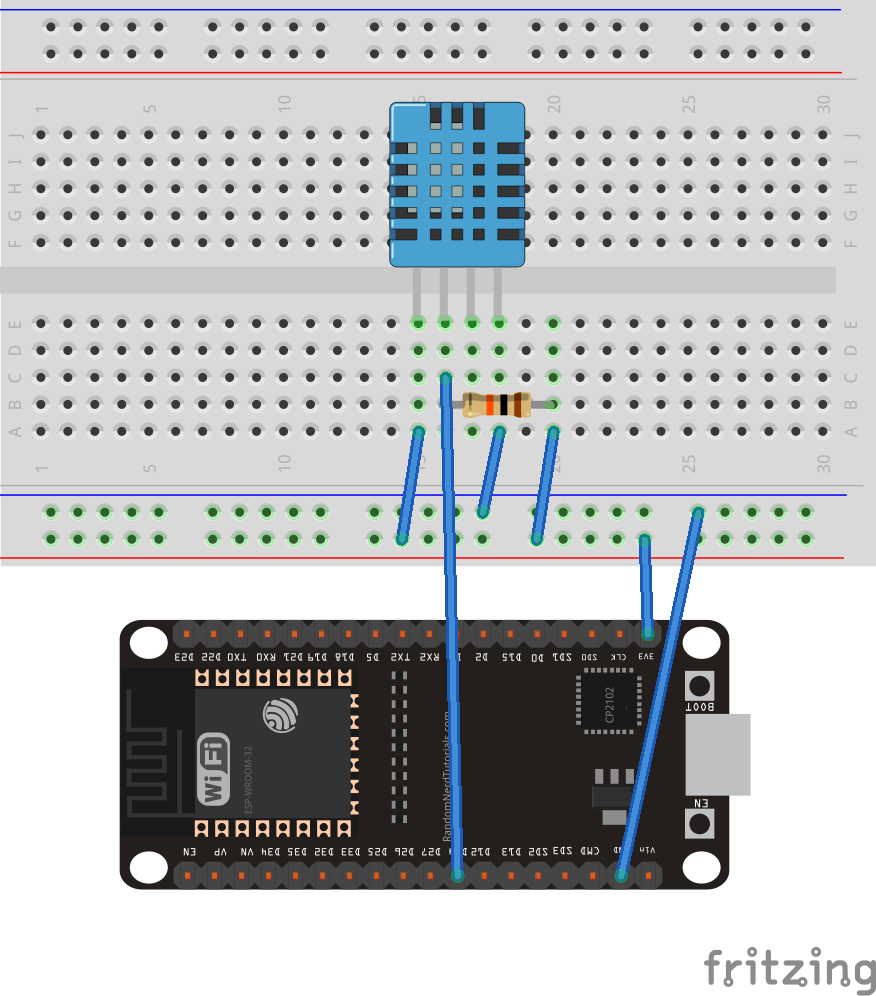
To learn more about the DHT11 sensor, check out this Arduino tutorial. For interfacing DHT11 with ESP8266, connect the VCC and GND pins of DHT11 with the 3V and GND of ESP8266. Connect the data pin of DHT11 with any GPIO of ESP8266. In this project, the data pin of DHT11 is connected to GPIO14 (D5) of ESP8266. The data pin is pulled high by connecting a 10K resistor between the data output and VCC.
 If ESP32 is used, D14 is the GPIO14 in ESP32. ESP32 will have the following circuit connections.
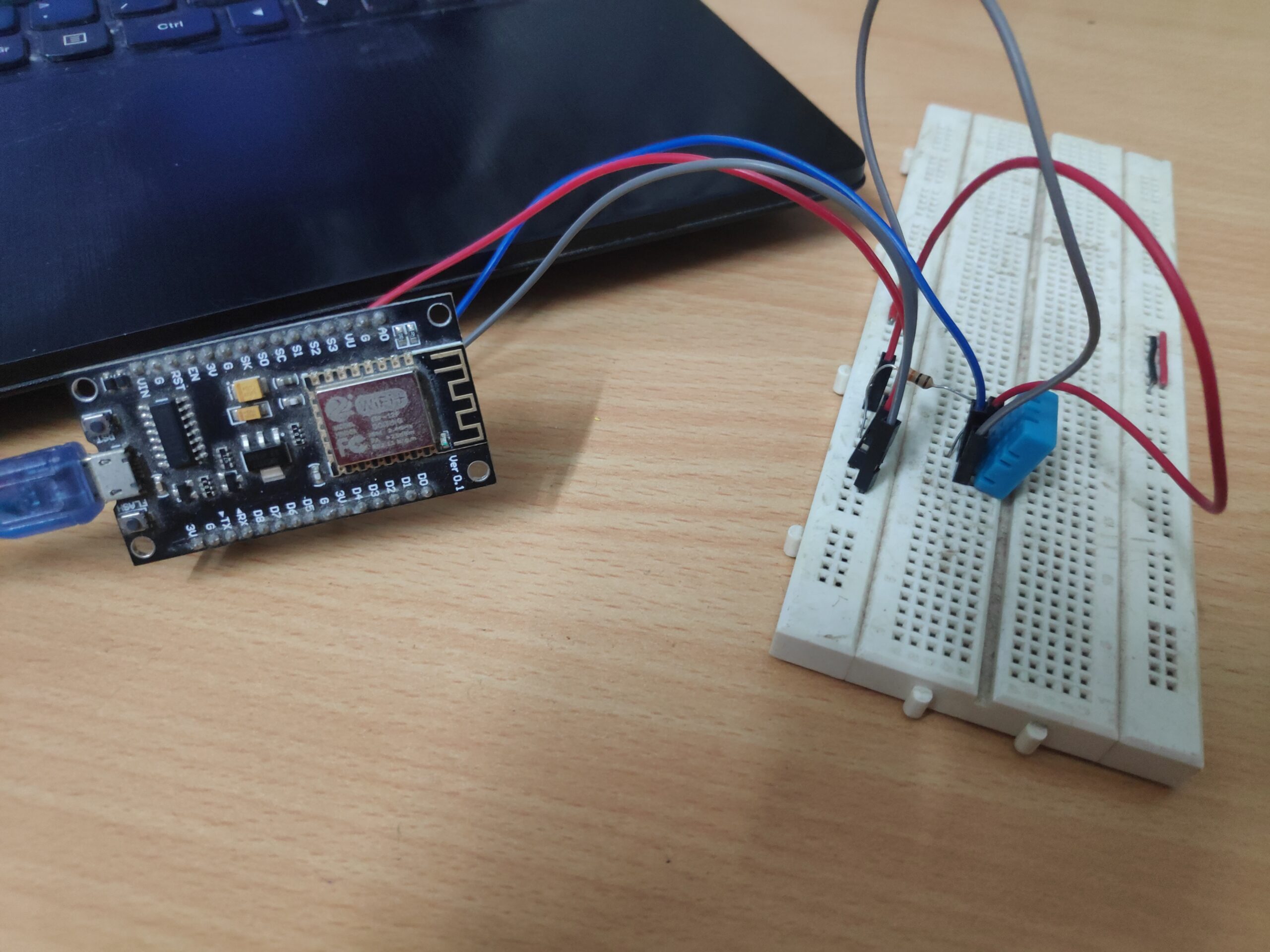
 After circuit connections, the ESP8266 TCP server would look as follows.
MicroPython Script
How project works
This ESP8266/ESP32-based online weather station reads temperature and humidity from the DHT11 sensor and publishes the readings on a webpage in real-time. The webpage is hosted by ESP8266/ESP32 itself, for which, the board is configured as a TCP server. The webpage can be accessed by any device, a computer or mobile that has a browser to access the internet over HTTP protocol. The webpage is hosted locally within wireless LAN, so only devices connected to the same WiFi connection can access the webpage.
The working of the project is straightforward. The board reads temperature and humidity from DHT11 using the built-in DHT module of MicroPython. The board connects with an available WiFi connection using MicroPython’s network module. For hosting a webpage and operating as a TCP server, the socket module of MicroPython is utilized. ESP8266/ESP32 reads temperature and humidity and embeds the readings within the webpage. The webpage is returned as an HTTP response to any device that accesses the localhost IP address.
The code
The code begins with importing a usocket module. In case a usocket module is not available, the default socket module is imported. Next, the network module, pin class from the machine module, and dht module are imported. The network module is used to connect with a WiFi connection. The pin class of the machine module is used to interact with the DHT11 sensor. The dht module is used to get readings from DHT11. The esp module is imported, and OS-level errors are suppressed by calling esp.osdebug(None) method. The gc module is imported, and garbage collection is enabled by calling gc.collect() method. This frees microcontroller resources (RAM) as soon as variables and objects are left unused.
The SSID and network key of available WiFi connection are stored in variables SSID and password. You will need to replace the SSID and WiFi password with the SSID and network key of your own WiFi connection in the following lines of code.
ssid = ‘SSID’
password = ‘PASSWORD’
An object network.WLAN() class is instantiated, configuring ESP8266/ESP32 as a WiFi station. The ESP8266/ESP32 as a WiFi station is activated by calling station.active() method. The board is connected to an available WiFi connection by calling station.connect() method. The connection with the WiFi network is verified by the calling station.isconnected() method. On successful connection with the WiFi network, a message is printed to the console, and IP-level configuration parameters are also printed to the console by the calling station.ifconfig() method. The very first IP-level parameter printed to the console is the IP address of the ESP8266/ESP32 station.
A variable sensor is declared to instantiate the object of the DHT class. The variables temp and hum are declared to store temperature and humidity readings. A user-defined function read_dht() is defined to get temperature and humidity readings from DHT11. The function calls the measure() method for getting readings from the DHT11 sensor. It uses temperature() and humidity() methods to get temperature and humidity values, respectively, as float or integer. The temperature and humidity values are returned in global variables temp and hum, respectively.
A user-defined function web_page() is defined to return an HTML page with temperature and humidity values stored in global variables temp and hum embedded within the HTML page. An object of socket class is instantiated and configured to use IPv4 address and TCP for network layer protocol. The object is bound to the localhost address using the bind() method and activated to listen from TCP clients by calling listen() method.
An infinite while loop is started. In the loop, the ESP8266/ESP32 TCP server is configured to accept HTTP requests from TCP clients from the same WiFi network by calling the s.connect() method. The HTTP requests from a connected TCP client are stored in a variable request by calling conn.recv() method. The message containing temperature and humidity readings is printed to the console, and the webpage containing the temperature and humidity values embedded is returned as the response by calling conn.send() and conn.sendall() methods. After returning the webpage as a response, the connection with the TCP client is explicitly closed by calling conn.close() method.
Result
The webpage with temperature and humidity readings from the DHT11 sensor is accessed by typing the IP address returned by the station.ifconfig() method in any browser’s address bar. The ESP8266/ESP32 TCP server operating as an online weather station returns a custom webpage as a response to an HTTP request from your computer/mobile’s browser. The following screenshot shows the webpage returned by the ESP8266/ESP32 online weather station.

Remember that the ESP8266/ESP32 weather station is hosting the webpage locally, so the webpage can only be accessed by devices connected to the same WiFi connection. ESP8266/ESP32 is using the localhost IP address as the IP address of the web server.
You may also like:


Filed Under: Python, Tutorials
Questions related to this article?
👉Ask and discuss on Electro-Tech-Online.com and EDAboard.com forums.
Tell Us What You Think!!
You must be logged in to post a comment.