Engineers Garage

  • Electronic Projects & Tutorials
    • Electronic Projects
      • Arduino Projects
      • AVR
      • Raspberry pi
      • ESP8266
      • BeagleBone
      • 8051 Microcontroller
      • ARM
      • PIC Microcontroller
      • STM32
    • Tutorials
      • Audio Electronics
      • Battery Management
      • Brainwave
      • Electric Vehicles
      • EMI/EMC/RFI
      • Hardware Filters
      • IoT tutorials
      • Power Tutorials
      • Python
      • Sensors
      • USB
      • VHDL
    • Circuit Design
    • Project Videos
    • Components
  • Articles
    • Tech Articles
    • Insight
    • Invention Stories
    • How to
    • What Is
  • News
    • Electronic Product News
    • Business News
    • Company/Start-up News
    • DIY Reviews
    • Guest Post
  • Forums
    • EDABoard.com
    • Electro-Tech-Online
    • EG Forum Archive
  • DigiKey Store
    • Cables, Wires
    • Connectors, Interconnect
    • Discrete
    • Electromechanical
    • Embedded Computers
    • Enclosures, Hardware, Office
    • Integrated Circuits (ICs)
    • Isolators
    • LED/Optoelectronics
    • Passive
    • Power, Circuit Protection
    • Programmers
    • RF, Wireless
    • Semiconductors
    • Sensors, Transducers
    • Test Products
    • Tools
  • Learn
    • eBooks/Tech Tips
    • Design Guides
    • Learning Center
    • Tech Toolboxes
    • Webinars & Digital Events
  • Resources
    • Digital Issues
    • EE Training Days
    • LEAP Awards
    • Podcasts
    • Webinars / Digital Events
    • White Papers
    • Engineering Diversity & Inclusion
    • DesignFast
  • Guest Post Guidelines
  • Advertise
  • Subscribe

Insight – Learn the workings of a capacitive touch sensor

By Ashutosh Bhatt March 1, 2025

Everything in today’s digital world is becoming just a touch away. Capacitive touch technology is widely used in modern touch-sensitive devices, whether filling a morning coffee mug, setting a washing machine timer, or turning on a PC display. Its fast response time and adaptability to different environments have made it a popular choice among manufacturers. Typical applications include water purifiers, kitchen appliances, vending machines, and touch-sensitive switches.

Most of us encounter capacitive touch sensors daily, but how often do we consider how they work? Capacitive displays detect touch by measuring changes in capacitance. Surprised? How can a component of two metal plates that store charge detect touch? This article explores the answer to that question.

Figure 1. A typical capacitive touch sensor.

The capacitive touch sensor

Figure 1 shows a capacitive touch sensor. The sensor is encapsulated in a durable black plastic material that holds an IP67 rating. The Ingress Protection (IP) rating system classifies the degree of protection a device has against solid objects and liquids. In this case, the first number after “IP” indicates dust protection, while the second number signifies protection against immersion in liquid.
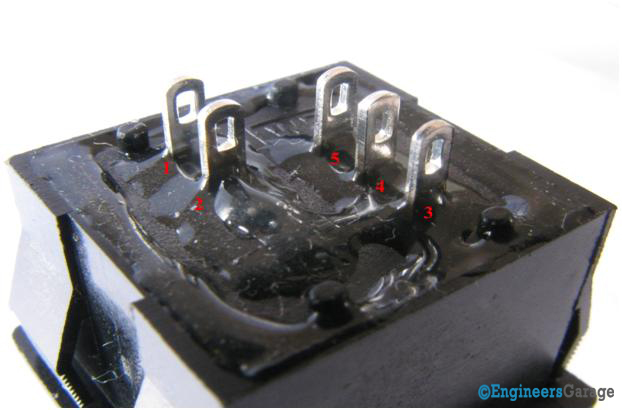
Figure 2. The pin-out terminals are on the back of the capacitive touch sensor.

The pinout terminals

Flipping the sensor reveals the pinout terminals, which are made from brass (Figure 2). The two separated terminals marked 1 and 2, are the LED terminals that illuminate when the sensor is touched. The remaining 3, 4, and 5 terminals correspond to the supply voltage, ground, and output connections, respectively.

The lock, frame, and sctuator

Diagrammatical Image Showing Various Parts of A Capacitive Touch Sensor

Figure 3. The various parts of a capacitive touch sensor.

The mechanical lock and scales

Mechanical locks are provided on the sides to ensure a secure fit within water purifiers, kitchen appliances, vending machines, and switches (Figure 3). The scales assist in adjusting the device’s height to accommodate these applications.
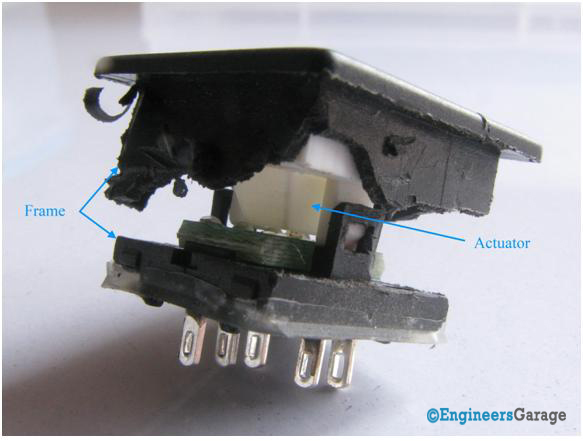
Figure 4. The frame and actuator of a capacitive touch sensor.

The frame and actuator

By cutting the sensor’s frame into two parts, you’ll find the actuator. The mechanical locking mechanism between the actuator and frame ensures that the components remain securely intact (Figure 4).

The wire connections and the PCB
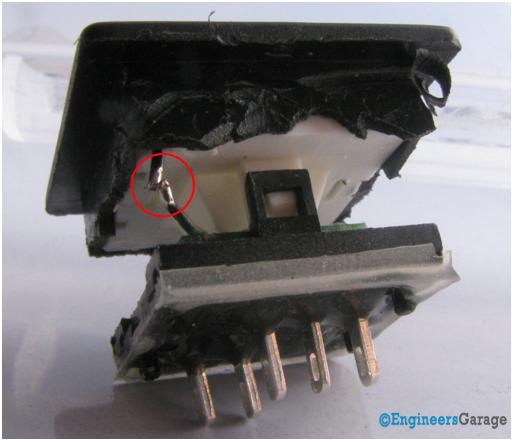
Figure 5. A closer view of the metal connection in a capacitive touch sensor.

The metal wire connection

A metal wire extends from the actuator to the printed circuit board or PCB (Figure 5). To understand its purpose, let’s take a closer look at the sensor’s internal structure.
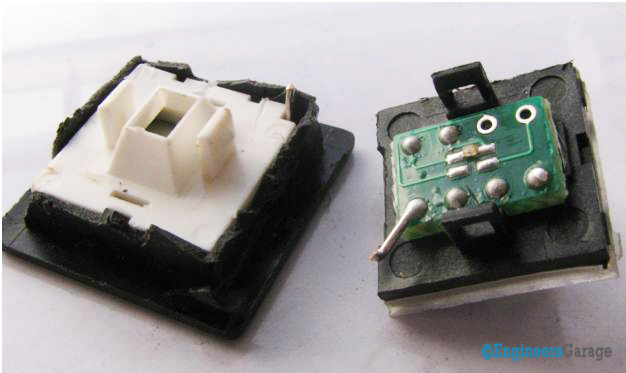
Figure 6. The PCB inside a capacitive touch sensor.

The PCB

After cutting the sensor into two halves, a clear view of the PCB is revealed (Figure 6). The PCB hosts various soldered components, including the metal wire, which is securely soldered onto it.

An LED is centrally positioned on the PCB and connected to its respective terminals.

The fluorescent plate and electrode

A white fluorescent plate is enclosed beneath the glass surface (Figure 7). Light emitted from the LED passes through the actuator and reflects off the fluorescent plate, illuminating markings (if present) on the glass surface. The glass surface serves as a protective covering, ensuring durability and visibility.
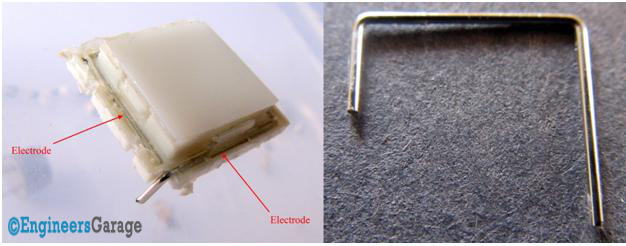
Figure 7. The white fluorescent plate (left) and an electrode (right).

The electrode

A metal wire, the electrode, surrounds the fluorescent plate (as shown in the image). The electrode is the core component of the device, as it detects changes in capacitance and transmits this change as a signal to the PCB.

Iron in the human body acts as a string of capacitors aligned to the body’s surface. When these capacitors come close to the glass surface, they create a capacitance coupled to the ground, leading to a measurable change in capacitance, which is then interpreted as a touch input.
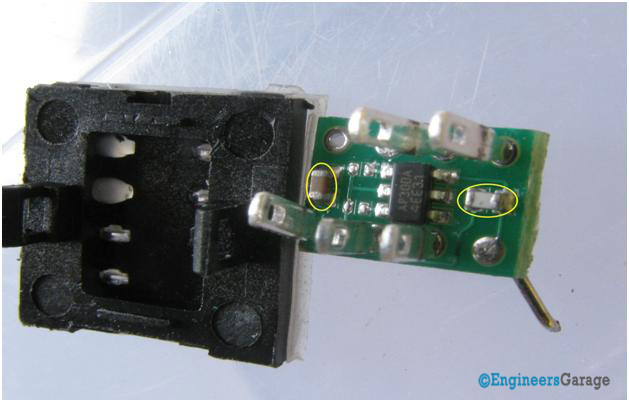
Figure 8. A closer look at the capacitive touch sensor’s PCB.

How the PCB works

Various soldered components can be observed after removing the PCB from its casing. The Touch Sensor IC, located at the center of the PCB, is responsible for sensing changes in capacitance.

To achieve this, the IC is connected to two reference ceramic capacitors, which help analyze changes in capacitance. The sensor electrode is also connected to the IC through a ceramic capacitor.

When a user touches the glass surface, the electrode carries the signal to the IC. This varying capacitance creates a frequency shift in the sensor oscillator circuit. The system oscillator circuit then reads this frequency change. It transmits it to the touch detection circuit, which accurately determines whether a valid touch has occurred and generates the corresponding output.


Filed Under: Insight
Tagged With: capacitive touch, capacitive touch sensor, sensor, touch, touch sensor
 

Next Article

← Previous Article
Next Article →

Questions related to this article?
👉Ask and discuss on Electro-Tech-Online.com and EDAboard.com forums.


Tell Us What You Think!! Cancel reply

You must be logged in to post a comment.

EE TECH TOOLBOX

“ee
Tech Toolbox: Internet of Things
Explore practical strategies for minimizing attack surfaces, managing memory efficiently, and securing firmware. Download now to ensure your IoT implementations remain secure, efficient, and future-ready.

EE Learning Center

EE Learning Center
“engineers
EXPAND YOUR KNOWLEDGE AND STAY CONNECTED
Get the latest info on technologies, tools and strategies for EE professionals.

HAVE A QUESTION?

Have a technical question about an article or other engineering questions? Check out our engineering forums EDABoard.com and Electro-Tech-Online.com where you can get those questions asked and answered by your peers!


RSS EDABOARD.com Discussions

  • Reducing "shoot-through" in offline Full Bridge SMPS?
  • High Side current sensing
  • How to simulate power electronics converter in PSpice?
  • Voltage mode pushpull is a nonsense SMPS?
  • Layout IRN reduction in Comparator

RSS Electro-Tech-Online.com Discussions

  • Back to the old BASIC days
  • Parts required for a personal project
  • PIC KIT 3 not able to program dsPIC
  • Failure of polypropylene motor-run capacitors
  • Siemens large industrial PLC parts

Featured – RPi Python Programming (27 Part)

  • RPi Python Programming 21: The SIM900A AT commands
  • RPi Python Programming 22: Calls & SMS using a SIM900A GSM-GPRS modem
  • RPi Python Programming 23: Interfacing a NEO-6MV2 GPS module with Raspberry Pi
  • RPi Python Programming 24: I2C explained
  • RPi Python Programming 25 – Synchronous serial communication in Raspberry Pi using I2C protocol
  • RPi Python Programming 26 – Interfacing ADXL345 accelerometer sensor with Raspberry Pi

Recent Articles

  • What is AWS IoT Core and when should you use it?
  • AC-DC power supply extends voltage range to 800 V DC
  • Infineon’s inductive sensor integrates coil system driver, signal conditioning circuits and DSP
  • Arm Cortex-M23 MCU delivers 87.5 µA/MHz active mode
  • STMicroelectronics releases automotive amplifiers with in-play open-load detection

EE ENGINEERING TRAINING DAYS

engineering

Submit a Guest Post

submit a guest post
Engineers Garage
  • Analog IC TIps
  • Connector Tips
  • Battery Power Tips
  • DesignFast
  • EDABoard Forums
  • EE World Online
  • Electro-Tech-Online Forums
  • EV Engineering
  • Microcontroller Tips
  • Power Electronic Tips
  • Sensor Tips
  • Test and Measurement Tips
  • 5G Technology World
  • Subscribe to our newsletter
  • About Us
  • Contact Us
  • Advertise

Copyright © 2025 WTWH Media LLC. All Rights Reserved. The material on this site may not be reproduced, distributed, transmitted, cached or otherwise used, except with the prior written permission of WTWH Media
Privacy Policy

Search Engineers Garage

  • Electronic Projects & Tutorials
    • Electronic Projects
      • Arduino Projects
      • AVR
      • Raspberry pi
      • ESP8266
      • BeagleBone
      • 8051 Microcontroller
      • ARM
      • PIC Microcontroller
      • STM32
    • Tutorials
      • Audio Electronics
      • Battery Management
      • Brainwave
      • Electric Vehicles
      • EMI/EMC/RFI
      • Hardware Filters
      • IoT tutorials
      • Power Tutorials
      • Python
      • Sensors
      • USB
      • VHDL
    • Circuit Design
    • Project Videos
    • Components
  • Articles
    • Tech Articles
    • Insight
    • Invention Stories
    • How to
    • What Is
  • News
    • Electronic Product News
    • Business News
    • Company/Start-up News
    • DIY Reviews
    • Guest Post
  • Forums
    • EDABoard.com
    • Electro-Tech-Online
    • EG Forum Archive
  • DigiKey Store
    • Cables, Wires
    • Connectors, Interconnect
    • Discrete
    • Electromechanical
    • Embedded Computers
    • Enclosures, Hardware, Office
    • Integrated Circuits (ICs)
    • Isolators
    • LED/Optoelectronics
    • Passive
    • Power, Circuit Protection
    • Programmers
    • RF, Wireless
    • Semiconductors
    • Sensors, Transducers
    • Test Products
    • Tools
  • Learn
    • eBooks/Tech Tips
    • Design Guides
    • Learning Center
    • Tech Toolboxes
    • Webinars & Digital Events
  • Resources
    • Digital Issues
    • EE Training Days
    • LEAP Awards
    • Podcasts
    • Webinars / Digital Events
    • White Papers
    • Engineering Diversity & Inclusion
    • DesignFast
  • Guest Post Guidelines
  • Advertise
  • Subscribe