Engineers Garage

  • Electronic Projects & Tutorials
    • Electronic Projects
      • Arduino Projects
      • AVR
      • Raspberry pi
      • ESP8266
      • BeagleBone
      • 8051 Microcontroller
      • ARM
      • PIC Microcontroller
      • STM32
    • Tutorials
      • Audio Electronics
      • Battery Management
      • Brainwave
      • Electric Vehicles
      • EMI/EMC/RFI
      • Hardware Filters
      • IoT tutorials
      • Power Tutorials
      • Python
      • Sensors
      • USB
      • VHDL
    • Circuit Design
    • Project Videos
    • Components
  • Articles
    • Tech Articles
    • Insight
    • Invention Stories
    • How to
    • What Is
  • News
    • Electronic Product News
    • Business News
    • Company/Start-up News
    • DIY Reviews
    • Guest Post
  • Forums
    • EDABoard.com
    • Electro-Tech-Online
    • EG Forum Archive
  • DigiKey Store
    • Cables, Wires
    • Connectors, Interconnect
    • Discrete
    • Electromechanical
    • Embedded Computers
    • Enclosures, Hardware, Office
    • Integrated Circuits (ICs)
    • Isolators
    • LED/Optoelectronics
    • Passive
    • Power, Circuit Protection
    • Programmers
    • RF, Wireless
    • Semiconductors
    • Sensors, Transducers
    • Test Products
    • Tools
  • Learn
    • eBooks/Tech Tips
    • Design Guides
    • Learning Center
    • Tech Toolboxes
    • Webinars & Digital Events
  • Resources
    • Digital Issues
    • EE Training Days
    • LEAP Awards
    • Podcasts
    • Webinars / Digital Events
    • White Papers
    • Engineering Diversity & Inclusion
    • DesignFast
  • Guest Post Guidelines
  • Advertise
  • Subscribe

Insight – Learn the Working of a Turbidity Sensor

By Ashutosh Bhatt March 1, 2025


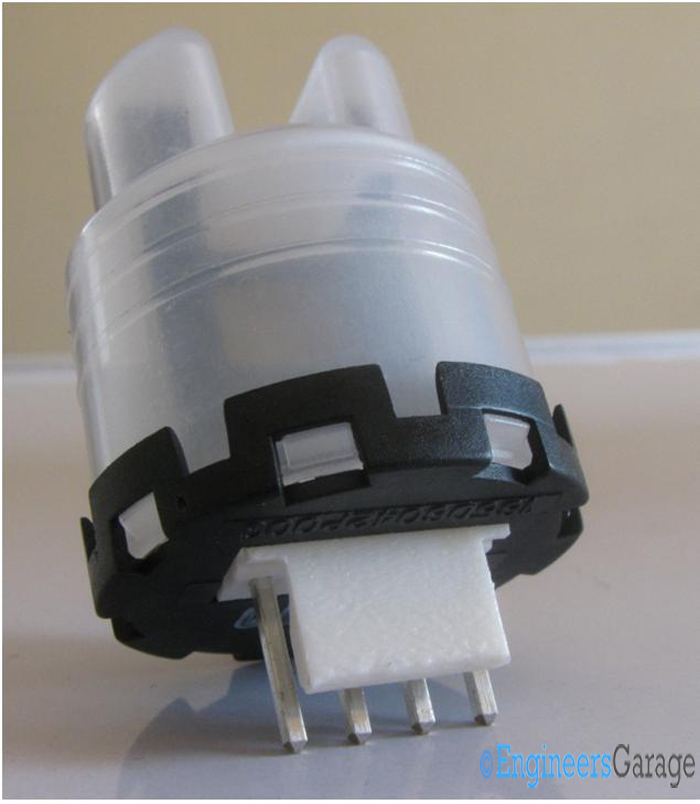
Figure 1. A typical turbidity sensor.

Turbidity is a quantitative measure of suspended particles in a fluid. These particles can range from soil in water to chocolate flakes in a milkshake. While chocolate is a welcome addition to a drink, soil particles are undesirable.

Beyond potable water applications, numerous industrial and household systems rely on water in some capacity. For example, a car uses water to clean the windshield, a power plant requires it to cool reactors, and washing machines and dishwashers depend on water much like fish rely on it for survival.

This raises an important question: how do these machines detect turbidity? Humans can rely on their senses to identify soil in water, but what about a washing machine? It has no eyes to see, no tongue to taste, and no skin to feel — just a plastic body, buttons, and a motor. How does it function intelligently based on the level of suspended soil?

(If you’re wondering whether it even does this, the answer is a resounding yes!)

The key lies in a 4.7 cm device: the turbidity sensor (Figure 1). Working in conjunction with a microcontroller unit, this sensor is responsible for turbidity measurements. Made of plastic and metal-alloy traces, the turbidity sensor uses light to determine water clarity and detect suspended particles.
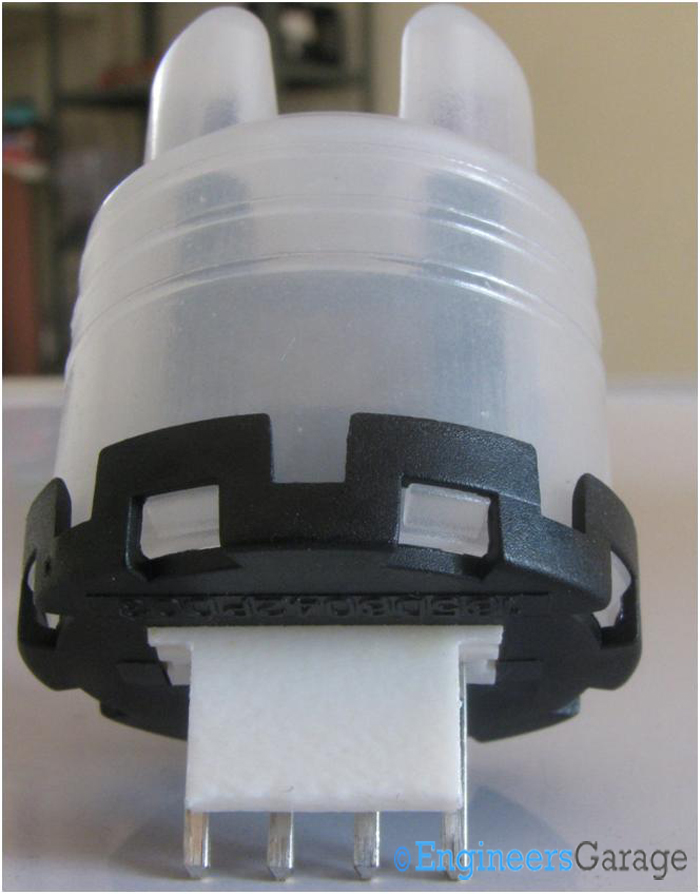
Figure 2. The outer structure of a turbidity sensor.

Figure 2 showcases the outer structure of a turbidity sensor. When viewed from the front, the sensor bears a resemblance to an Android bot, with two horn-like structures and a single-material body extending from top to bottom. A black cap is positioned at the bottom of the sensor, while thick alloyed contact legs allow for secure connections with various connectors. A white plastic slab protects these legs from damage and serves as a fixture to ensure a firm grip on the sensor.

The plastic used for the outer structure is designed to withstand significant temperature variations and resist mechanical abrasions, ensuring durability in various operating conditions.

The thermistor and the pinouts
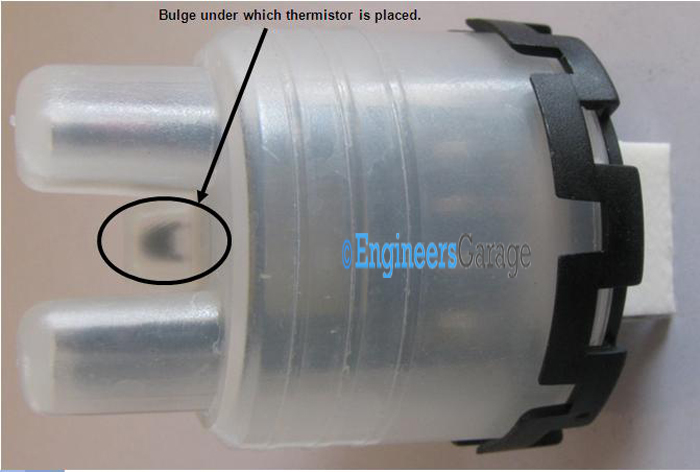
Figure 3. The lateral view and parts of the sensor.

Figure 3 is the lateral view of the sensor. It features external scales designed for a secure grip. Between the “horns,” a noticeable bulge houses the thermistor, enabling the sensor to measure temperature with precision.
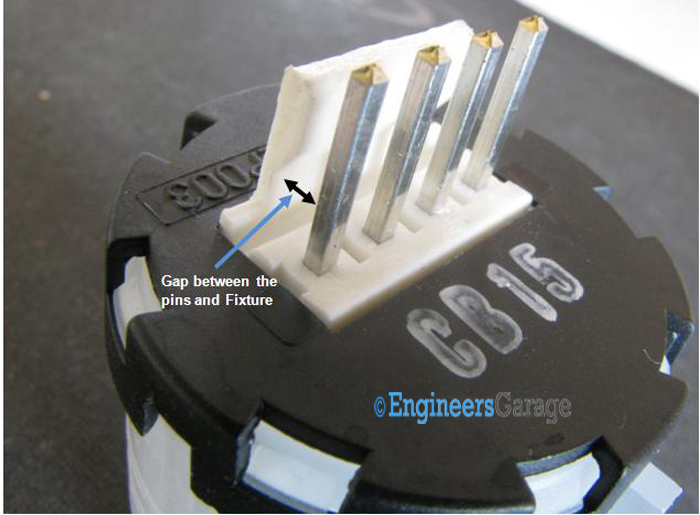
Figure 4. The connecting pins at the base of the sensor.

Connecting pins are at the base or bottom of the sensor (Figure 4). Extending from the base of the white plastic fixture, these pins are robust enough to withstand sudden jolts and unexpected mechanical forces.
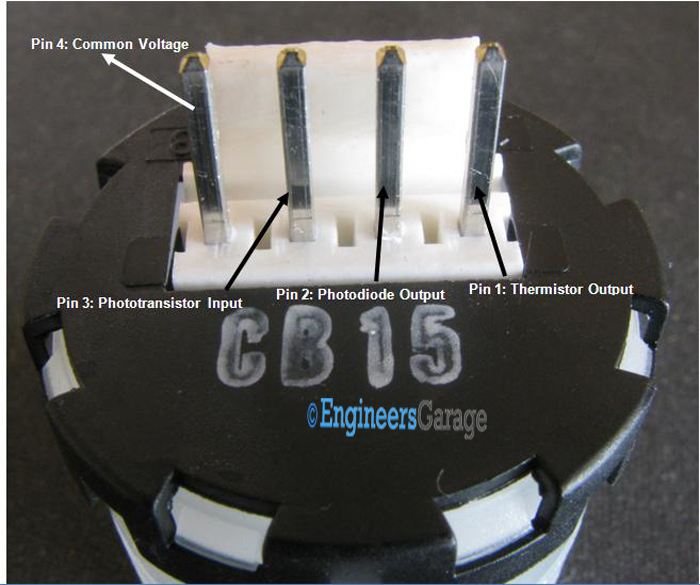
Figure 5. The description of the pin functions.

The pinouts are arranged from right to left (Figure 5).

Here’s what each pin represents:

  • Pin 1: Connects to the sensor’s thermistor and transmits its signal to the microcontroller of the device it is integrated with.
  • Pin 2: Links to the photodiode, which serves as the output component for turbidity measurements.
  • Pin 3: Acts as an extension of the phototransistor, functioning as the sensor’s input unit.
  • Pin 4: Serves as the common voltage connection for the sensor.

Notably, there is no dedicated ground pin. Instead, Pin 2 and Pin 3 are externally connected to ground when the sensor is mounted on a device.

Placement of the PCB
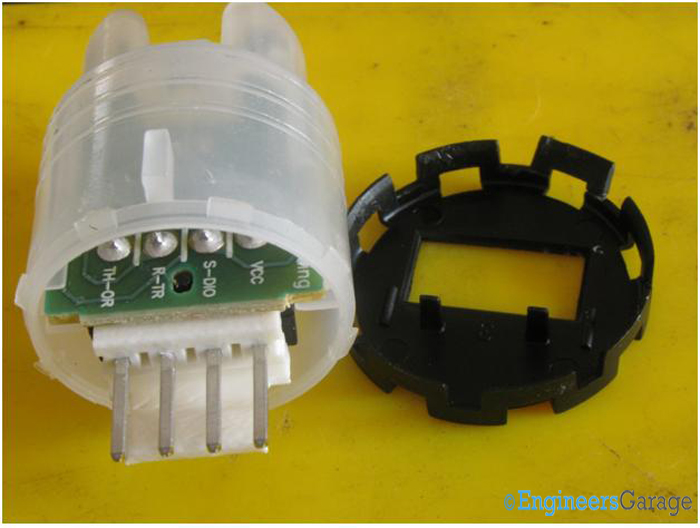
Figure 6. The placement of the PCB within the sensor.
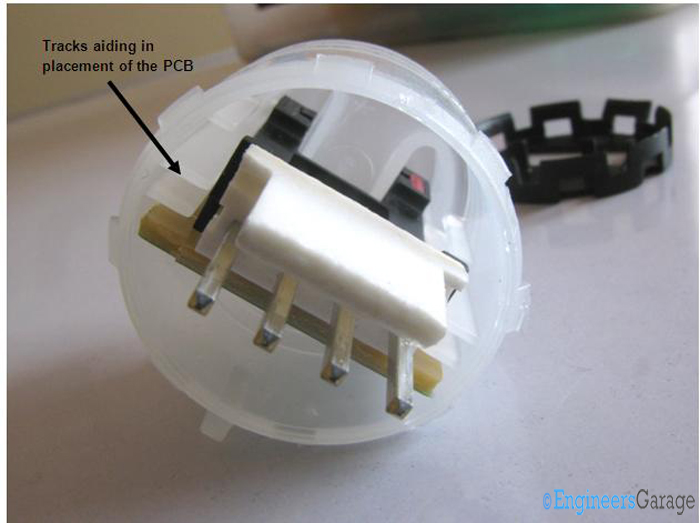
Figure 7. The tracking aid in the PCB.

The cap is securely attached to the transparent casing. Removing it reveals the internal circuitry in a single step. Inside the plastic chamber, all components are mounted on a PCB (Figure 6).

The PCB is positioned on a dedicated track that ensures its stability within the sensor (Figure 7).
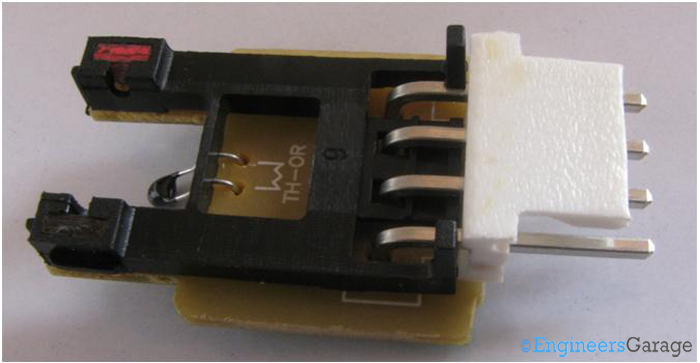
Figure 8. The components of the PCB.

The brown-colored PCB is largely covered by a black frame, with a thermistor positioned in a bent configuration (Figure 8). This bending allows the thermistor to align perfectly within the bulge of the transparent plastic casing, ensuring accurate temperature sensing.
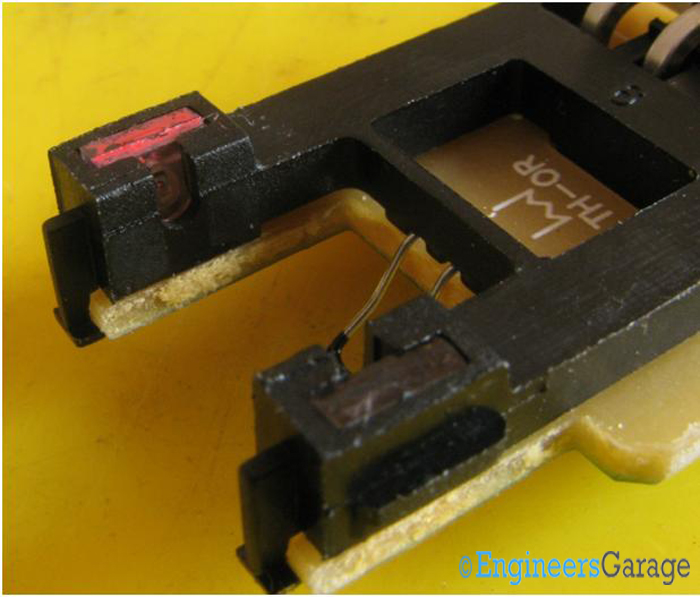
Figure 9. The phototransistor and a photodiode, which are soldered onto the PCB.

Upon close inspection, a phototransistor and a photodiode (Figure 9) can be seen soldered onto the PCB. These two components are positioned directly beneath the horn-like projections of the plastic casing, ensuring optimal light detection for turbidity measurement.
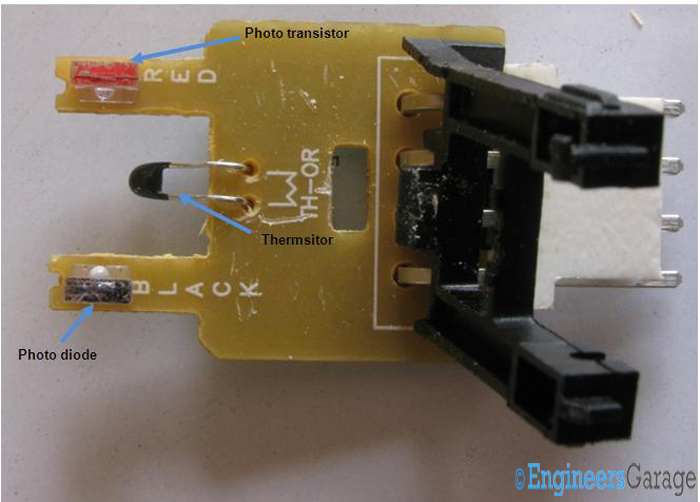
Arrangement of Components of Photodiode Region of PCB

Figure 10. The arrangement of the photodiode region’s component on the PCB.

The black plastic frame is lifted upward to provide a clear view of the phototransistor and photodiode regions of the sensor (Figure 10). The component soldered in red is the transistor, while the one in black is the diode.

The PCB’s components and connections
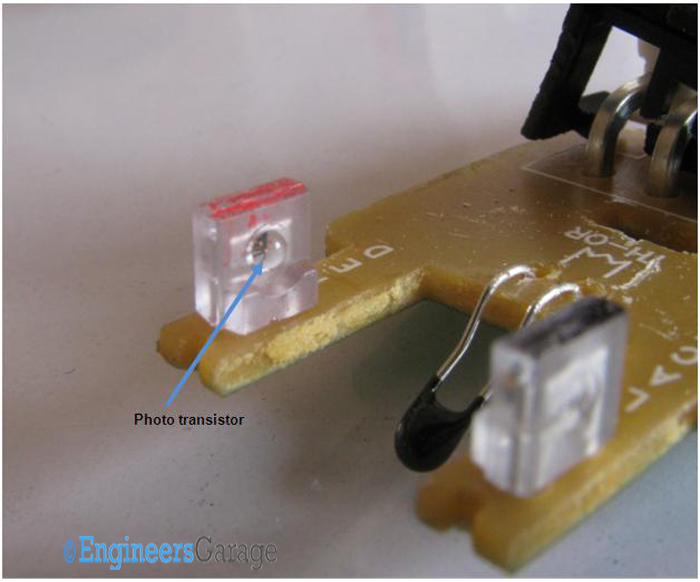
Figure 11. The phototransistor.
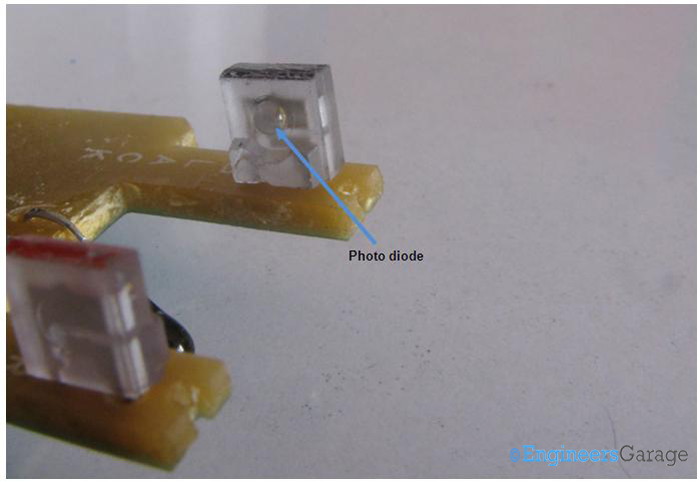
Figure 12. The photodiode.

Phototransistors and photodiodes have similar structures, requiring a reliable method for differentiation. One way to distinguish them is by measuring resistance in darkness — while a phototransistor (Figure 11) will produce an output, a photodiode (Figure 12) will not respond in terms of resistance due to the absence of light. This is why the sensor’s transparent casing is essential, as it facilitates light transmission between the phototransistor and photodiode.

Another distinguishing method is color coding, as implemented in this sensor.

Additionally, analyzing the PCB tracks on the reverse side can help identify which component is the photodiode and which is the phototransistor.
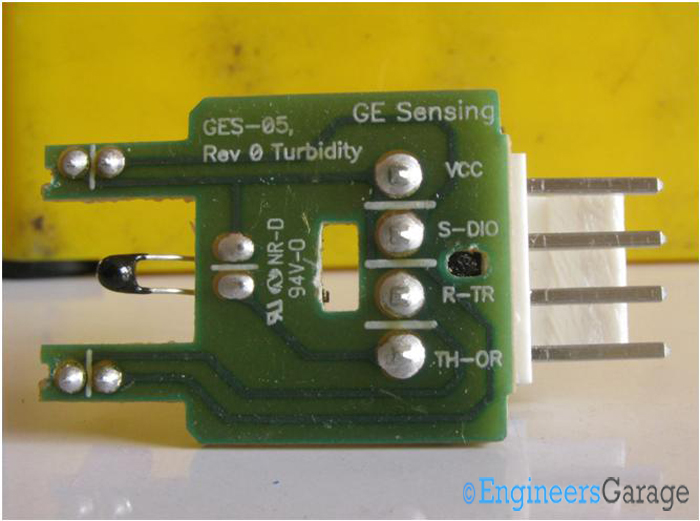
Figure 13. The layout of the PCB and its connections.

Since the sensor itself does not contain a microcontroller, understanding the function of its pinouts is essential. A closer look at the sensor’s PCB reveals the tracks connecting embedded components to their respective pins (Figure 13). Additionally, a faint sulfuric acid scent can be detected, indicating the presence of a conformal coating applied for protection.

The working principle of the turbidity sensor

Water flows between the two projections of the transparent plastic casing, where the phototransistor and photodiode are housed. The phototransistor emits light rays intended to reach the photodiode. However, when suspended particles are present in the water, they scatter the light, reducing the amount of light that reaches the photodiode.

This reduction in light intensity is then transmitted to an external microcontroller, which interprets the data and triggers appropriate actions. For example, in a dishwasher, if the water is highly turbid, the system may extend the washing cycle and reduce water recycling to ensure proper cleaning.


Filed Under: Insight
Tagged With: thermistor, turbidity, turbidity sensor
 

Next Article

← Previous Article
Next Article →

Questions related to this article?
👉Ask and discuss on Electro-Tech-Online.com and EDAboard.com forums.


Tell Us What You Think!! Cancel reply

You must be logged in to post a comment.

EE TECH TOOLBOX

“ee
Tech Toolbox: Internet of Things
Explore practical strategies for minimizing attack surfaces, managing memory efficiently, and securing firmware. Download now to ensure your IoT implementations remain secure, efficient, and future-ready.

EE Learning Center

EE Learning Center
“engineers
EXPAND YOUR KNOWLEDGE AND STAY CONNECTED
Get the latest info on technologies, tools and strategies for EE professionals.

HAVE A QUESTION?

Have a technical question about an article or other engineering questions? Check out our engineering forums EDABoard.com and Electro-Tech-Online.com where you can get those questions asked and answered by your peers!


RSS EDABOARD.com Discussions

  • Reducing "shoot-through" in offline Full Bridge SMPS?
  • High Side current sensing
  • How to simulate power electronics converter in PSpice?
  • Voltage mode pushpull is a nonsense SMPS?
  • Layout IRN reduction in Comparator

RSS Electro-Tech-Online.com Discussions

  • Back to the old BASIC days
  • Parts required for a personal project
  • PIC KIT 3 not able to program dsPIC
  • Failure of polypropylene motor-run capacitors
  • Siemens large industrial PLC parts

Featured – RPi Python Programming (27 Part)

  • RPi Python Programming 21: The SIM900A AT commands
  • RPi Python Programming 22: Calls & SMS using a SIM900A GSM-GPRS modem
  • RPi Python Programming 23: Interfacing a NEO-6MV2 GPS module with Raspberry Pi
  • RPi Python Programming 24: I2C explained
  • RPi Python Programming 25 – Synchronous serial communication in Raspberry Pi using I2C protocol
  • RPi Python Programming 26 – Interfacing ADXL345 accelerometer sensor with Raspberry Pi

Recent Articles

  • What is AWS IoT Core and when should you use it?
  • AC-DC power supply extends voltage range to 800 V DC
  • Infineon’s inductive sensor integrates coil system driver, signal conditioning circuits and DSP
  • Arm Cortex-M23 MCU delivers 87.5 µA/MHz active mode
  • STMicroelectronics releases automotive amplifiers with in-play open-load detection

EE ENGINEERING TRAINING DAYS

engineering

Submit a Guest Post

submit a guest post
Engineers Garage
  • Analog IC TIps
  • Connector Tips
  • Battery Power Tips
  • DesignFast
  • EDABoard Forums
  • EE World Online
  • Electro-Tech-Online Forums
  • EV Engineering
  • Microcontroller Tips
  • Power Electronic Tips
  • Sensor Tips
  • Test and Measurement Tips
  • 5G Technology World
  • Subscribe to our newsletter
  • About Us
  • Contact Us
  • Advertise

Copyright © 2025 WTWH Media LLC. All Rights Reserved. The material on this site may not be reproduced, distributed, transmitted, cached or otherwise used, except with the prior written permission of WTWH Media
Privacy Policy

Search Engineers Garage

  • Electronic Projects & Tutorials
    • Electronic Projects
      • Arduino Projects
      • AVR
      • Raspberry pi
      • ESP8266
      • BeagleBone
      • 8051 Microcontroller
      • ARM
      • PIC Microcontroller
      • STM32
    • Tutorials
      • Audio Electronics
      • Battery Management
      • Brainwave
      • Electric Vehicles
      • EMI/EMC/RFI
      • Hardware Filters
      • IoT tutorials
      • Power Tutorials
      • Python
      • Sensors
      • USB
      • VHDL
    • Circuit Design
    • Project Videos
    • Components
  • Articles
    • Tech Articles
    • Insight
    • Invention Stories
    • How to
    • What Is
  • News
    • Electronic Product News
    • Business News
    • Company/Start-up News
    • DIY Reviews
    • Guest Post
  • Forums
    • EDABoard.com
    • Electro-Tech-Online
    • EG Forum Archive
  • DigiKey Store
    • Cables, Wires
    • Connectors, Interconnect
    • Discrete
    • Electromechanical
    • Embedded Computers
    • Enclosures, Hardware, Office
    • Integrated Circuits (ICs)
    • Isolators
    • LED/Optoelectronics
    • Passive
    • Power, Circuit Protection
    • Programmers
    • RF, Wireless
    • Semiconductors
    • Sensors, Transducers
    • Test Products
    • Tools
  • Learn
    • eBooks/Tech Tips
    • Design Guides
    • Learning Center
    • Tech Toolboxes
    • Webinars & Digital Events
  • Resources
    • Digital Issues
    • EE Training Days
    • LEAP Awards
    • Podcasts
    • Webinars / Digital Events
    • White Papers
    • Engineering Diversity & Inclusion
    • DesignFast
  • Guest Post Guidelines
  • Advertise
  • Subscribe