Engineers Garage

  • Electronic Projects & Tutorials
    • Electronic Projects
      • Arduino Projects
      • AVR
      • Raspberry pi
      • ESP8266
      • BeagleBone
      • 8051 Microcontroller
      • ARM
      • PIC Microcontroller
      • STM32
    • Tutorials
      • Audio Electronics
      • Battery Management
      • Brainwave
      • Electric Vehicles
      • EMI/EMC/RFI
      • Hardware Filters
      • IoT tutorials
      • Power Tutorials
      • Python
      • Sensors
      • USB
      • VHDL
    • Circuit Design
    • Project Videos
    • Components
  • Articles
    • Tech Articles
    • Insight
    • Invention Stories
    • How to
    • What Is
  • News
    • Electronic Product News
    • Business News
    • Company/Start-up News
    • DIY Reviews
    • Guest Post
  • Forums
    • EDABoard.com
    • Electro-Tech-Online
    • EG Forum Archive
  • DigiKey Store
    • Cables, Wires
    • Connectors, Interconnect
    • Discrete
    • Electromechanical
    • Embedded Computers
    • Enclosures, Hardware, Office
    • Integrated Circuits (ICs)
    • Isolators
    • LED/Optoelectronics
    • Passive
    • Power, Circuit Protection
    • Programmers
    • RF, Wireless
    • Semiconductors
    • Sensors, Transducers
    • Test Products
    • Tools
  • Learn
    • eBooks/Tech Tips
    • Design Guides
    • Learning Center
    • Tech Toolboxes
    • Webinars & Digital Events
  • Resources
    • Digital Issues
    • EE Training Days
    • LEAP Awards
    • Podcasts
    • Webinars / Digital Events
    • White Papers
    • Engineering Diversity & Inclusion
    • DesignFast
  • Guest Post Guidelines
  • Advertise
  • Subscribe

Insight: A look inside the components of a webcam

By Ashutosh Bhatt May 5, 2021

A webcam is a device that captures images, audio, and video. They can be built into a computer or used as a separate, external device. 

Webcams are commonly used as cameras for remote video chats or recordings. The device generally consists of a lens, image and sound sensors, and electronic circuitry that processes and sends the data to the computer. 

There are many webcams available with different features. For example, some can block out background distractions, provide high-resolution and low-light correction, or auto-wake from sleep if movement is sensed within its vicinity. Other webcams integrate seamlessly with Zoom and Microsoft Teams for professional meetings. 

However, regardless of the features, the main functions of a webcam (providing video and audio) are the same.
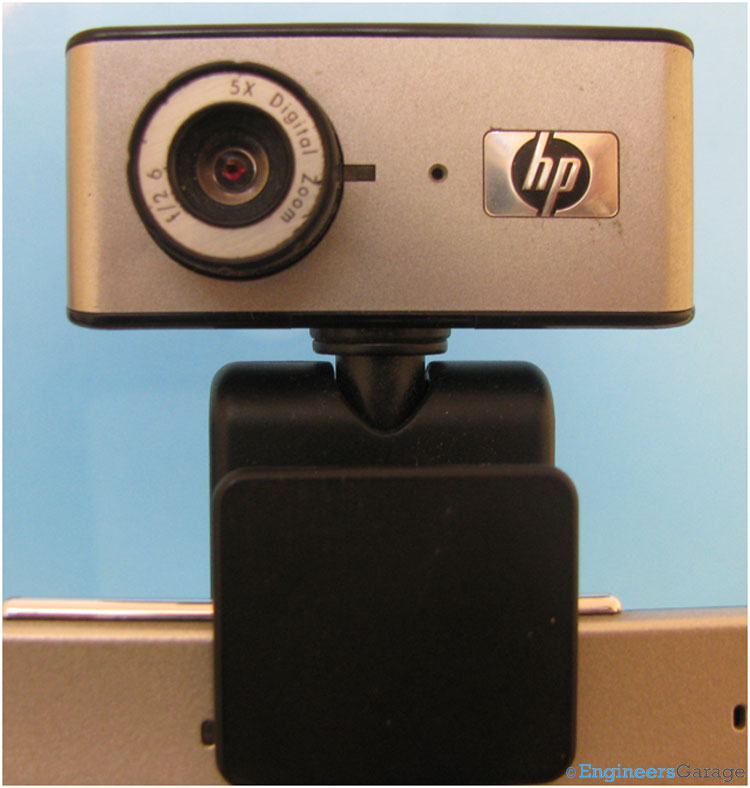
Image of Laptop Webcam

A typical webcam.

On the webcam in the above image, you can see the optical lens, which is used to capture images and videos. It has a small hole to a microphone to capture audio.

The base has a secure clip that affixes to the top of a computer.

The neck

Rotating Neck of Webcam

The HP webcam has a neck that rotates in different directions to capture video.

The neck of this HP webcam can rotate along the horizontal and vertical axis up to certain angles. The rotation is limited by means of mechanical stoppages, so the camera only goes so far.

Mechanical hooks
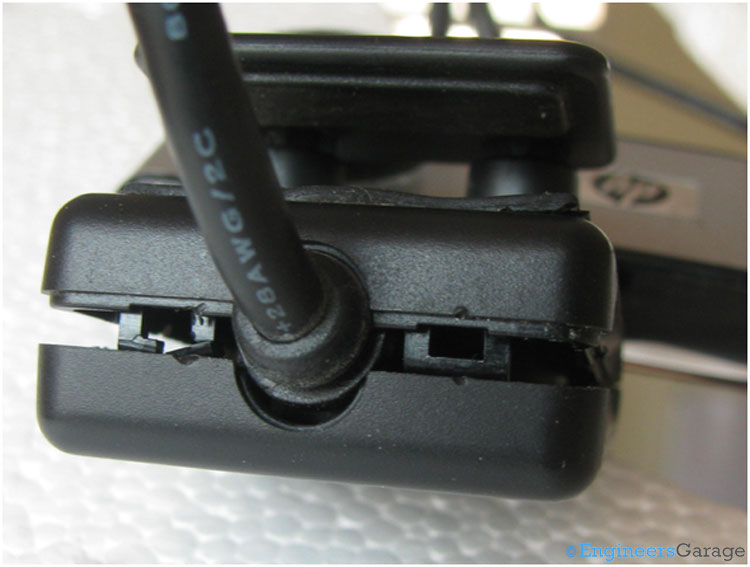
Image Indicating Hooks that Bind Together Front and Back of Webcam

The webcam is secured via hooks that hold its front and back together.

The front and back face of the webcam’s plastic casing are fixed to one another by four mechanical hooks. Two of them are visible in the above image and the other two are just opposite to them.

Assembly

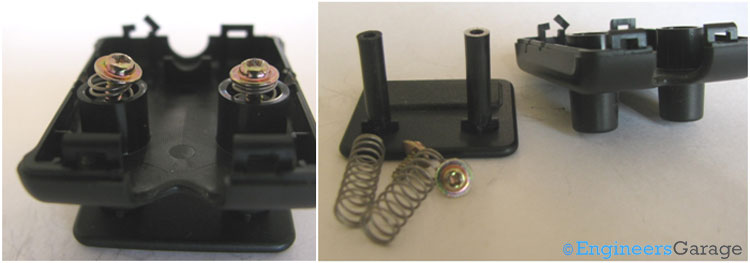
 Inside View of Plastic Casing

Inside the webcam’s plastic casing.

Spring-Loaded Screw Mechanism of Laptop

The spring-loaded components and screws holding the base of the webcam together.

The webcam’s base clamp uses spring-loaded screws to secure it on a laptop or PC. The front face of the clamp can be pulled open to fit on the top of the computer, with the spring forces securing it in place so it does not fall off.

Rotation mechanism
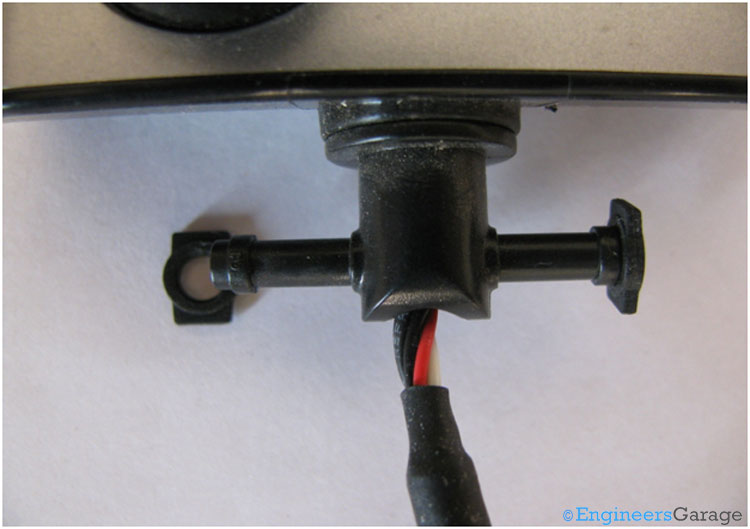
Image Indicating Mechanics of Neck Movement of Webcam

The inside mechanism, which allows the webcam to rotate.

The mechanical structure of the webcam’s neck is responsible for its motion along the horizontal and vertical axis. Two rubber rings at the end of a cylindrical rod have a unique shape to allow for this rotational movement. Also, the webcam’s casing has a slot for the rubber rings.
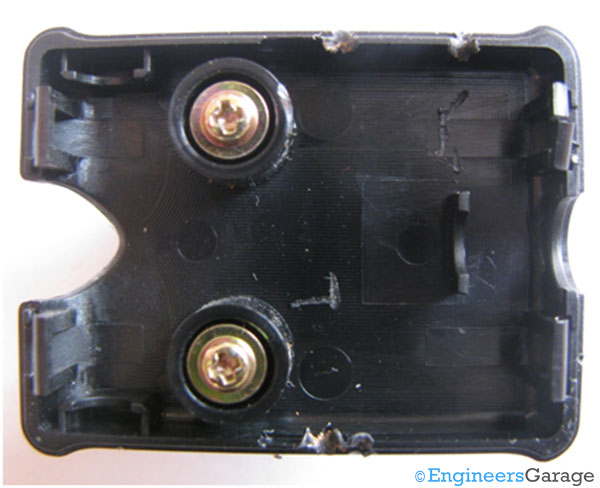
Plastic Casing with Slot for Rubber Rings

The webcam’s plastic casing with the slots for the rubber rings.

The internal structure
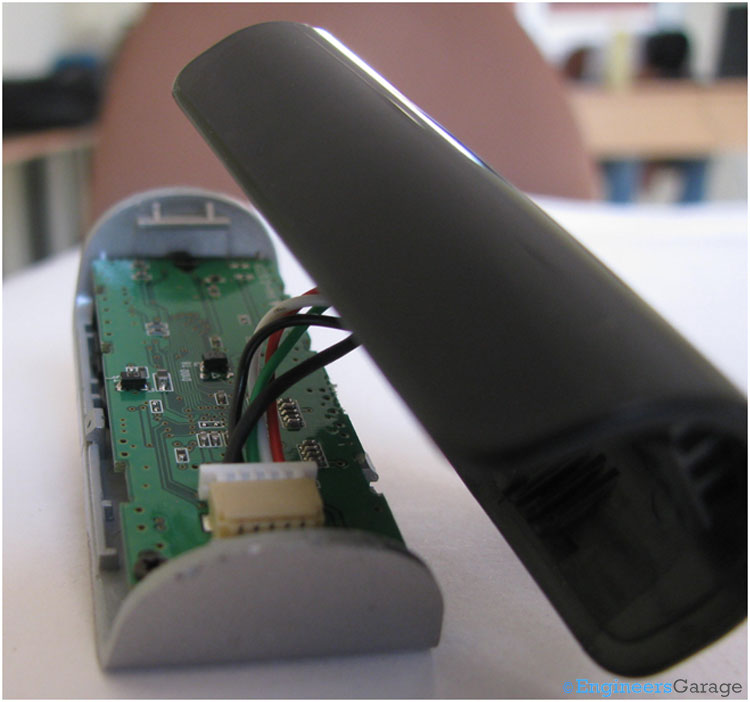
Electronic Circuitry at Top of Webcam

Inside the webcam with a view of its electronic circuitry.

The top part of the webcam contains a printed circuit board with all of the electronic circuitry required for the camera to do its job — recording videos and audio, or taking photos, and then sending the data to another device or computer. The circuitry is protected by plastic casings, which are connected by mechanical hooks.

The back of the PCB
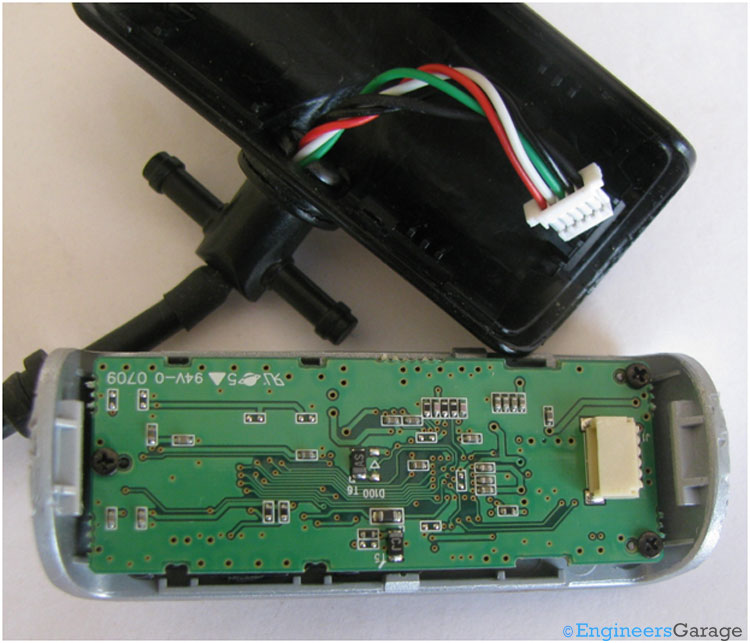
PCB and Wire Connections

The PCB and wire connections.

The front of the PCB
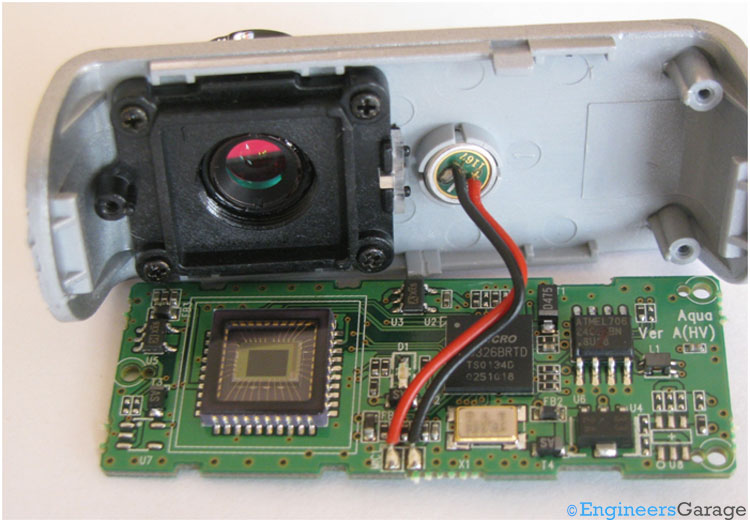
PCB Configuration

The front of the PCB configuration, which contains all of the electronic circuitry.

The other side of the PCB has the major components, including the camera lens, microphone, CMOS sensor, semiconductor chips etc. A CMOS sensors — which stands for complimentary metal-oxide semiconductor — is a type of image sensor that captures light and converts it into an electrical signal. CMOS sensors are commonly used in smartphones, digital cameras, and other electronic devices like webcams.

The microphone

Microphone and PCB Setting

The webcam’s microphone, which is connected to the PCB.

The microphone, which is also referred to as the webcam’s sound sensor, is used to capture audio signals, converting them into electrical signals for further processing by the processor. An electret condenser microphone is used for this purpose.

The CMOS sensor
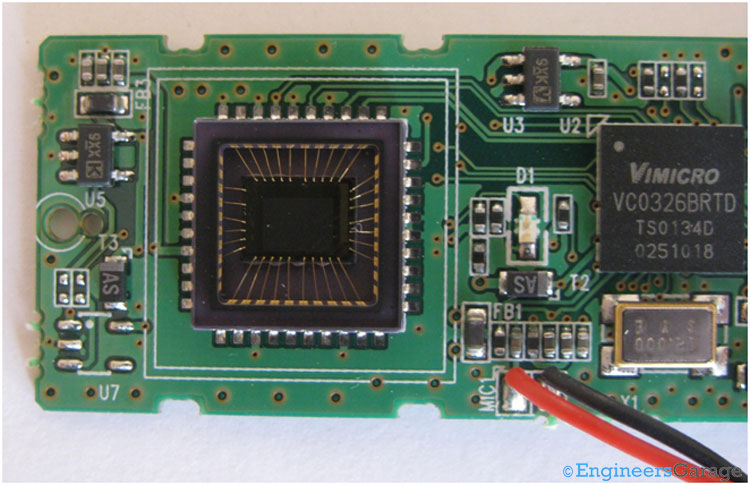
CMOS Image Sensor of Laptop Webcam

The CMOS image sensor.

The image and video sensor is one of the most essential parts of the webcam. A CMOS image sensor is used for this webcam, converting light into electrical signals. CMOS sensors are made up of an array of light-sensitive diodes, which convert optical light into electricity and then store it as a signal that a computer can read.

A CMOS sensor comprises an array of photodetectors with amplifiers, noise correction, and digitization circuits. As the name suggests, it uses CMOS, a common technology for manufacturing integrated circuits. The output of the CMOS sensor is digitalized signals. 

Electronic components
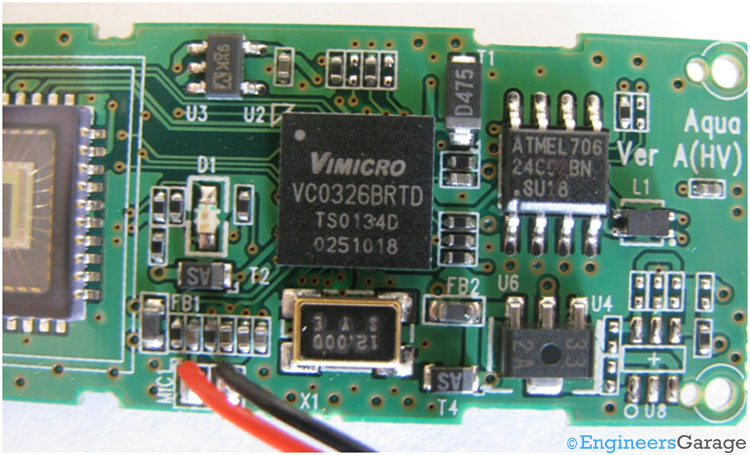
The integrated circuit (IC) and electronic circuitry of the webcam's PCB.

The integrated circuit (IC) and electronic circuitry of the webcam’s PCB.

The PCB’s electronic components comprise two major semiconductor integrated circuits (ICs). One is 24C02, a serial EEPROM memory manufactured by Atmel that stores data. It maintains this data even if the webcam is turned off.

The second circuit is VC0326 IC, manufactured by Vimicro. It has several embedded functions, including an 8-bit microcontroller, a 10-bit imaging processor, a JPEG encoder engine, an inbuilt ADC, and audio and video-class USB support.

The VC0326 IC also complies with the USB 2.0 protocols for transferring data to a laptop or PC. It collects the data from the image and sound sensors, processes it, and sends it to a computer using the USB.

The lens housing

Lens of Webcam and its Housing Pattern

The webcam’s lens and housing pattern.

The webcam’s lens is in a separate plastic housing screwed to the front casing. The housing ensures mechanical stability and protection from any potential external damage.

Close-up View of Lens

A close-up view of the webcam’s lens.

The outside lens of the webcam is made of plastic with a fixed focal length. The lens is used to focus the image of objects on the CMOS sensor. Its focal length and aperture size define its quality.


Filed Under: Insight
Tagged With: cmos, lens, microphone, webcam
 

Next Article

← Previous Article
Next Article →

Questions related to this article?
👉Ask and discuss on Electro-Tech-Online.com and EDAboard.com forums.


Tell Us What You Think!! Cancel reply

You must be logged in to post a comment.

EE TECH TOOLBOX

“ee
Tech Toolbox: Internet of Things
Explore practical strategies for minimizing attack surfaces, managing memory efficiently, and securing firmware. Download now to ensure your IoT implementations remain secure, efficient, and future-ready.

EE Learning Center

EE Learning Center
“engineers
EXPAND YOUR KNOWLEDGE AND STAY CONNECTED
Get the latest info on technologies, tools and strategies for EE professionals.

HAVE A QUESTION?

Have a technical question about an article or other engineering questions? Check out our engineering forums EDABoard.com and Electro-Tech-Online.com where you can get those questions asked and answered by your peers!


RSS EDABOARD.com Discussions

  • Reducing "shoot-through" in offline Full Bridge SMPS?
  • High Side current sensing
  • How to simulate power electronics converter in PSpice?
  • Voltage mode pushpull is a nonsense SMPS?
  • Layout IRN reduction in Comparator

RSS Electro-Tech-Online.com Discussions

  • Back to the old BASIC days
  • Parts required for a personal project
  • PIC KIT 3 not able to program dsPIC
  • Failure of polypropylene motor-run capacitors
  • Siemens large industrial PLC parts

Featured – RPi Python Programming (27 Part)

  • RPi Python Programming 21: The SIM900A AT commands
  • RPi Python Programming 22: Calls & SMS using a SIM900A GSM-GPRS modem
  • RPi Python Programming 23: Interfacing a NEO-6MV2 GPS module with Raspberry Pi
  • RPi Python Programming 24: I2C explained
  • RPi Python Programming 25 – Synchronous serial communication in Raspberry Pi using I2C protocol
  • RPi Python Programming 26 – Interfacing ADXL345 accelerometer sensor with Raspberry Pi

Recent Articles

  • What is AWS IoT Core and when should you use it?
  • AC-DC power supply extends voltage range to 800 V DC
  • Infineon’s inductive sensor integrates coil system driver, signal conditioning circuits and DSP
  • Arm Cortex-M23 MCU delivers 87.5 µA/MHz active mode
  • STMicroelectronics releases automotive amplifiers with in-play open-load detection

EE ENGINEERING TRAINING DAYS

engineering

Submit a Guest Post

submit a guest post
Engineers Garage
  • Analog IC TIps
  • Connector Tips
  • Battery Power Tips
  • DesignFast
  • EDABoard Forums
  • EE World Online
  • Electro-Tech-Online Forums
  • EV Engineering
  • Microcontroller Tips
  • Power Electronic Tips
  • Sensor Tips
  • Test and Measurement Tips
  • 5G Technology World
  • Subscribe to our newsletter
  • About Us
  • Contact Us
  • Advertise

Copyright © 2025 WTWH Media LLC. All Rights Reserved. The material on this site may not be reproduced, distributed, transmitted, cached or otherwise used, except with the prior written permission of WTWH Media
Privacy Policy

Search Engineers Garage

  • Electronic Projects & Tutorials
    • Electronic Projects
      • Arduino Projects
      • AVR
      • Raspberry pi
      • ESP8266
      • BeagleBone
      • 8051 Microcontroller
      • ARM
      • PIC Microcontroller
      • STM32
    • Tutorials
      • Audio Electronics
      • Battery Management
      • Brainwave
      • Electric Vehicles
      • EMI/EMC/RFI
      • Hardware Filters
      • IoT tutorials
      • Power Tutorials
      • Python
      • Sensors
      • USB
      • VHDL
    • Circuit Design
    • Project Videos
    • Components
  • Articles
    • Tech Articles
    • Insight
    • Invention Stories
    • How to
    • What Is
  • News
    • Electronic Product News
    • Business News
    • Company/Start-up News
    • DIY Reviews
    • Guest Post
  • Forums
    • EDABoard.com
    • Electro-Tech-Online
    • EG Forum Archive
  • DigiKey Store
    • Cables, Wires
    • Connectors, Interconnect
    • Discrete
    • Electromechanical
    • Embedded Computers
    • Enclosures, Hardware, Office
    • Integrated Circuits (ICs)
    • Isolators
    • LED/Optoelectronics
    • Passive
    • Power, Circuit Protection
    • Programmers
    • RF, Wireless
    • Semiconductors
    • Sensors, Transducers
    • Test Products
    • Tools
  • Learn
    • eBooks/Tech Tips
    • Design Guides
    • Learning Center
    • Tech Toolboxes
    • Webinars & Digital Events
  • Resources
    • Digital Issues
    • EE Training Days
    • LEAP Awards
    • Podcasts
    • Webinars / Digital Events
    • White Papers
    • Engineering Diversity & Inclusion
    • DesignFast
  • Guest Post Guidelines
  • Advertise
  • Subscribe