Engineers Garage

  • Electronic Projects & Tutorials
    • Electronic Projects
      • Arduino Projects
      • AVR
      • Raspberry pi
      • ESP8266
      • BeagleBone
      • 8051 Microcontroller
      • ARM
      • PIC Microcontroller
      • STM32
    • Tutorials
      • Audio Electronics
      • Battery Management
      • Brainwave
      • Electric Vehicles
      • EMI/EMC/RFI
      • Hardware Filters
      • IoT tutorials
      • Power Tutorials
      • Python
      • Sensors
      • USB
      • VHDL
    • Circuit Design
    • Project Videos
    • Components
  • Articles
    • Tech Articles
    • Insight
    • Invention Stories
    • How to
    • What Is
  • News
    • Electronic Product News
    • Business News
    • Company/Start-up News
    • DIY Reviews
    • Guest Post
  • Forums
    • EDABoard.com
    • Electro-Tech-Online
    • EG Forum Archive
  • DigiKey Store
    • Cables, Wires
    • Connectors, Interconnect
    • Discrete
    • Electromechanical
    • Embedded Computers
    • Enclosures, Hardware, Office
    • Integrated Circuits (ICs)
    • Isolators
    • LED/Optoelectronics
    • Passive
    • Power, Circuit Protection
    • Programmers
    • RF, Wireless
    • Semiconductors
    • Sensors, Transducers
    • Test Products
    • Tools
  • Learn
    • eBooks/Tech Tips
    • Design Guides
    • Learning Center
    • Tech Toolboxes
    • Webinars & Digital Events
  • Resources
    • Digital Issues
    • EE Training Days
    • LEAP Awards
    • Podcasts
    • Webinars / Digital Events
    • White Papers
    • Engineering Diversity & Inclusion
    • DesignFast
  • Guest Post Guidelines
  • Advertise
  • Subscribe

Difference Between Optical Mouse and Laser Mouse

By Ashutosh Bhatt May 20, 2013

 
Mouse is one of the most important peripheral for computers, especially for those which are not touch screen based. Fascinating is the concept that how various types of computer mice are available depending on the need, shape, pointing technology etc. There was a time when only ball mouse was prevalent. A proper surface was needed to make it work and regular cleaning was mandatory too. Then came in the optical technology giving us LED and laser based mice which, now has removed the barriers of wiring too. These optical mice are now the present and probably future of this palm sized computer peripheral. This article would detail with difference between a general optical mouse and its sub-type, a Laser mouse. Obviously, both these mice are based on light based tracking method but stand apart when detailed in numerous other terms.
     

     1. Technology Inception: Optical mouse technology was invented in the year 1980 but it took almost 2 decades to get to the commercial success threshold. Laser mouse was first seen in Sun computers’ servers and workstations. It was launched for day to day computing purposes in the year 2004 by Logitech.
 
      2. Light Source: Optical mouse can use LED or an array of photodiodes as their light source. Laser mice use infra red laser sources which are invisible to the naked eye. However, when photographed using a CCD sensor, a purple can be seen in the image.  As Laser and optical mouse would appear similar in their appearance, one can figure out the difference only by turning them upside down and comparing their light sources. Optical mice usually have a red, white or even blue colored light coming out of them whereas laser mice will have an infrared source which usually is not visible.
 
     3. Button Functionality: Optical mice come with a manufacturer setting of two buttons and one scrolling wheel or three buttons. Laser mice, on the other hand, carry much more functionality features as they have extra buttons which can be programmed by the user.  The number of buttons on a laser mouse can go as many as 12.
 
     4. DPI and Mouse Sensitivity: Dots per inch (DPI) is a measure of mouse sensitivity. It can be defined as the number of movements the mouse can sense when it is moved one inch. The higher the DPI of a mouse, more sensitive the mouse pointer would be.  The user can then expect more precise and accurate mouse-pointer experience.
 
5.   Generally laser mice are known to show a fairly high DPI than other optical mice.  An optical mouse is known to show DPI of upto 800 while laser mouse support DPI’s anywhere between 2000 and 3400. A few laser mice also allow DPI variations.
 
      5. Surface: Mouse have been known to work under a relatively softer platform known as mouse pad and most of the optical mouse need a mouse pad to work. These mice don’t work that well when working on shiny or highly reflective surfaces.
 However, surface is no constraint with the laser mouse. One can use them on something as hard as a coffee table or as soft as a bed.
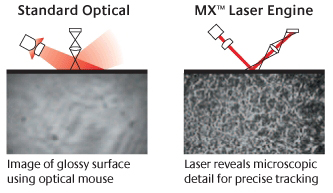
 

surface

Surface for Optical and Laser Mice

     6. Optical vs Laser Moues: Battery Consumption – When user goes to wireless mode of mouse pointing, standard optical mice are not that much encouraged as they have been known to struggle with battery back-up. Though there have been improvements in power usage and even type of batteries, not much satisfactory battery back-up has been grabbed from these mice.
On the other hand, laser mice give a better battery back-up and can run on for 8 months on Li-on batteries. It is recommended to use rechargeable batteries with any type of wireless mice as it would be more economical and better battery life would be possible.
 
      7. Optical vs Laser Mouse: User Experience – Optical mouse has definitely proved itself as a much improved version over the mechanical mouse. However, it cannot take down the supremacy that laser mouse has established in terms of user experience.  As the screen for the computer sizes up to 17inches and even larger sizes, it is desired that the mouse gives a good DPI. Here, Laser mice are always preferred than the simple optical ones. Also, laser mice are popular among gamers for their high precision and added hardware feature of extra buttons.
 
     8. Optical vs Laser Mouse Pricing: Both mice are available in economic prices but when one goes towards high end mice which are designed specifically for gaming, he would find laser mice normally. Apart from the laser based navigation technology, laser mice have a better plastic body which can be covered by Teflon and other non sticky coatings which promotes longer use.  Moreover, the DPI can be changed as per the output screen.
 
      9.  Optical vs Laser Moues Applications: Optical mice are more of general task mice which suffice enough to be used at homes, office and schools. When the user adapts to a larger screen or wants to work on graphics or wants to play high-end video games, it is more probable for he would use a laser mouse. Laser mice are also available with several modifications such as different surface texture, including a separate trackball etc. Some laser mice are also developed in a game specific manner where user can play the game using just a mouse.
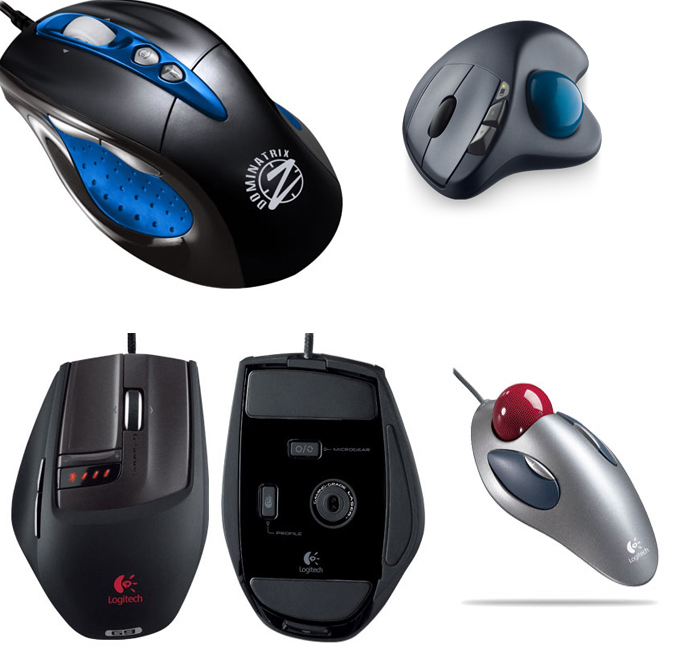
Types of Laser Mouse


Filed Under: How to
Tagged With: computer mouse, laser mouse, optical mouse
 

Next Article

← Previous Article
Next Article →

Questions related to this article?
👉Ask and discuss on Electro-Tech-Online.com and EDAboard.com forums.


Tell Us What You Think!! Cancel reply

You must be logged in to post a comment.

EE TECH TOOLBOX

“ee
Tech Toolbox: Internet of Things
Explore practical strategies for minimizing attack surfaces, managing memory efficiently, and securing firmware. Download now to ensure your IoT implementations remain secure, efficient, and future-ready.

EE Learning Center

EE Learning Center
“engineers
EXPAND YOUR KNOWLEDGE AND STAY CONNECTED
Get the latest info on technologies, tools and strategies for EE professionals.

HAVE A QUESTION?

Have a technical question about an article or other engineering questions? Check out our engineering forums EDABoard.com and Electro-Tech-Online.com where you can get those questions asked and answered by your peers!


RSS EDABOARD.com Discussions

  • Reducing "shoot-through" in offline Full Bridge SMPS?
  • High Side current sensing
  • How to simulate power electronics converter in PSpice?
  • Voltage mode pushpull is a nonsense SMPS?
  • Layout IRN reduction in Comparator

RSS Electro-Tech-Online.com Discussions

  • Back to the old BASIC days
  • Parts required for a personal project
  • PIC KIT 3 not able to program dsPIC
  • Failure of polypropylene motor-run capacitors
  • Siemens large industrial PLC parts

Featured – RPi Python Programming (27 Part)

  • RPi Python Programming 21: The SIM900A AT commands
  • RPi Python Programming 22: Calls & SMS using a SIM900A GSM-GPRS modem
  • RPi Python Programming 23: Interfacing a NEO-6MV2 GPS module with Raspberry Pi
  • RPi Python Programming 24: I2C explained
  • RPi Python Programming 25 – Synchronous serial communication in Raspberry Pi using I2C protocol
  • RPi Python Programming 26 – Interfacing ADXL345 accelerometer sensor with Raspberry Pi

Recent Articles

  • What is AWS IoT Core and when should you use it?
  • AC-DC power supply extends voltage range to 800 V DC
  • Infineon’s inductive sensor integrates coil system driver, signal conditioning circuits and DSP
  • Arm Cortex-M23 MCU delivers 87.5 µA/MHz active mode
  • STMicroelectronics releases automotive amplifiers with in-play open-load detection

EE ENGINEERING TRAINING DAYS

engineering

Submit a Guest Post

submit a guest post
Engineers Garage
  • Analog IC TIps
  • Connector Tips
  • Battery Power Tips
  • DesignFast
  • EDABoard Forums
  • EE World Online
  • Electro-Tech-Online Forums
  • EV Engineering
  • Microcontroller Tips
  • Power Electronic Tips
  • Sensor Tips
  • Test and Measurement Tips
  • 5G Technology World
  • Subscribe to our newsletter
  • About Us
  • Contact Us
  • Advertise

Copyright © 2025 WTWH Media LLC. All Rights Reserved. The material on this site may not be reproduced, distributed, transmitted, cached or otherwise used, except with the prior written permission of WTWH Media
Privacy Policy

Search Engineers Garage

  • Electronic Projects & Tutorials
    • Electronic Projects
      • Arduino Projects
      • AVR
      • Raspberry pi
      • ESP8266
      • BeagleBone
      • 8051 Microcontroller
      • ARM
      • PIC Microcontroller
      • STM32
    • Tutorials
      • Audio Electronics
      • Battery Management
      • Brainwave
      • Electric Vehicles
      • EMI/EMC/RFI
      • Hardware Filters
      • IoT tutorials
      • Power Tutorials
      • Python
      • Sensors
      • USB
      • VHDL
    • Circuit Design
    • Project Videos
    • Components
  • Articles
    • Tech Articles
    • Insight
    • Invention Stories
    • How to
    • What Is
  • News
    • Electronic Product News
    • Business News
    • Company/Start-up News
    • DIY Reviews
    • Guest Post
  • Forums
    • EDABoard.com
    • Electro-Tech-Online
    • EG Forum Archive
  • DigiKey Store
    • Cables, Wires
    • Connectors, Interconnect
    • Discrete
    • Electromechanical
    • Embedded Computers
    • Enclosures, Hardware, Office
    • Integrated Circuits (ICs)
    • Isolators
    • LED/Optoelectronics
    • Passive
    • Power, Circuit Protection
    • Programmers
    • RF, Wireless
    • Semiconductors
    • Sensors, Transducers
    • Test Products
    • Tools
  • Learn
    • eBooks/Tech Tips
    • Design Guides
    • Learning Center
    • Tech Toolboxes
    • Webinars & Digital Events
  • Resources
    • Digital Issues
    • EE Training Days
    • LEAP Awards
    • Podcasts
    • Webinars / Digital Events
    • White Papers
    • Engineering Diversity & Inclusion
    • DesignFast
  • Guest Post Guidelines
  • Advertise
  • Subscribe