Engineers Garage

  • Electronic Projects & Tutorials
    • Electronic Projects
      • Arduino Projects
      • AVR
      • Raspberry pi
      • ESP8266
      • BeagleBone
      • 8051 Microcontroller
      • ARM
      • PIC Microcontroller
      • STM32
    • Tutorials
      • Audio Electronics
      • Battery Management
      • Brainwave
      • Electric Vehicles
      • EMI/EMC/RFI
      • Hardware Filters
      • IoT tutorials
      • Power Tutorials
      • Python
      • Sensors
      • USB
      • VHDL
    • Circuit Design
    • Project Videos
    • Components
  • Articles
    • Tech Articles
    • Insight
    • Invention Stories
    • How to
    • What Is
  • News
    • Electronic Product News
    • Business News
    • Company/Start-up News
    • DIY Reviews
    • Guest Post
  • Forums
    • EDABoard.com
    • Electro-Tech-Online
    • EG Forum Archive
  • DigiKey Store
    • Cables, Wires
    • Connectors, Interconnect
    • Discrete
    • Electromechanical
    • Embedded Computers
    • Enclosures, Hardware, Office
    • Integrated Circuits (ICs)
    • Isolators
    • LED/Optoelectronics
    • Passive
    • Power, Circuit Protection
    • Programmers
    • RF, Wireless
    • Semiconductors
    • Sensors, Transducers
    • Test Products
    • Tools
  • Learn
    • eBooks/Tech Tips
    • Design Guides
    • Learning Center
    • Tech Toolboxes
    • Webinars & Digital Events
  • Resources
    • Digital Issues
    • EE Training Days
    • LEAP Awards
    • Podcasts
    • Webinars / Digital Events
    • White Papers
    • Engineering Diversity & Inclusion
    • DesignFast
  • Guest Post Guidelines
  • Advertise
  • Subscribe

Battery voltage/usage monitoring using Arduino and Simulink

By Usman ali Butt March 3, 2021

Simulink and MatLab are great tools to simulate and analyze an application. Simulink offers blocks (software, hardware, arithmetic, functional, electrical, etc.) which can be put together for monitoring or generating various kinds of functions and controls. Putting blocks together gives a clear image of the system. Through blocks, control and data flow sequentially.

Let’s see an example of data flow. An external hardware module (Arduino) will send data packets to Simulink. Simulink process the received data and displays the output on a graph.

Before beginning any further, I expect you are familiar with Simulink its blocks and its hardware support packages. Simulink offers hardware packages for various microcontrollers/processors/soc’s Arduino, intel processors, Stm32, FPGA’s, and various other development kits. Please make sure you have the Simulink Arduino support package installed. We will use the Arduino package in this example.

You can find the Arduino support package at Simulink > Simulink Support Package for Arduino Hardware. Under the support package, various blocks are grouped based on attributes.

Random input

Arduino analog pin can monitor analog voltage from 0 to 5 volts. We need just two blocks to visualize the analog input voltage: analog input block and display block.

Analog input block reads what is present on the Arduino analog pin. You must specify the analog pin in the properties of the block. Just click the block and enter the analog pin in the popped window.

The analog input block is equivalent to analogRead() function of Arduino. It returns a value between 0 to 1023. Arduino ADC (analog to dc converter) is 10 bits wide.

Plot block plots the input it receives. In our case, this is from Arduino analog pin#4. Plot X and Y-axis parameters can be set by double-clicking the block and inputting the parameters. By default, the data will be displayed on X-axis.

Place the blocks in the Simulink workspace and connect them. Connect Arduino to your PC. Now press the RUN button on Simulink. That’s all
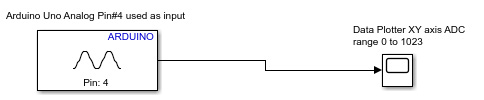
If the graph is not displaying, double-click the graph block while the simulation is running. The random value will display on the graph because our analog pin is open; nothing is connected to it. Attaching an analog source (variable resistor/potentiometer) to the analog pin will force the graph to display discrete and user-controlled inputs.

Converting analog range (0-1023) to TTL (0-5 volts)

The Arduino statement to convert from analog range to TTL is below. How can we implement this statement in Simulink?

Break the statement into chunks. Divide operation can be one chuck and multiply the other. Dividing 5/1023 results 0.00488. Multiply is between sensorValue (0-1023) and 0.00488. Select a multiply block from the arithmetic library and place it in the workspace.
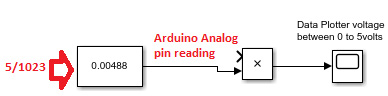
Select a constant block from Simulink general block category place. Place it in the workspace and initialize it with 0.00488. Block represents the same Arduino statement float i=0.00488. Now place a multiply block from the arithmetic block and connect its one input-output from a constant block.
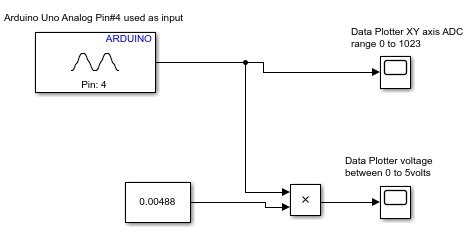
The other input of the multiply block is the Arduino analog input.  The whole system is represented above.

Battery voltage monitoring over time

Monitoring a DC battery voltage is nearly the same as what we studied so far. We need an ADC to measure the battery voltage.

Suppose we have a 12volt DC battery. We can’t connect the Arduino analog pin directly with 12 volts battery. Arduino is 5 volts tolerant so that Arduino analog pins can accept only 5 volts. Greater than 5 volts will burn the analog channel, and the probability of Arduino failure is high.

We need to lower the voltage for 5 volts tolerance. The voltage divider is a circuit to divide voltage. The voltage divider or resistor divider is composed of two resistors in series. Recall in series voltage divides among each resistor. The voltage drop across each resistor depends on the resistor value.

We need to select resistor values to increase the voltage by 5 volts in all conditions across the bottom resistor. A resistor divider circuit must be utilized to calculate the bottom resistor value. Select a fixed top resistor value.

In our case, Vout=5 volts, Rtop=Fixed (Suppose 12kohm), Vin=12 volts, Rbottom=?
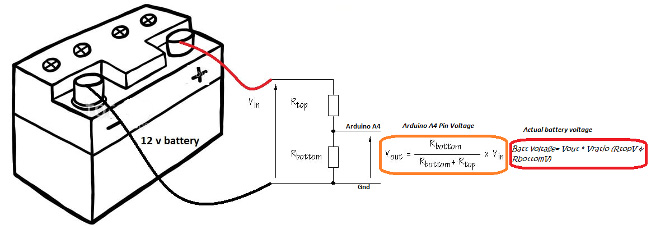
The bottom resistor voltage is input to the Arduino analog pin.


How can 5 volts input to Arduino yield battery voltage?

Answer=>Voltage divider ratio. We calculated the Rbottom resistance above. Now we have all the parameters. Vout, Vin, Rbottom, and Rtop.

The voltage divider ratio is input voltage divided by the voltage across Rbottom. This ratio always remains the same. I discussed this ratio in another tutorial. Visit it if you want to learn more about it.

Multiplying this ratio with the voltage gives us the exact battery voltage.

So in our Simulink system, we just need to add a multiplier, a constant(ratio), and a plotter. The end battery voltage monitoring system is shown below.
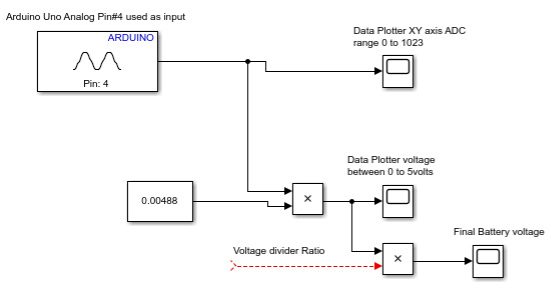
The advantage of Simulink is it is easy as it requires blocks which need to be placed in sequential order. The system is predictable, saves time, and debugging/finding errors is a lot easier than Arduino code. Moreover, we have plenty of blocks for almost every operation, from mechanical to electrical.

Let’s DIY this project: Where to purchase parts?

Mouser : Arduino
Mouser : Battery

You may also like:
  • battery types
    What are the different battery types for specific applications?

  • Robot Controlled through MATLAB GUI by RF Wireless Technology

  • Home Automation using Matlab and ArduinoIO

  • Arduino Modelling in MATLAB-Simulink

  • Use Arduino and Matlab Simulink to Blink an LED

Filed Under: Featured, Microcontroller Projects
Tagged With: Arduino, batteries, simulink
 

Next Article

← Previous Article
Next Article →

Questions related to this article?
👉Ask and discuss on Electro-Tech-Online.com and EDAboard.com forums.


Tell Us What You Think!! Cancel reply

You must be logged in to post a comment.

EE TECH TOOLBOX

“ee
Tech Toolbox: Internet of Things
Explore practical strategies for minimizing attack surfaces, managing memory efficiently, and securing firmware. Download now to ensure your IoT implementations remain secure, efficient, and future-ready.

EE Learning Center

EE Learning Center
“engineers
EXPAND YOUR KNOWLEDGE AND STAY CONNECTED
Get the latest info on technologies, tools and strategies for EE professionals.

HAVE A QUESTION?

Have a technical question about an article or other engineering questions? Check out our engineering forums EDABoard.com and Electro-Tech-Online.com where you can get those questions asked and answered by your peers!


RSS EDABOARD.com Discussions

  • High Side current sensing
  • Voltage mode pushpull is a nonsense SMPS?
  • Reducing "shoot-through" in offline Full Bridge SMPS?
  • How to simulate power electronics converter in PSpice?
  • Layout IRN reduction in Comparator

RSS Electro-Tech-Online.com Discussions

  • Back to the old BASIC days
  • Parts required for a personal project
  • PIC KIT 3 not able to program dsPIC
  • Failure of polypropylene motor-run capacitors
  • Siemens large industrial PLC parts

Featured – RPi Python Programming (27 Part)

  • RPi Python Programming 21: The SIM900A AT commands
  • RPi Python Programming 22: Calls & SMS using a SIM900A GSM-GPRS modem
  • RPi Python Programming 23: Interfacing a NEO-6MV2 GPS module with Raspberry Pi
  • RPi Python Programming 24: I2C explained
  • RPi Python Programming 25 – Synchronous serial communication in Raspberry Pi using I2C protocol
  • RPi Python Programming 26 – Interfacing ADXL345 accelerometer sensor with Raspberry Pi

Recent Articles

  • What is AWS IoT Core and when should you use it?
  • AC-DC power supply extends voltage range to 800 V DC
  • Infineon’s inductive sensor integrates coil system driver, signal conditioning circuits and DSP
  • Arm Cortex-M23 MCU delivers 87.5 µA/MHz active mode
  • STMicroelectronics releases automotive amplifiers with in-play open-load detection

EE ENGINEERING TRAINING DAYS

engineering

Submit a Guest Post

submit a guest post
Engineers Garage
  • Analog IC TIps
  • Connector Tips
  • Battery Power Tips
  • DesignFast
  • EDABoard Forums
  • EE World Online
  • Electro-Tech-Online Forums
  • EV Engineering
  • Microcontroller Tips
  • Power Electronic Tips
  • Sensor Tips
  • Test and Measurement Tips
  • 5G Technology World
  • Subscribe to our newsletter
  • About Us
  • Contact Us
  • Advertise

Copyright © 2025 WTWH Media LLC. All Rights Reserved. The material on this site may not be reproduced, distributed, transmitted, cached or otherwise used, except with the prior written permission of WTWH Media
Privacy Policy

Search Engineers Garage

  • Electronic Projects & Tutorials
    • Electronic Projects
      • Arduino Projects
      • AVR
      • Raspberry pi
      • ESP8266
      • BeagleBone
      • 8051 Microcontroller
      • ARM
      • PIC Microcontroller
      • STM32
    • Tutorials
      • Audio Electronics
      • Battery Management
      • Brainwave
      • Electric Vehicles
      • EMI/EMC/RFI
      • Hardware Filters
      • IoT tutorials
      • Power Tutorials
      • Python
      • Sensors
      • USB
      • VHDL
    • Circuit Design
    • Project Videos
    • Components
  • Articles
    • Tech Articles
    • Insight
    • Invention Stories
    • How to
    • What Is
  • News
    • Electronic Product News
    • Business News
    • Company/Start-up News
    • DIY Reviews
    • Guest Post
  • Forums
    • EDABoard.com
    • Electro-Tech-Online
    • EG Forum Archive
  • DigiKey Store
    • Cables, Wires
    • Connectors, Interconnect
    • Discrete
    • Electromechanical
    • Embedded Computers
    • Enclosures, Hardware, Office
    • Integrated Circuits (ICs)
    • Isolators
    • LED/Optoelectronics
    • Passive
    • Power, Circuit Protection
    • Programmers
    • RF, Wireless
    • Semiconductors
    • Sensors, Transducers
    • Test Products
    • Tools
  • Learn
    • eBooks/Tech Tips
    • Design Guides
    • Learning Center
    • Tech Toolboxes
    • Webinars & Digital Events
  • Resources
    • Digital Issues
    • EE Training Days
    • LEAP Awards
    • Podcasts
    • Webinars / Digital Events
    • White Papers
    • Engineering Diversity & Inclusion
    • DesignFast
  • Guest Post Guidelines
  • Advertise
  • Subscribe