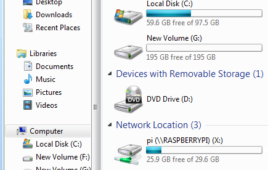
This article is to make the process of transferring files from a Windows PC to Raspberry Pi easier. The Raspberry Pi is connected to a Windows PC through Ethernet cable and the GUI is obtained using a VNC server. Sharing files between Raspberry Pi and Windows is often very useful for Raspberry Pi users. Whether we need to transfer media files to the Raspberry Pi or want to share some software packages. This article discusses how to enable file sharing for a folder on the Raspberry Pi running the Raspbian OS.Microsoft developed the protocol called Common Internet File System (CIFS) for transfer of files between windows machines. The most popular implementation of CIFS in LINUX system is known as Samba and it allows Raspberry Pi to act as a CIFS file server, which allows a Windows PC to mount a folder on a Raspberry Pi and then allowing to modify(copy, delete, read and write) the files on it.
How to use Raspberry Pi to monitor and log environmental parameters
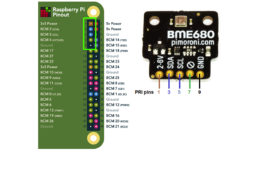
In this tutorial, we’ll learn how to interface the four-in-one BME680 pressure, gas, humidity, and temperature sensor with Raspberry Pi (RPi). This will include understanding how to log and retrieve data from a database. The BME680 can “communicate” with external controllers on either the serial peripheral interface (SPI) and I2C protocols. For this project, we’ll…
Raspberry Pi-based smart home security system
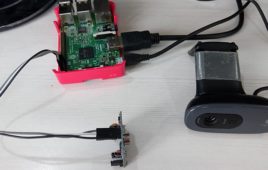
Home Security Systems are a need of the modern day houses. It is possible to design a simple home security solution by using Raspberry Pi and utilizing the power of Internet of Things. The home security system designed in this project is a simple and easily installable device built using Raspberry Pi 3, Web Cam and PIR Motion Sensor. The Raspberry Pi 3 Model B comes equipped with on-board Bluetooth (BLE) and Wi-Fi (BCM43438 Wireless LAN), so, it can be easily connected with a Wi-Fi Router to access a cloud service.
Raspberry Pi camera QR code encoding and decoding
This tutorial is about creating a QR code (quick response code) using Raspberry Pi B and Python 3.7. QR code is an optical machine-readable code. Optical means it can be decoded using any camera device. A direct competitor of QR code is Bar code. QR’s advantage over Bar Code is it’s faster to read and…
The pros and cons of the Raspberry Pi 400
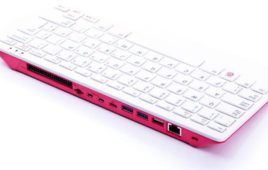
In many ways, Raspberry Pi falls short as a full-fledged personal computer. The Raspberry Pi Foundation has tried to change this with its latest addition, the Raspberry Pi 400. Launched in November of 2020, the Raspberry Pi 400 is a single-board computer in the form of a keyboard, retailing at $70 per unit or $100…
Raspberry Pi camera QR-code scanning
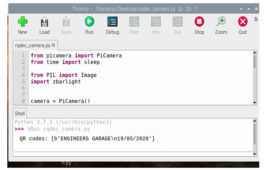
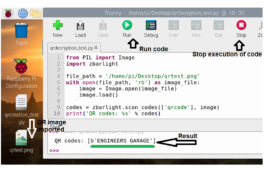
This tutorial will teach you how to scan QR codes using the Raspberry Pi module and the official Raspberry Pi camera. To attach the camera to the Raspberry pi, we use a dedicated header is available onboard. You can also use a USB camera with Raspberry Pi. The disadvantage is USB interface is slow. Also,…
Getting started with Raspberry Pi
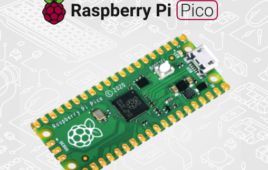
Raspberry Pi Pico is a low-cost, high-performance microcontroller board built on silicon with flexible digital interfaces. Whether you choose to use the C/C++ SDK or the official MicroPython port, everything you need to get started is available here. Key features: RP2040 microcontroller chip designed by Raspberry Pi in the UK Dual-core Arm Cortex M0+ processor,…
Optical Character Recognition Robot- (Part 12/12)
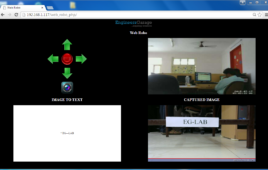
In this project, our ultimate goal is to find and solve the different requirements in making a web controlled robot that recognizes and converts textual messages placed in real world to the computer readable text files. Our objective is to integrate the appropriate techniques to explain and prove that such capability, using their limited hardware and software capabilities and not to develop new character recognition algorithms or hardware for doing that.
Streaming Videos using Webcam- (Part 10/12)
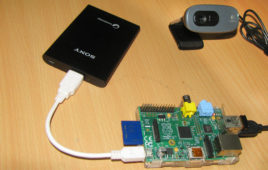
This article is to provide step by step instructions for making Raspberry Pi as a webcam server where we can live stream video over a local network using python scripts and some required packages. A software package used in this tutorial is Motion which is an open source software with a number of configuration options which can be changed according to our needs.
RPi Python Programming 27 – SPI protocol explained
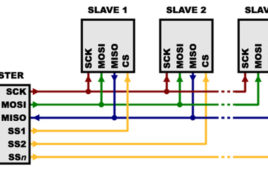
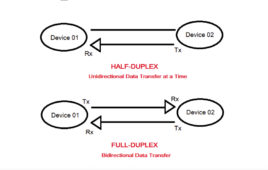
In the previous tutorial, we discussed interfacing with the ADXL345 accelerometer sensor with Raspberry Pi using the I2C interface. UART, I2C, and SPI are the most common serial communication interfaces used in embedded systems. UART is used for point-to-point full-duplex asynchronous serial communication between two devices. I2C is used for synchronous serial communication among multiple…
How to use Alarm Signal in Raspberry Pi -(Part 19/38)
The operating systems like Archlinux ARM, OpenELEC, Pidora, Raspbmc, RISC OS and the Raspbian and also Ubuntu versions are available for the Raspberrypi board. Linux operating systems especially Ubuntu is preferred for all kind of programming and development. The immediate advantage of having an Operating System like Ubuntu running on an embedded system device is multitasking. The Raspberrypi is a board actually designed for helping computer education for remote schools but it is a nice platform for programmers especially beginners to explore various coding techniques. In a multi-tasking system several processes will be running at a time. The Operating System can control a process by sending signals to it. A user can sometimes initiate a signal sending and the processes can also send signals to each other. This project demonstrates how a process can receive the signal called SIGALRM from the OS and use it.
How to Access Raspberry Pi Directly through the Ethernet Port of PC – (Part 03/38)
The Raspberry pi is a single board minicomputer which has only the essential hardware included so as to meet the goal of low cost. The board is Raspberry pi board runs on ARM11 processor but is available at extremely cheap price. The board is designed with an intention of providing computer education to the remote schools where the PCs are not very commonly used. The idea behind the design is to use the TV screen as the display unit for the Raspberry pi board and hence converting the normal TV into a computer. The board is hence provided with a RCA connector which can be used to connect it directly to a TV screen which is based on PAL and NTSC standard. The board also has a HDMI connector output which can be used to connect the board to a HD TV.
RPi Python Programming 19: Serial UART communication on RPi’s TTL port
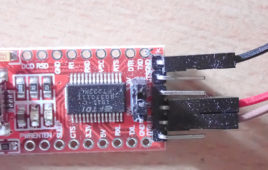
In the previous tutorial, we discussed the universal asynchronous receiver-transmitter (UART) protocol and voltage levels, covering USB-serial boards and other serial adaptors. We also learned how to find a serial port name on Linux, Windows, macOS, and Raspberry Pi (RPi). In this tutorial, we’ll learn how to use the Python Serial library to setup bidirectional…
RPi Python Programming 18 – Serial UART communication on Raspberry Pi’s TTL port
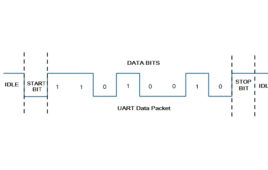
In the previous tutorial, we discussed serial communication protocols available on Raspberry Pi. We discussed the terminology of data communication and defined the terms like ‘port’, ‘bus’, ‘interface’, ‘protocol’ and ‘standard’. We talked about UARTs on Raspberry Pi and how these UARTs are referenced by different serial Linux device names when they are accessed through…
RPi Python Programming 17: Serial communication using UART protocol
In the previous tutorial, we learned how to generate analog output in the form of software PWM when using Raspberry Pi (RPi). We also showed how software PWM can be used to fade an LED. The PWM output can also be used for other applications, such as for speed control of a DC motor or…
RPi Python Programming 16: Analog output and software PWM
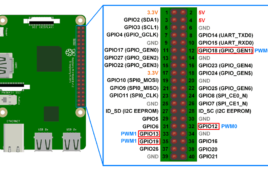
In the previous tutorial, we learned how to use digital input with Raspberry Pi. Raspberry Pi (RPi), as an embedded computer, is capable of digital input, digital output, pulse width modulation (PWM), and the implementation of several serial communication protocols (such as UART/USART, I2C, and SPI). In this tutorial, we’ll cover analog output by using PWM with…
RPi Python Programming 15: Interfacing a push button & digital input
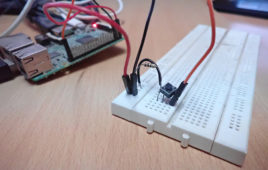
In the previous tutorial, we discussed how to use a digital output on Raspberry Pi. We designed a GUI-controlled LED driver, demonstrating how single-board computer features — like high-level language (HLL) such as Python — can control embedded applications. Microcontroller-based embedded applications are typically programmed in low-level languages, such as in Assembly Language or embedded…
RPi Python Programming 14: GUI-controlled LED driver
In the previous tutorial, we covered TTK menus, layout management in the Tk GUI toolkit, and mouse and keyboard events in Tkinter/TTK. We also discussed multi-threading in Python and created our own class of a threading package. This means we can implement our Raspberry Pi (RPi) codes exactly as if they are running on a…
Top 11 applications of Raspberry Pi
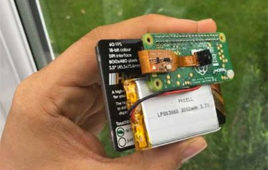
Raspberry Pi is an amazing credit card-sized development board that can serve varied purposes for hackers, hobbyists, artists, as well as students. One of the most versatile application boards, it is believed that it can only be used for some common programming purposes especially the ones related to IoT or AI. In this blog, we will be breaking that myth and show you the versatility of this system and how it can make a difference to our lives in a long run. Let’s get on with it then.
RPi Python Programming 13: TTK menus, layout management, events & multi-threading

In the previous tutorial, we covered Tkinter and TTK widgets. With the help of these widgets, we’ll create user interfaces to control embedded electronics. We have already created a blank GUI window for our Raspberry Pi (RPi) embedded electronics control app. In this tutorial, we’ll learn about TTK menus and create one for our RPi…