Engineers Garage

  • Electronic Projects & Tutorials
    • Electronic Projects
      • Arduino Projects
      • AVR
      • Raspberry pi
      • ESP8266
      • BeagleBone
      • 8051 Microcontroller
      • ARM
      • PIC Microcontroller
      • STM32
    • Tutorials
      • Audio Electronics
      • Battery Management
      • Brainwave
      • Electric Vehicles
      • EMI/EMC/RFI
      • Hardware Filters
      • IoT tutorials
      • Power Tutorials
      • Python
      • Sensors
      • USB
      • VHDL
    • Circuit Design
    • Project Videos
    • Components
  • Articles
    • Tech Articles
    • Insight
    • Invention Stories
    • How to
    • What Is
  • News
    • Electronic Product News
    • Business News
    • Company/Start-up News
    • DIY Reviews
    • Guest Post
  • Forums
    • EDABoard.com
    • Electro-Tech-Online
    • EG Forum Archive
  • DigiKey Store
    • Cables, Wires
    • Connectors, Interconnect
    • Discrete
    • Electromechanical
    • Embedded Computers
    • Enclosures, Hardware, Office
    • Integrated Circuits (ICs)
    • Isolators
    • LED/Optoelectronics
    • Passive
    • Power, Circuit Protection
    • Programmers
    • RF, Wireless
    • Semiconductors
    • Sensors, Transducers
    • Test Products
    • Tools
  • Learn
    • eBooks/Tech Tips
    • Design Guides
    • Learning Center
    • Tech Toolboxes
    • Webinars & Digital Events
  • Resources
    • Digital Issues
    • EE Training Days
    • LEAP Awards
    • Podcasts
    • Webinars / Digital Events
    • White Papers
    • Engineering Diversity & Inclusion
    • DesignFast
  • Guest Post Guidelines
  • Advertise
  • Subscribe

How to play MP3 files on Arduino using the DFPlayer Mini or the MP3-TF-16P

By Nikhil Agnihotri June 11, 2024

Including an audio option with an electronic or Internet-of-Things (IoT) project is often an ideal addition. However, microcontrollers cannot process MP3 files, which is the most common audio file format. Fortunately, there is a solution.

It is possible to play MP3 audio files on Arduino using dedicated MP3 decoders like the DFPlayer Mini or MP3-TF-16P.

DFPlayer Mini is a popular original MP3 decoder for Arduino. But if you ordered the DFPlayer Mini module online, you may have received the MP3-TF-16P instead of the original DFPlayer. Both modules look identical and have the same pin configuration but use different chipsets.

The issue is if you try to run audio files using the MP3-TF-16P module and Arduino’s libraries for the DFPlayer Mini. The MP3-TF-16P uses a different chipset despite having the same chipset as the DFPlayer Mini. The popular libraries for the DFPlayer Mini fail to run on MP3-TF-16P because of the different chipset features.

In this project, we’ll explain how to play MP3 files on Arduino using the MP3-TF-16P module. The code provided here also works on the original DFPlayer Mini, as both chipsets have the same instruction set.

Components required

  1. Arduino Mega/UNO x1
  2. DFPlayer Mini/MP3-TF-16P x1  
  3. TDA2030 Audio Power Amplifier module x1
  4. 4Ω/8Ω Speaker x1
  5. 10K Resistors x2
  6. Connecting/Dupont wires

Circuit connections

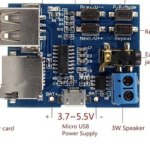
We’ll need to interface the DFPlayer Mini or the MP3-TF-16P with Arduino to play MP3 audio files on Arduino. Both modules have the same pinout which is shown in the below image.
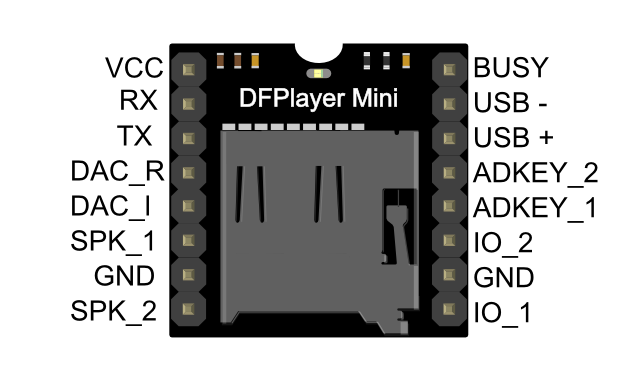
To interface the DFPlayer Mini or MP3-TF-16P with Arduino:

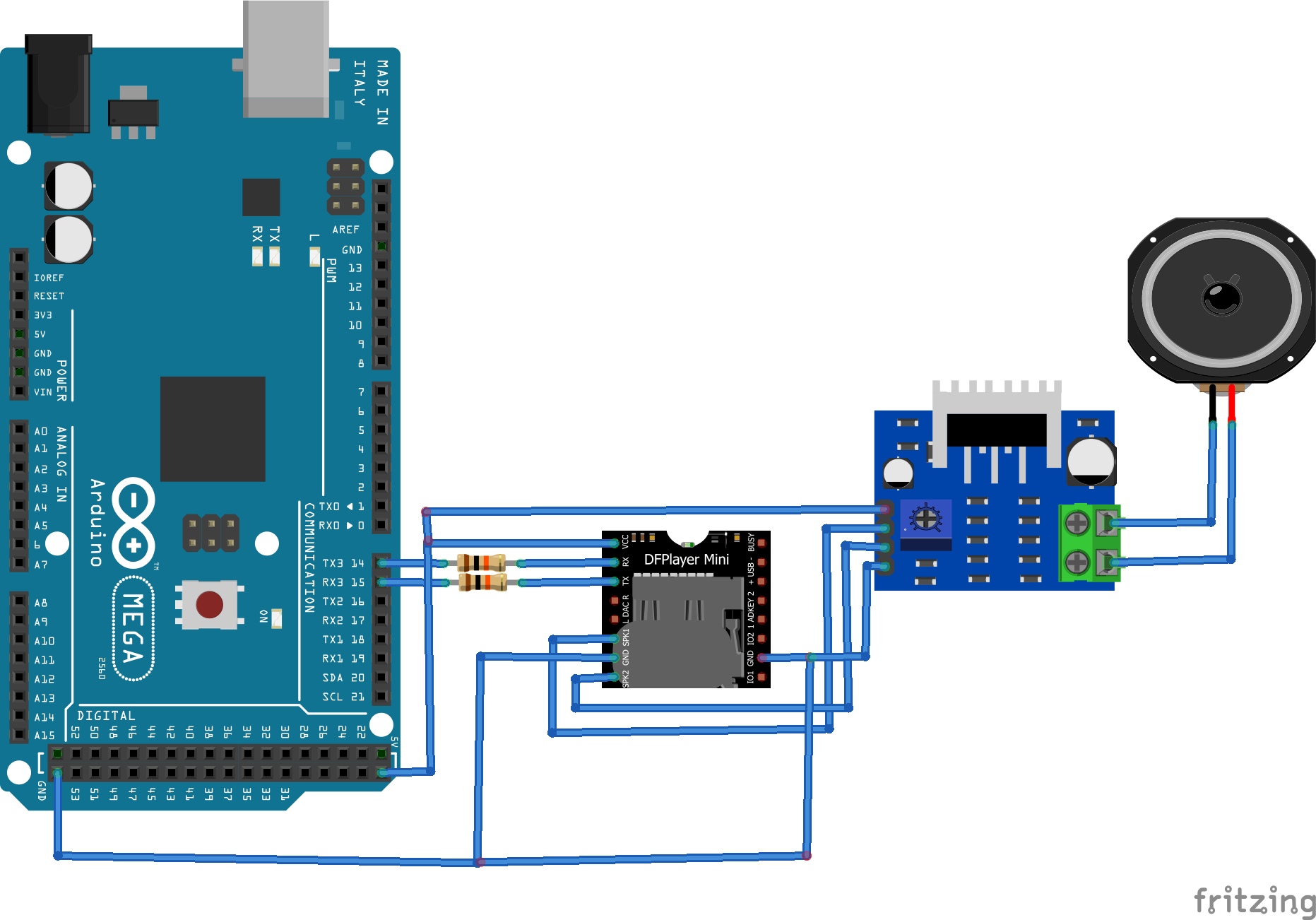
  • Connect both grounds of the DFPlayer Mini/MP3-TF-16P with the ground of Arduino.
  • Connect the MP3’s VCC pin with Arduino’s 5V.
  • Connect the DFPlayer Mini/MP3-TF-16P’s RX and TX pins with Arduino’s TX and RX pins.
  • For Arduino Mega, connect the DFPlayer Mini/MP3-TF-16P’s RX and TX pins with Arduino Mega’s TX3 and RX3 pins, respectively.

To eliminate noise, it’s important to connect the DFPlayer Mini/MP3-TF-16P’s TX and RX pins with Arduino’s RX and TX pins via 10K resistors.

Note: if you connect a speaker directly to the DFPlayer Mini/MP3-TF-16P’s SPK_1 and SPK_2 pins, the audio output might not be as audible. Instead, consider connecting speakers to the DFPlayer Mini/MP3-TF-16P through an audio power amplifier, such as the TDA2030.

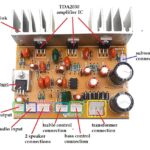
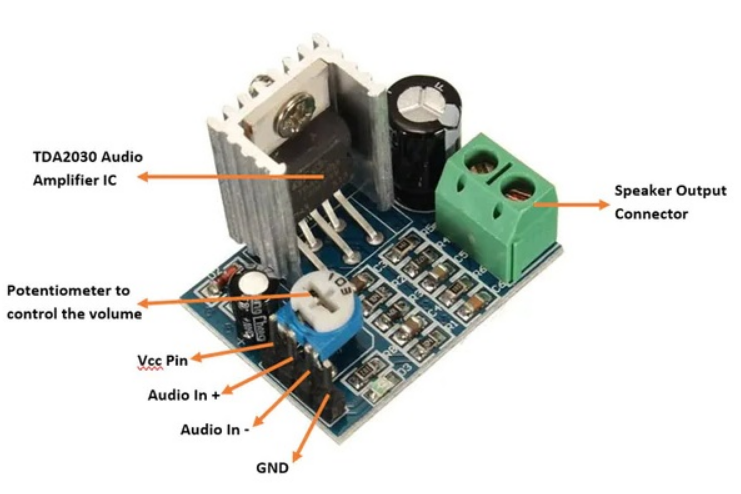
The pin diagram of a TDA2030 audio power amplifier module is below.
Next:

  • Connect the DFPlayer Mini/MP3-TF-16P module’s SPK_1 and SPK_2 with the Audio In + and Audio in – terminals of the amplifier module.
  • Connect the amplifier module’s VCC and GND pins with Arduino’s 5V out and ground, respectively.
  • Connect a 4Ω/8Ω speaker with the amplifier’s speaker output connector.

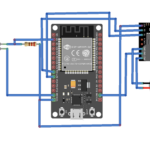
The image below illustrates the complete circuit connections required to play MP3 files on Arduino using the DFPlayer Mini/MP3-TF-16P.
Arduino sketch

After making the proper circuit connections, format a TF card using an SD card formatter like one provided on the SD Association website. Add some of your favorite MP3 songs to the TF card and insert it in DFPlayer Mini/MP3-TF-16P module. Then, upload the following sketch to Arduino.

How it works

The DFPlayer Mini/MP3-TF-16P modules can play MP3 audio files and have pins to control their playback. Using Arduino, the MP3 audio files can be precisely controlled and integrated into a larger application if desired.

The audio playback is controlled by interfacing pushbuttons with the module’s control pins (such as IO_1, IO_2, ADKEY_1, ADKEY_2, and BUSY). The module also provides a UART port for serial communication with Arduino.

The default baud rate of the module(s) is 9600 bps. On the serial port, 10-byte commands can be sent to the DFPlayer Mini/MP3-TF-16P to control the playback. These commands have the following format.
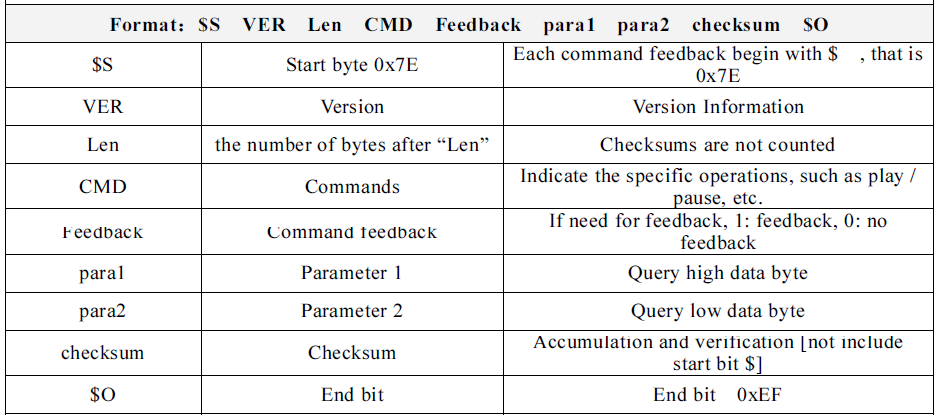
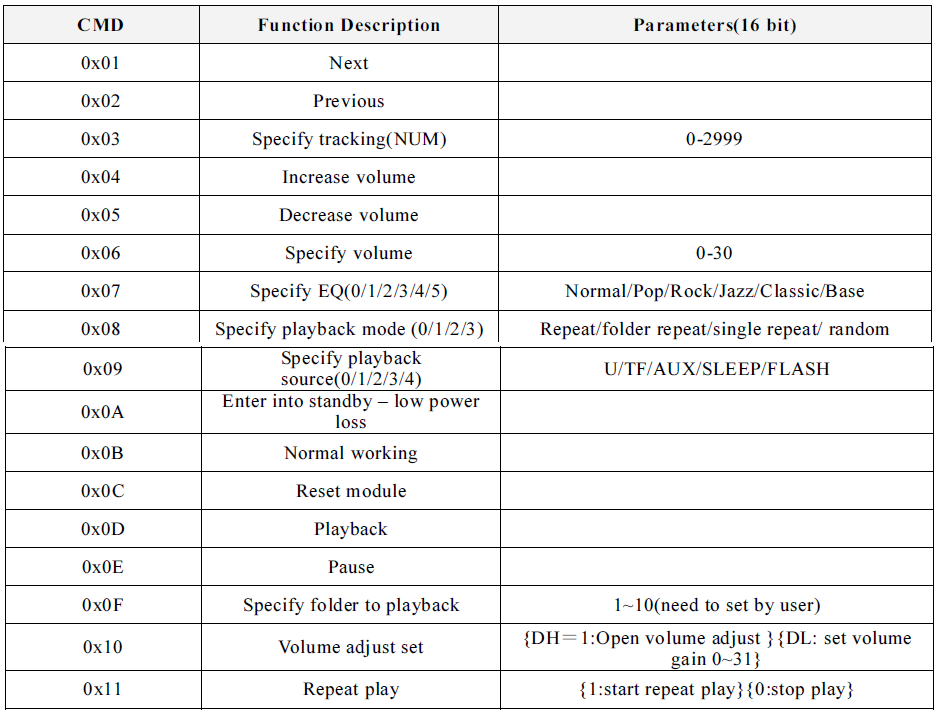
The implementable command in the 10-byte packet is the 4th byte. The command may require additional parameters, which are sent via the 6th and 7th bytes in the packet. The commands that can be directly forwarded to the DFPlayer module are listed below.
For some query commands or events, the DFPlayer Mini provides a response. The response is also a 10-byte packet. For example, the following responses occur upon finishing the audio files’ playback.
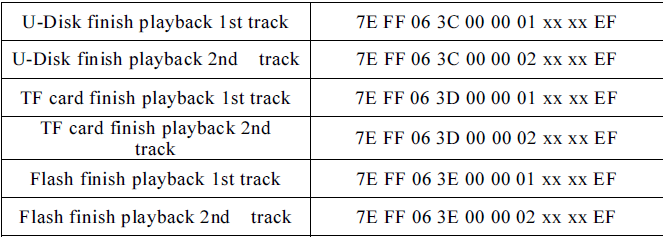
When we tested to receive the responses from the MP3-TF-16P module, the serial transmission from the module was inconsistent. However, the execution of the direct commands was successful. The responses from the original DFPlayer Mini were consistent.

In this project, we sent various direct commands from Arduino to the DFPlayer Mini/MP3-TF-16P module, controlling the playback of the audio files that were stored on a TF card.

The code

The sketch begins by defining the user-defined function sendDFCommand(). This function sends the command packet from Arduino to the DFPlayer Mini/MP3-TF-16P module.

  • The user-defined function playTrack() is defined to play a specific track number from the TF card.
  • The user-defined function playNext() is defined to play next MP3 file.
  • The user-defined function playPrevious() is defined to play the previous track. The user-defined function volumeUp() is defined to increase the volume by ‘1.’ The maximum volume is ‘30.’
  • The user-defined function volumeDown() is defined to reduce the volume by ‘1’.
  • The user-defined function changeVolume() is defined to change the volume to a specific level.
  • The user-defined function changeEQ() is defined to change the equalizer settings.
  • The user-defined function setRepeat() is defined to set the repeat options.
  • The user-defined function pausePlay() is defined to pause or playback audio.
  • The user-defined function RepeatPlay() is defined to turn on and off the repeat play option.

In the setup() function, the baud rate for the serial debug and communication with the DFPlayer Mini/Mp3-TF-16P is set to 9600 bps. The volume is set to a maximum level. The first track is played, and “repeat all” is implemented. In the loop() function, the user-defined functions to control the playback are executed at intervals of ten seconds to investigate their execution via the DFPlayer Mini/MP3-TF-16P.  

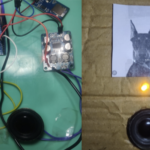
Results

You may also like:

  • What are the different amplifier classes?

  • How to design a security system that sounds like a…

  • How to build a sign-to-speech converter

  • How to design an audio player for toys

  • How to build 100W 2.1-channel home theater system

  • How to play tune for any song or music on…

  • How to play musical notes on Arduino

Filed Under: Arduino Projects, Electronic Projects, Video
Tagged With: Arduino, arduinomega, arduinouno, audio, dfplayer, electronicproject, mp3, video
 

Next Article

← Previous Article
Next Article →

Questions related to this article?
👉Ask and discuss on EDAboard.com and Electro-Tech-Online.com forums.


Tell Us What You Think!! Cancel reply

You must be logged in to post a comment.

EE TECH TOOLBOX

“ee
Tech Toolbox: Internet of Things
Explore practical strategies for minimizing attack surfaces, managing memory efficiently, and securing firmware. Download now to ensure your IoT implementations remain secure, efficient, and future-ready.

EE Learning Center

EE Learning Center
“engineers
EXPAND YOUR KNOWLEDGE AND STAY CONNECTED
Get the latest info on technologies, tools and strategies for EE professionals.

HAVE A QUESTION?

Have a technical question about an article or other engineering questions? Check out our engineering forums EDABoard.com and Electro-Tech-Online.com where you can get those questions asked and answered by your peers!


RSS EDABOARD.com Discussions

  • Reducing "shoot-through" in offline Full Bridge SMPS?
  • High Side current sensing
  • How to simulate power electronics converter in PSpice?
  • Voltage mode pushpull is a nonsense SMPS?
  • Layout IRN reduction in Comparator

RSS Electro-Tech-Online.com Discussions

  • Back to the old BASIC days
  • Parts required for a personal project
  • PIC KIT 3 not able to program dsPIC
  • Failure of polypropylene motor-run capacitors
  • Siemens large industrial PLC parts

Featured – RPi Python Programming (27 Part)

  • RPi Python Programming 21: The SIM900A AT commands
  • RPi Python Programming 22: Calls & SMS using a SIM900A GSM-GPRS modem
  • RPi Python Programming 23: Interfacing a NEO-6MV2 GPS module with Raspberry Pi
  • RPi Python Programming 24: I2C explained
  • RPi Python Programming 25 – Synchronous serial communication in Raspberry Pi using I2C protocol
  • RPi Python Programming 26 – Interfacing ADXL345 accelerometer sensor with Raspberry Pi

Recent Articles

  • What is AWS IoT Core and when should you use it?
  • AC-DC power supply extends voltage range to 800 V DC
  • Infineon’s inductive sensor integrates coil system driver, signal conditioning circuits and DSP
  • Arm Cortex-M23 MCU delivers 87.5 µA/MHz active mode
  • STMicroelectronics releases automotive amplifiers with in-play open-load detection

EE ENGINEERING TRAINING DAYS

engineering

Submit a Guest Post

submit a guest post
Engineers Garage
  • Analog IC TIps
  • Connector Tips
  • Battery Power Tips
  • DesignFast
  • EDABoard Forums
  • EE World Online
  • Electro-Tech-Online Forums
  • EV Engineering
  • Microcontroller Tips
  • Power Electronic Tips
  • Sensor Tips
  • Test and Measurement Tips
  • 5G Technology World
  • Subscribe to our newsletter
  • About Us
  • Contact Us
  • Advertise

Copyright © 2025 WTWH Media LLC. All Rights Reserved. The material on this site may not be reproduced, distributed, transmitted, cached or otherwise used, except with the prior written permission of WTWH Media
Privacy Policy

Search Engineers Garage

  • Electronic Projects & Tutorials
    • Electronic Projects
      • Arduino Projects
      • AVR
      • Raspberry pi
      • ESP8266
      • BeagleBone
      • 8051 Microcontroller
      • ARM
      • PIC Microcontroller
      • STM32
    • Tutorials
      • Audio Electronics
      • Battery Management
      • Brainwave
      • Electric Vehicles
      • EMI/EMC/RFI
      • Hardware Filters
      • IoT tutorials
      • Power Tutorials
      • Python
      • Sensors
      • USB
      • VHDL
    • Circuit Design
    • Project Videos
    • Components
  • Articles
    • Tech Articles
    • Insight
    • Invention Stories
    • How to
    • What Is
  • News
    • Electronic Product News
    • Business News
    • Company/Start-up News
    • DIY Reviews
    • Guest Post
  • Forums
    • EDABoard.com
    • Electro-Tech-Online
    • EG Forum Archive
  • DigiKey Store
    • Cables, Wires
    • Connectors, Interconnect
    • Discrete
    • Electromechanical
    • Embedded Computers
    • Enclosures, Hardware, Office
    • Integrated Circuits (ICs)
    • Isolators
    • LED/Optoelectronics
    • Passive
    • Power, Circuit Protection
    • Programmers
    • RF, Wireless
    • Semiconductors
    • Sensors, Transducers
    • Test Products
    • Tools
  • Learn
    • eBooks/Tech Tips
    • Design Guides
    • Learning Center
    • Tech Toolboxes
    • Webinars & Digital Events
  • Resources
    • Digital Issues
    • EE Training Days
    • LEAP Awards
    • Podcasts
    • Webinars / Digital Events
    • White Papers
    • Engineering Diversity & Inclusion
    • DesignFast
  • Guest Post Guidelines
  • Advertise
  • Subscribe